A website is composed of static files (CSS, JS, HTML, and others) and dynamic pages. In this post, we will focus on static files. In the old days, serving static files was as simple as copying them into a web project folder; they were directly accessible once the site was hosted in IIS. With ASP.NET 5, things changed. You now need to explicitly enable all required functionality using middleware. To serve static files, you must activate the StaticFiles middleware.
#StaticFiles middleware
Let's start by adding the reference to StaticFiles. For that we simply add the following line in the project.json file:
JSON
{
    "dependencies": {
        "Microsoft.AspNet.StaticFiles": "1.0.0-beta3"
    }
}
Then we can add the OWIN Middleware:
C#
public void Configure(IApplicationBuilder app, IHostingEnvironment env, ILoggerFactory loggerfactory)
{
    app.UseStaticFiles();
}
We can now access the files of the site. For example, the URL http://localhost/css/site.css returns the file wwwroot/css/site.css:
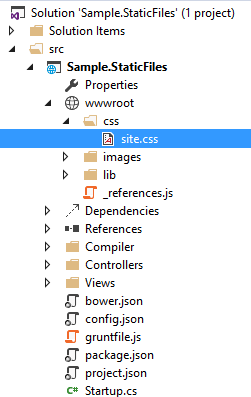
This answers the majority of needs but we will explore a little more and see how the UseStaticFiles extension method works.
#Customization
The UseStaticFiles method has an optional parameter to specify different options:
C#
StaticFileOptions staticFileOptions = new StaticFileOptions();
staticFileOptions.FileProvider = new PhysicalFileProvider("/files");
staticFileOptions.ContentTypeProvider = new FileExtensionContentTypeProvider();
staticFileOptions.DefaultContentType = "text/plain";
staticFileOptions.ServeUnknownFileTypes = false;

app.UseStaticFiles(staticFileOptions);
FileProvider: A class implementing the IFileProvider interface, used to open a file or enumerate the contents of a folder by path. A FileProvider does not necessarily use the file system; for example, you could create a provider that reads files stored in a database.
The default FileProvider is accessible via hostingEnv.WebRootFileProvider (IHostingEnvironment). It uses the file system and points to the wwwroot folder. This folder is not hardcoded; it is defined in the configuration file (project.json) via the webroot property:
JSON
{
    "webroot": "wwwroot"
}
ContentTypeProvider: A class implementing the IContentTypeProvider interface with a single method that retrieves the MIME type of a file.
The default content type provider includes about 370 file extension-to-MIME type mappings. While this covers most cases, some types may be missing. If the MIME type is unknown and ServeUnknownFileTypes is set to false (the default), the file will not be served to the client. For example, FontAwesome uses icon files of type woff2. Because the MIME type for this extension is not included by default, the client receives a 404 error. To fix this, you can define a custom ContentTypeProvider or simply add the missing mappings to the default one:
C#
var contentTypeProvider = new FileExtensionContentTypeProvider();
if (!contentTypeProvider.Mappings.ContainsKey(".woff2"))
{
    contentTypeProvider.Mappings.Add(".woff2", "application/font-woff2");
}

staticFileOptions.ContentTypeProvider = contentTypeProvider;
#Multiple folders
You can map multiple folders using multiple calls to UseStaticFiles:
C#
app.UseStaticFiles(new StaticFileOptions
{
    RequestPath = new PathString("/css"),
    FileSystem = new PhysicalFileSystem("Public/Styles")
});

app.UseStaticFiles(new StaticFileOptions
{
    RequestPath = new PathString("/js"),
    FileSystem = new PhysicalFileSystem("Public/Scripts")
});
Or you can use a CompositeFileProvider:
C#
var webRootProvider = new PhysicalFileProvider(builder.Environment.WebRootPath);
var otherProvider = new PhysicalFileProvider(Path.Combine(builder.Environment.WebRootPath, "other_folder"));
app.Environment.WebRootFileProvider = new CompositeFileProvider(
    webRootProvider,
    otherProvider);

app.UseStaticFiles();
#Authorization
If some of the files are private, you can ensure the users are logged in before serving the files:
C#
app.Map("/private", privateApp =>
{
    privateApp.Use(async (context, next) =>
    {
        if (!context.User.Identity.IsAuthenticated)
        {
            context.Response.Challenge();
            return;
        }

        await next();
    });

    privateApp.UseStaticFiles(new StaticFileOptions() { FileProvider = new PhysicalFileProvider("/PrivateDirectory") });
});
#Conclusion
UseStaticFiles allows you to expose folder contents to the client. It is configurable and supports serving files from the file system or any other source, such as a database.
Do you have a question or a suggestion about this post? Contact me!
