Aspect-Oriented Programming (AOP) addresses the problem of cross-cutting concerns: code that is repeated across different methods and cannot be cleanly refactored into its own module, such as logging, caching, or validation. These system services are called cross-cutting concerns because they tend to cut across multiple components in a system.
AOP lets you extract this kind of code and inject it wherever needed, without duplicating similar logic. For instance, the following code mixes logging, security, caching, and the actual code:
TypeScript
function sample(arg: string) {
    console.log("sample: " + arg);
    if(!isUserAuthenticated()) {
        throw new Error("User is not authenticated");
    }

    if(cache.has(arg)) {
        return cache.get(arg);
    }

    const result = 42; // TODO complex calculation
    cache.set(arg, result);
    return result;
}
With TypeScript, you can rewrite the method to:
TypeScript
@log
@authorize
@cache
function sample(arg: string) {
    const result = 42;
    return result;
}
The method is now much easier to read, with all the cross-cutting concerns removed. The decorator framework automatically rewrites it to behave like the original. Let's see how to implement this using TypeScript decorators.
#Decorators in TypeScript
A decorator is a special kind of declaration that can be attached to a class declaration, method, accessor, property, or parameter. Decorators use the form @expression, where expression must evaluate to a function that will be called at runtime with information about the decorated declaration.
TypeScript
@sealed
class Sample {
    @cache
    @log(LogLevel.Verbose)
    f() {
        // code
    }
}
At runtime, when you call f(), it will actually call cache(log(f())). This allows changing the default behavior of the method f. A decorator allows you to wrap the actual function with your cross-cutting concern code.
To write a decorator, you create a function that takes parameters and manipulates the descriptor. The parameters depend on what you want to decorate: a class, method, property, accessor, or parameter. The typed declarations below should be sufficient, but you can refer to the documentation for more information: https://www.typescriptlang.org/docs/handbook/decorators.html.
Note: Function composition is not commutative, so the order in which decorators are declared matters. Swapping two decorators can lead to different behaviors. In the memoization example later in this post, try swapping @log and @cache to see the difference.
Before using a decorator, you must enable them in the configuration file tsconfig.json:
JSON
{
    "compilerOptions": {
        "target": "ES5",
        "experimentalDecorators": true
    }
}
TypeScript
function sampleClassDecorator(constructor: Function) {
}

@sampleClassDecorator
class Sample {
}
TypeScript
function sampleMethodDecorator(target: Object, propertyKey: string, descriptor: PropertyDescriptor) {
}

class Sample {
    @sampleMethodDecorator
    f() {
    }
}
TypeScript
function samplePropertyDecorator(target: Object, propertyKey: string | symbol) {
}

class Sample {
    @samplePropertyDecorator
    x: number;
}
TypeScript
function sampleAccessorDecorator(target: any, propertyKey: string, descriptor: PropertyDescriptor) {
}

class Sample {
    @sampleAccessorDecorator
    get x() { return 42; }
}
TypeScript
function sampleParameterDecorator(target: any, propertyKey: string, parameterIndex: number) {
}

class Sample {
    x(@sampleParameterDecorator str: string) { }
}
- Decorator factories or parametrize decorators
A decorator can accept parameters. The expression after @ must return a function with the correct signature, which means you can call a function there. This is how you create a parameterized decorator, such as @configurable(false). To create one, define a function that accepts the desired parameters and returns a function matching the expected decorator signature:
TypeScript
function sampleMethodDecorator(value: boolean) {
    return function(target: any, propertyKey: string, descriptor: PropertyDescriptor) {
    };
}

class Sample {
    @sampleMethodDecorator(true) // call the function
    f() {
    }
}
In this post, we'll see how to log the parameters and return value of a method, use memoization, or automatically raise an event when a property is changed.
#Logging parameters and the return value of a method
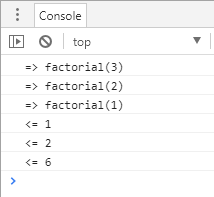
This decorator logs the parameters and the return value. In a method decorator, the actual function is located in descriptor.value. The idea is to replace descriptor.value with a wrapper function.
TypeScript
function log(target: any, propertyKey: string, descriptor: PropertyDescriptor) {
    // keep a reference to the original function
    const originalValue = descriptor.value;

    // Replace the original function with a wrapper
    descriptor.value = function (...args: any[]) {
        console.log(`=> ${propertyKey}(${args.join(", ")})`);

        // Call the original function
        var result = originalValue.apply(this, args);

        console.log(`<= ${result}`);
        return result;
    }
}
Here's how to use the decorator:
TypeScript
class Sample {
    @log
    static factorial(n: number): number {
        if (n <= 1) {
            return 1;
        }

        return n * this.factorial(n - 1);
    }
}

Sample.factorial(3);
#Caching result (Memoization)
Memoization is an optimization technique used primarily to speed up computer programs by storing the results of expensive function calls and returning the cached result when the same inputs occur again.
The idea is again to wrap the method. Before executing the actual function, we check whether the cache contains the result for the given parameter. If it doesn't contain the result, let's compute it and store it into the cache. Instead of using a plain object {} for caching results, you should use the Map object (Map documentation). A Map allows any type of key, not just strings, which makes it much more flexible here.
For simplicity, this example only handles methods with a single argument (though you can extend it to support multiple arguments).
TypeScript
function memoization(target: any, propertyKey: string, descriptor: PropertyDescriptor) {
    const originalValue = descriptor.value;
    const cache = new Map<any, any>();

    descriptor.value = function (arg: any) { // we only support one argument
        if (cache.has(arg)) {
            return cache.get(arg);
        }

        // call the original function
        var result = originalValue.apply(this, [arg]);

        // cache the result
        cache.set(arg, result);
        return result;
    }
}
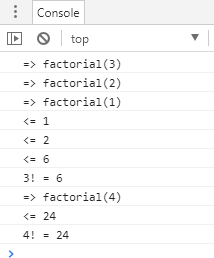
Here's the usage of the decorator. I also added the log decorator to show when the original method is called.
TypeScript
class Sample {
    @memoization
    @log
    static factorial(n: number): number {
        if (n <= 1) {
            return 1;
        }

        return n * this.factorial(n - 1);
    }
}

console.log(`3! = ${Sample.factorial(3)}`);
console.log(`4! = ${Sample.factorial(4)}`);
The first call will trigger 3 factorial calls. But the second will call 4 * factorial(3) and use the cache for factorial(3). So factorial(3) is called only once thanks to the memoization.
#Sealed classes
The previous two examples demonstrate method decorators. Now let's look at class decorators. A class decorator takes the constructor function as a parameter and lets you manipulate it. For instance, you can call Object.seal to prevent the prototype from being changed. If you are writing a library, this can be useful to ensure users don't make unwanted modifications to your objects.
From MDN:
The Object.seal() method seals an object, preventing new properties from being added to it and marking all existing properties as non-configurable. Values of present properties can still be changed as long as they are writable.
The decorator is very simple. It just needs to call Object.seal on the constructor and its prototype:
TypeScript
function sealed(constructor: Function) {
    Object.seal(constructor);
    Object.seal(constructor.prototype);
}
Then, you can use it:
TypeScript
@sealed
class Sample {
    factorial(n: number): number {
        if (n <= 1) {
            return 1;
        }

        return n * this.factorial(n - 1);
    }
}
If you try to augment the object, it will fail:
TypeScript
Sample.prototype.newMethod = function(a) { return a; };
console.log(Sample.prototype.newMethod); // "undefined"
#Conclusion
In TypeScript, decorators allow you to implement shared behaviors once and reuse them everywhere. This reduces the number of lines of code and the potential for bugs, while also improving readability. In this post we created some simple decorators. If you search online, you'll find many more examples covering validation, execution time logging, and more. Angular also uses decorators extensively: @Inject, @Component, @Input, @Output, etc.
Do you have a question or a suggestion about this post? Contact me!
