HttpClient is designed to be instantiated once and reused throughout the lifetime of an application. It maintains a connection pool to minimize the number of open TCP connections. When you send multiple requests to the same host, they share the same connection. This prevents the application from exhausting available sockets under heavy load (You're using HttpClient wrong and it's destabilizing your software), and improves performance by avoiding repeated TCP and TLS handshakes.
Keeping connections open improves performance, but stale connections can cause problems. If a host changes its IP address, existing connections may become invalid once the DNS TTL expires. Those connections should be closed so new ones can be established to the updated address. HttpClient does not handle this automatically because it has no knowledge of DNS TTL values. Instead, you can configure timeouts to close connections automatically. On the next request, a new connection is opened and DNS is queried to resolve the current IP address.
You can use SocketsHttpHandler to configure the behavior of HttpClient and its connection pool. Two properties control this: PooledConnectionIdleTimeout and PooledConnectionLifetime. These properties force HttpClient to close connections after a set amount of time, ensuring the next request to the same host opens a fresh connection and picks up any DNS or network changes.
By default, idle connections are closed after 1 minute, but active connections are never closed. You must explicitly set PooledConnectionLifetime to an appropriate value.
C#
using System.Net;

using var socketHandler = new SocketsHttpHandler()
{
    // The maximum idle time for a connection in the pool. When there is no request in
    // the provided delay, the connection is released.
    // Default value from .NET 6 to .NET 11: 1 minute
    PooledConnectionIdleTimeout = TimeSpan.FromMinutes(1),

    // This property defines maximal connection lifetime in the pool regardless
    // of whether the connection is idle or active. The connection is reestablished
    // periodically to reflect the DNS or other network changes.
    // ⚠️ Default value from .NET 6 to .NET 11: never
    //    Set a timeout to reflect the DNS or other network changes
    PooledConnectionLifetime = TimeSpan.FromMinutes(1),
};

using var httpClient = new HttpClient(socketHandler);

var timer = new PeriodicTimer(TimeSpan.FromSeconds(10));
while (await timer.WaitForNextTickAsync())
{
    _ = await httpClient.GetStringAsync("https://www.meziantou.net");
}
#Evicting connections when the address changes (.NET 11)
PooledConnectionLifetime is a blunt instrument. The value is a guess: too long and the application keeps sending requests to a stale address, too short and it pays for a TCP and TLS handshake again even though nothing changed. It also recycles every connection on a fixed schedule, whether or not the address it uses is still valid.
.NET 11 adds SocketsHttpHandler.ShouldEvictConnection, a callback that decides, per connection, whether it should be retired:
C#
public Func<SocketsHttpConnectionEvictionContext, CancellationToken, Task<bool>>? ShouldEvictConnection { get; set; }
Returning true marks the connection for eviction: it stops serving new requests and is closed once it becomes idle. A request already in flight on that connection is allowed to complete first. The callback is asynchronous, so it can perform a DNS lookup.
The SocketsHttpConnectionEvictionContext describes the connection being evaluated:
| Property | Description |
|---|
DnsEndPoint | The host and port the connection targets. When a proxy is used, this is the proxy's endpoint, not the origin server |
RemoteEndPoint | The address the transport is actually connected to. null when a custom ConnectCallback returned a stream that is not backed by a socket |
ConnectionId | The connection identifier, which matches the one reported by telemetry and by HttpRequestMessage.ConnectionId |
HttpVersion | The negotiated HTTP version: 1.1, 2.0, or 3.0 |
Age | The time elapsed since the connection was established |
You can now compare the address a connection uses against the current DNS answer, and evict only the connections that are actually stale. Healthy connections are kept, so PooledConnectionLifetime no longer has to be short:
C#
#pragma warning disable SYSLIB5008 // ShouldEvictConnection is experimental in .NET 11

using System.Collections.Concurrent;
using System.Net;
using System.Net.Sockets;

var dnsCache = new DnsCache();

using var socketHandler = new SocketsHttpHandler
{
    PooledConnectionIdleTimeout = TimeSpan.FromMinutes(1),

    // Healthy connections no longer need to be recycled just to observe DNS changes.
    // Keep a long lifetime as a safety net instead of Timeout.InfiniteTimeSpan.
    PooledConnectionLifetime = TimeSpan.FromHours(1),

    ShouldEvictConnection = async (context, cancellationToken) =>
    {
        // The remote endpoint is unknown when a custom ConnectCallback returns a stream that
        // is not backed by a socket. There is nothing to compare, so keep the connection.
        if (context.RemoteEndPoint is null)
            return false;

        var addresses = await dnsCache.GetAddressesAsync(context.DnsEndPoint.Host, cancellationToken);

        // Keep the connection when the host doesn't resolve, instead of dropping the whole
        // pool every few seconds while DNS is unavailable
        if (addresses.Count is 0)
            return false;

        // A dual-mode socket reports an IPv4 address as an IPv4-mapped IPv6 address
        // (::ffff:203.0.113.1), while DNS returns the plain IPv4 address (203.0.113.1)
        var address = context.RemoteEndPoint.Address;
        if (address.IsIPv4MappedToIPv6)
        {
            address = address.MapToIPv4();
        }

        // Evict the connection when the address it uses is no longer advertised by DNS
        return !addresses.Contains(address);
    },
};

using var httpClient = new HttpClient(socketHandler);

var timer = new PeriodicTimer(TimeSpan.FromSeconds(10));
while (await timer.WaitForNextTickAsync())
{
    _ = await httpClient.GetStringAsync("https://www.meziantou.net");
}

// Caches the addresses of a host, so the callback doesn't query DNS for every connection
sealed class DnsCache
{
    private readonly ConcurrentDictionary<string, (HashSet<IPAddress> Addresses, long ExpiresAt)> _entries = new(StringComparer.OrdinalIgnoreCase);

    public async ValueTask<HashSet<IPAddress>> GetAddressesAsync(string host, CancellationToken cancellationToken)
    {
        if (_entries.TryGetValue(host, out var entry) && Environment.TickCount64 < entry.ExpiresAt)
            return entry.Addresses;

        HashSet<IPAddress> addresses;
        try
        {
            addresses = [.. await Dns.GetHostAddressesAsync(host, cancellationToken)];
        }
        catch (SocketException)
        {
            addresses = [];
        }

        _entries[host] = (addresses, Environment.TickCount64 + (long)TimeSpan.FromSeconds(30).TotalMilliseconds);
        return addresses;
    }
}
A few things are worth knowing before using the callback:
- The callback runs from the connection pool's maintenance timer. Setting it makes that timer fire at least every 5 seconds, and the callback is invoked for every pooled connection. Keep it cheap and cache the DNS answers, as the sample does, otherwise a busy pool will flood the DNS server.
- A connection that is busy serving a request when a pass runs is skipped, and evaluated when it is returned to the pool.
- The callback may run concurrently for different connections, and concurrently with the connection serving requests.
- If the callback throws, the runtime catches the exception and keeps the connection. A failing lookup won't take the pool down, but it also won't be reported, so handle errors explicitly if you want to know about them.
- The
CancellationToken is canceled if the connection is disposed while the callback is running.
#Using the DNS TTL to decide when to re-resolve
Dns.GetHostAddressesAsync returns the addresses, but not how long they are valid. In the previous sample, the cache duration is an arbitrary 30 seconds. .NET 11 adds typed DNS record APIs that expose the TTL, so the cache can honor what the DNS server actually advertises:
C#
// Caches the addresses of a host for the duration advertised by the DNS server (TTL)
sealed class DnsCache
{
    private readonly ConcurrentDictionary<string, (HashSet<IPAddress> Addresses, long ExpiresAt)> _entries = new(StringComparer.OrdinalIgnoreCase);

    public async ValueTask<HashSet<IPAddress>> GetAddressesAsync(string host, CancellationToken cancellationToken)
    {
        if (_entries.TryGetValue(host, out var entry) && Environment.TickCount64 < entry.ExpiresAt)
            return entry.Addresses;

        var result = await Dns.ResolveAddressesAsync(host, cancellationToken);

        // The TTL indicates how long the answer may be cached. Use the shortest TTL of the records,
        // or the negative cache TTL (RFC 2308) when the host has no address record.
        var ttl = result.Records.Count > 0
            ? result.Records.Min(record => record.Ttl)
            : result.NegativeCacheTtl;

        // Don't query the DNS server on every check when the TTL is very short
        if (ttl < TimeSpan.FromSeconds(5))
        {
            ttl = TimeSpan.FromSeconds(5);
        }

        var addresses = result.Records.Select(record => record.Address).ToHashSet();
        _entries[host] = (addresses, Environment.TickCount64 + (long)ttl.TotalMilliseconds);
        return addresses;
    }
}
Dns.ResolveAddressesAsync returns a DnsResult<AddressRecord>, where each record exposes its Address and its Ttl. The result also carries the ResponseCode returned by the server and, for a negative answer, the NegativeCacheTtl. Similar methods exist for the other record types: ResolveSrv, ResolveMx, ResolveTxt, ResolveCName, ResolveNs, and ResolvePtr. Use the DnsResolver class instead of the static methods when you want to query specific DNS servers.
#Debugging
To observe when HttpClient queries DNS, you can use an EventListener. The System.Net.* objects emit ETW traces that capture this information.
C#
using System.Diagnostics.Tracing;

_ = new NetEventListener();

using var socketHandler = new SocketsHttpHandler()
{
    PooledConnectionIdleTimeout = TimeSpan.FromMinutes(1),
    PooledConnectionLifetime = TimeSpan.FromSeconds(10),
};

using var httpClient = new HttpClient(socketHandler);

var timer = new PeriodicTimer(TimeSpan.FromSeconds(2));
while (await timer.WaitForNextTickAsync())
{
    _ = await httpClient.GetStringAsync("https://www.meziantou.net");
}

class NetEventListener : EventListener
{
    protected override void OnEventSourceCreated(EventSource eventSource)
    {
        if (eventSource.Name.StartsWith("System.Net"))
            EnableEvents(eventSource, EventLevel.Informational);
    }
    protected override void OnEventWritten(EventWrittenEventArgs eventData)
    {
        if (eventData.EventName == "ResolutionStart")
        {
            Console.WriteLine(eventData.EventName + " - " + eventData.Payload[0]);
        }
        else if (eventData.EventName == "RequestStart")
        {
            Console.WriteLine(eventData.EventName + " - " + eventData.Payload[1]);
        }
    }
}
When you run this application, you will see HTTP requests and DNS resolution events logged to the console:
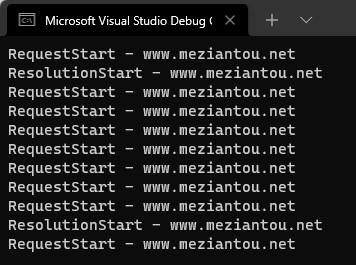
In .NET 11, HttpRequestMessage.ConnectionId is set to the identifier of the connection that served the request, so you can observe connection reuse without an EventListener. It is the same identifier reported by SocketsHttpConnectionEvictionContext.ConnectionId, which makes it easy to correlate an eviction decision with the requests the connection served:
C#
#pragma warning disable SYSLIB5008 // HttpRequestMessage.ConnectionId is experimental in .NET 11

using var request = new HttpRequestMessage(HttpMethod.Get, "https://www.meziantou.net");
using var response = await httpClient.SendAsync(request);

Console.WriteLine($"Served by connection {request.ConnectionId}");
#Additional resources
Do you have a question or a suggestion about this post? Contact me!
