A few weeks ago, a co-worker pointed out that I was not using the latest version of TypeScript. After a quick check, I found I was on version 2.1.4 while the latest was 2.1.5. My first thought was that I should be notified when a new release is published on GitHub. I searched for a setting on GitHub to enable email notifications for new releases, but couldn't find one. However, I spotted an RSS feed URL in the page source:
HTML
<link href="https://github.com/Microsoft/TypeScript/releases.atom" rel="alternate" title="TypeScript Release Notes" type="application/atom+xml" />
You can add this feed to Feedly or any other feed reader. However, I prefer receiving an email so I don't miss new versions. The idea is to use Zapier to automate sending an email whenever a new item appears in the feed. (Note: you can also use IFTTT or Microsoft Flow)
On their home page, I searched for "RSS" and "email". The second suggested zap was exactly what I was looking for:
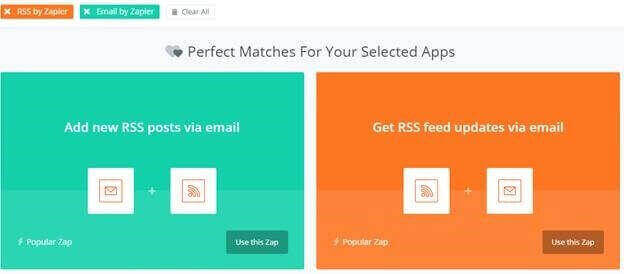
The creation process is very simple. First, you enter the URL of the feed:
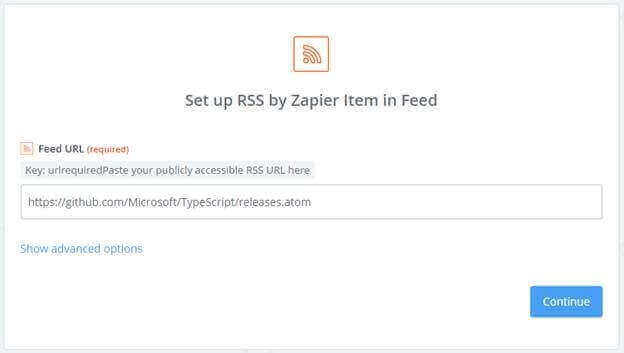
Then, enter your email address and the content of the body:

Zapier will send you a test email with the latest feed item:

Your zap is created. You'll now receive an email whenever a release is published in the TypeScript repository.
#Conclusion
From a developer's perspective, this post illustrates how implementing standard features like RSS feeds lets users unlock a wealth of additional functionality. Building a custom email notification system is non-trivial and can take days. With tools like Microsoft Flow, Zapier, or IFTTT, you can offer this capability and much more, for free (or nearly free), in a highly customizable way. For example, you could automatically create a card in Trello or a work item in TFS.
Feel free to explore these tools for ideas on workflows you can offer your users.
Do you have a question or a suggestion about this post? Contact me!
