Continuous integration scripts typically run dotnet build mysolution.sln and dotnet test mysolution.sln. Consider a solution with multiple class libraries and a few WPF projects, where the goal is to create NuGet packages and run tests on Windows, Linux, and Mac. The problem is that WPF projects cannot be built on Linux or Mac, so dotnet build fails on those platforms.
One approach is to create a new .sln file or use a filtered solution (.slnf) to exclude WPF projects when building on non-Windows systems. The downside is that the filtered solution must be kept up to date whenever a new project is added.
A better approach is to use the Microsoft.Build.Traversal SDK. This custom SDK lets you select which projects to build or test using MSBuild syntax, including glob patterns. To use the SDK, create a global.json file at the root of your repository with the following content:
JSON
// https://learn.microsoft.com/en-us/dotnet/core/tools/global-json?WT.mc_id=DT-MVP-5003978
{
  "sdk": {
    "version": "5.0.201",
    "rollForward": "patch"
  },
  "msbuild-sdks": {
    "Microsoft.Build.Traversal": "3.0.3"
  }
}
Then, create a project file named dirs.proj (any name works) with the following content:
csproj (MSBuild project file)
<Project Sdk="Microsoft.Build.Traversal">
  <ItemGroup>
    <!-- Build all csproj and vbproj -->
    <ProjectReference Include="**/*.*proj" />
  </ItemGroup>

  <!-- Remove WPF projects when building on Linux or Mac -->
  <ItemGroup Condition="$([MSBuild]::IsOsPlatform('WINDOWS')) == false">
    <ProjectReference Remove="src/Meziantou.Framework.WPF/Meziantou.Framework.WPF.csproj" />
    <ProjectReference Remove="tests/Meziantou.Framework.WPF.Tests/Meziantou.Framework.WPF.Tests.csproj" />
  </ItemGroup>
</Project>
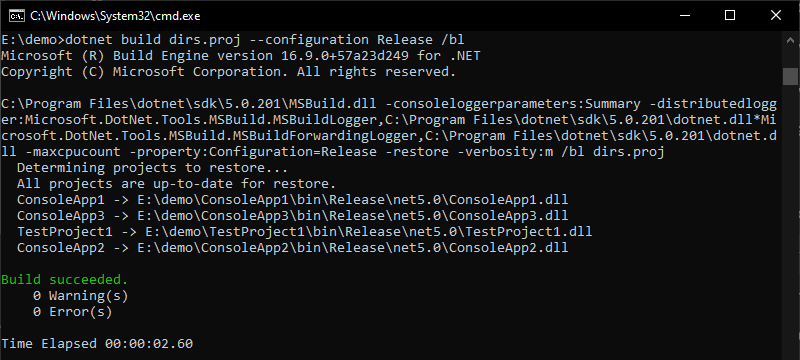
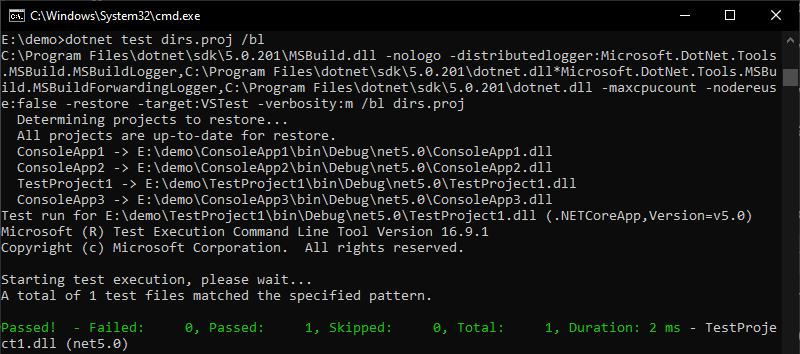
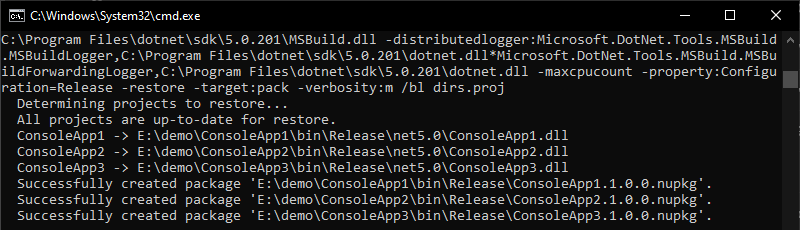
Finally, use the dotnet CLI to build, test, and pack the project. The SDK forwards the command to all referenced projects:
Shell
dotnet build dirs.proj --configuration Release /bl
Shell
dotnet test dirs.proj
Shell
dotnet pack dirs.proj
#Visual Studio integration
Currently, dirs.proj files cannot be opened in Visual Studio as a solution replacement. If you prefer to avoid .sln files, consider upvoting these issues:
#Additional resources
Do you have a question or a suggestion about this post? Contact me!
