Blazor WebAssembly relies on the browser to execute web requests. Every call you make using HttpClient is executed using the fetch API (documentation) provided by the browser.
By default, the browser uses the Cache-Control header to determine whether a response should be cached and for how long. When no header is present, the browser falls back to its own heuristic. A common workaround is to append a random query string parameter to prevent responses from being served from the cache. A better approach is to use the fetch cache-control API to control cache behavior directly.
Blazor WebAssembly lets you set the cache-control value when executing a request, allowing you to bypass the cache when needed by setting the appropriate value in the request options. Available options are provided by the BrowserRequestCache enumeration. Since the values match those of the fetch API, the MDN documentation applies here as well. Here's a summary of the available options:
Default: The browser looks for a matching request in its HTTP cache.ForceCache: The browser looks for a matching request in its HTTP cache. If there is a match, fresh or stale, it will be returned from the cache. If there is no match, the browser will make a normal request, and will update the cache with the downloaded resource.NoCache: The browser looks for a matching request in its HTTP cache. If there is a match, fresh or stale, the browser will make a conditional request to the remote server. If the server indicates that the resource has not changed, it will be returned from the cache. Otherwise, the resource will be downloaded from the server and the cache will be updated. If there is no match, the browser will make a normal request, and will update the cache with the downloaded resource.NoStore: The browser fetches the resource from the remote server without first looking in the cache, and will not update the cache with the downloaded resource.OnlyIfCached: The browser looks for a matching request in its HTTP cache. Mode can only be used if the request's mode is "same-origin". If there is a match, fresh or stale, it will be returned from the cache. If there is no match, the browser will respond with a 504 Gateway timeout status.Reload: The browser fetches the resource from the remote server without first looking in the cache, but then will update the cache with the downloaded resource.
In Blazor WebAssembly you can use SetBrowserRequestCache on a HttpRequestMessage to set the Request Cache mode:
C#
using var httpClient = new HttpClient();

// First request => Download from the server and set the cache
using var request1 = new HttpRequestMessage(HttpMethod.Get, "https://www.meziantou.net");
using var response1 = await httpClient.SendAsync(request1);

// Second request, should use the cache
using var request2 = new HttpRequestMessage(HttpMethod.Get, "https://www.meziantou.net");
using var response2 = await httpClient.SendAsync(request2);

// Third request, use no-cache => It should revalidate the cache
using var request3 = new HttpRequestMessage(HttpMethod.Get, "https://www.meziantou.net");
request3.SetBrowserRequestCache(BrowserRequestCache.NoCache);
using var response3 = await httpClient.SendAsync(request3);
You can verify in the browser's dev tools whether each request is served from the cache:
- The first request fetches data from the server and updates the cache
- The second request is served from the cache because it is still fresh (shown as "(disk cache)" in the screenshot)
- The third request is revalidated because it uses "no-cache", returning a 304 status code since the cache is still valid
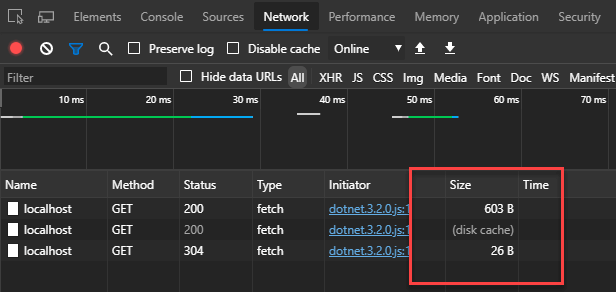
Note that other fetch options are available via the following methods: SetBrowserRequestCache, SetBrowserRequestMode, SetBrowserRequestIntegrity, SetBrowserResponseStreamingEnabled, SetBrowserRequestCredentials.
#Using a HttpMessageHandler to set the configuration for all messages
The SetBrowserRequestXXX methods apply per message, so you must create a message manually and set the option each time. This means you cannot use them with shorthand methods such as HttpClient.GetAsync or HttpClient.GetFromJsonAsync.
You can use an HttpMessageHandler or one of its subclasses to apply options to all messages. Here's an example:
C#
using System.Collections.Generic;
using System.Net.Http;
using System.Threading;
using System.Threading.Tasks;
using Microsoft.AspNetCore.Components.WebAssembly.Http;

public sealed class DefaultBrowserOptionsMessageHandler : DelegatingHandler
{
    public DefaultBrowserOptionsMessageHandler()
    {
    }

    public DefaultBrowserOptionsMessageHandler(HttpMessageHandler innerHandler)
    {
        InnerHandler = innerHandler;
    }

    public BrowserRequestCache DefaultBrowserRequestCache { get; set; }
    public BrowserRequestCredentials DefaultBrowserRequestCredentials { get; set; }
    public BrowserRequestMode DefaultBrowserRequestMode { get; set; }

    protected override Task<HttpResponseMessage> SendAsync(HttpRequestMessage request, CancellationToken cancellationToken)
    {
        // Get the existing options to not override them if set explicitly
        IDictionary<string, object> existingProperties = null;
        if (request.Properties.TryGetValue("WebAssemblyFetchOptions", out object fetchOptions))
        {
            existingProperties = (IDictionary<string, object>)fetchOptions;
        }

        if (existingProperties?.ContainsKey("cache") != true)
        {
            request.SetBrowserRequestCache(DefaultBrowserRequestCache);
        }

        if (existingProperties?.ContainsKey("credentials") != true)
        {
            request.SetBrowserRequestCredentials(DefaultBrowserRequestCredentials);
        }

        if (existingProperties?.ContainsKey("mode") != true)
        {
            request.SetBrowserRequestMode(DefaultBrowserRequestMode);
        }

        return base.SendAsync(request, cancellationToken);
    }
}
In the program.cs file, update the HttpClient declaration in the services builder.
C#
builder.Services.AddTransient(sp => new HttpClient(new DefaultBrowserOptionsMessageHandler(new WebAssemblyHttpHandler()) // or new HttpClientHandler() in .NET 5.0
{
    DefaultBrowserRequestCache = BrowserRequestCache.NoStore,
    DefaultBrowserRequestCredentials = BrowserRequestCredentials.Include,
    DefaultBrowserRequestMode = BrowserRequestMode.Cors,
})
{
    BaseAddress = new Uri(builder.HostEnvironment.BaseAddress),
});
Finally, you can use the HttpClient from any page/component using dependency injection:
Razor
@page "/fetchdata"
@inject HttpClient Http

@code {
    protected override async Task OnInitializedAsync()
    {
        await Http.GetFromJsonAsync<MyModel[]>("api/weather.json");
    }
}
Every request made using this HttpClient will now use the default browser options, with no need to configure them individually.
#Using dependency injection and IHttpClientFactory
You can inject an HttpClient instance into a Razor component using IHttpClientFactory. Using dependency injection provides a single place to configure all HttpClient instances and to add cross-cutting concerns such as retry policies or logging. In a Blazor WebAssembly application, you may need to add the Microsoft.Extensions.Http NuGet package.
C#
public class Program
{
    public static async Task Main(string[] args)
    {
        var builder = WebAssemblyHostBuilder.CreateDefault(args);
        builder.RootComponents.Add<App>("#app");

        // Register the Message Handler
        builder.Services.AddScoped(_ => new DefaultBrowserOptionsMessageHandler
        {
            DefaultBrowserRequestCache = BrowserRequestCache.NoStore
        });

        // Register a named HttpClient with the handler
        // Can be used in a razor component using:
        //   @inject IHttpClientFactory HttpClientFactory
        //   var httpClient = HttpClientFactory.CreateClient("Default");
        builder.Services.AddHttpClient("Default", client => client.BaseAddress = new Uri(builder.HostEnvironment.BaseAddress))
            .AddHttpMessageHandler<DefaultBrowserOptionsMessageHandler>();

        // Optional: Register the HttpClient service using the named client "Default"
        // This will use this client when using @inject HttpClient
        builder.Services.AddScoped<HttpClient>(sp => sp.GetRequiredService<IHttpClientFactory>().CreateClient("Default"));

        await builder.Build().RunAsync();
    }
}
You can then use the HttpClient from any page or component via dependency injection:
Razor
@page "/fetchdata"
@inject HttpClient Http

@code {
    protected override async Task OnInitializedAsync()
    {
        await Http.GetFromJsonAsync<MyModel[]>("api/weather.json");
    }
}
Or use it directly with an IHttpClientFactory:
Razor
@page "/fetchdata"
@inject IHttpClientFactory HttpClientFactory

@code {
    protected override async Task OnInitializedAsync()
    {
        var client = HttpClientFactory.CreateClient("Default");
        forecasts = await client.GetFromJsonAsync<WeatherForecast[]>("sample-data/weather.json");
    }
}
#Additional resources
Do you have a question or a suggestion about this post? Contact me!
