Caching static resources like stylesheets, JavaScript, or image files improves the performance of your website. On the client side, static files are always loaded from cache, reducing the number of requests to the server and the time needed to load the page and its resources. On the server side, fewer requests mean the server can handle more clients without hardware upgrades.
While caching is beneficial, you must ensure the client always runs the latest version of your application. When you deploy a new version of the website, you don't want clients using an outdated cached file.
#Versioned URL (Cache buster)
To ensure the user always uses the latest version of a file, we must have a unique URL per version of a file. There are many strategies:
- Use the query string:
https://sample.com/file.js?v=123 - Rename the file:
https://sample.com/file.123.js - Create a directory:
https://sample.com/123/file.js
ASP.NET Core provides a mechanism using a TagHelper to append the version with the query string. It supports the most common HTML tags that target a static resource: script, link and img. All you have to do is append asp-append-version="true" to the tag:
HTML
<link rel="stylesheet" href="~/css/site.css" asp-append-version="true" />
<script src="~/js/site.js" asp-append-version="true"></script>
<img src="~/images/banner1.svg" asp-append-version="true" />
This will produce:
HTML
<link rel="stylesheet" href="/css/site.css?v=1wp5zz4e-mOPFx4X2O8seW_DmUtePn5xFJk1vB7JKRc" />
<script src="/js/site.js?v=EWaMeWsJBYWmL2g_KkgXZQ5nPe-a3Ichp0LEgzXczKo"></script>
<img src="/images/banner1.svg?v=GaE_EmkeBf-yBbrJ26lpkGd4jkOSh1eVKJaNOw9I4uk" />
The version is the SHA256 of the file encoded in base64. Of course, the hash is computed only once per file and stored in an IMemoryCache.
File URLs are now unique and will change whenever the file changes, so we can add a cache header to the response to tell the client that the file can be cached forever.
To tell the browser to store the file in its cache, we must send the Cache-control header and the Expires header for HTTP/1.0 compatibility. To add these headers, use the OnPrepareResponse callback of StaticFileOptions. Update the Startup.cs file as follows:
C#
public void Configure(IApplicationBuilder app, IHostingEnvironment env)
{
    app.UseStaticFiles(new StaticFileOptions
    {
        OnPrepareResponse = context =>
        {
            // Cache static file for 1 year
            if (!string.IsNullOrEmpty(context.Context.Request.Query["v"]))
            {
                context.Context.Response.Headers.Add("cache-control", new[] { "public,max-age=31536000" });
                context.Context.Response.Headers.Add("Expires", new[] { DateTime.UtcNow.AddYears(1).ToString("R") }); // Format RFC1123
            }
        }
    });

    app.UseMvc(routes =>
    {
        routes.MapRoute(
            name: "default",
            template: "{controller=Home}/{action=Index}/{id?}");
    });
}
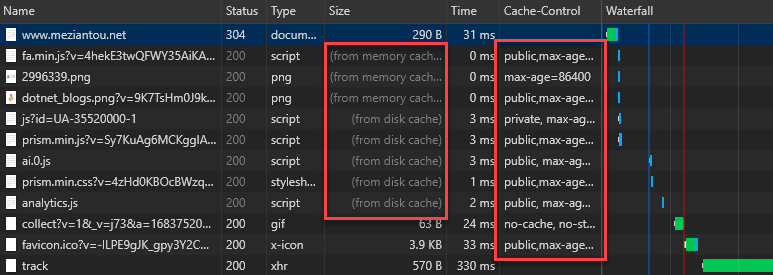
You can verify the headers are sent using the Developer Console:
#Conclusion
HTTP caching is important for performance on both the client and server sides. With ASP.NET Core, you can use the built-in TagHelpers to generate versioned URLs, and configure the StaticFilesMiddleware to add the Cache-control header for those URLs.
Do you have a question or a suggestion about this post? Contact me!
