Applications often consist of an executable and several DLLs, which means deployment requires copying all files together. It would be more convenient to ship just one file: the executable. ILMerge and ILRepack are popular tools for this, but it can also be done directly from Visual Studio.
The approach is to embed the dependencies as resources in the application. Add the DLLs to the project (or as links) and set their build action to Embedded Resource.
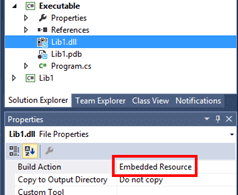
At runtime, you need to tell .NET to look for assemblies inside the executable's resources. To do this, subscribe to the AppDomain.AssemblyResolve event, which is raised whenever an assembly cannot be found automatically. It is also worth loading the associated symbol file (PDB) to support debugging.
C#
private static Assembly CurrentDomain_AssemblyResolve(object sender, ResolveEventArgs args)
{
    string baseResourceName = Assembly.GetExecutingAssembly().GetName().Name + "." + new AssemblyName(args.Name).Name;
    byte[] assemblyData = null;
    byte[] symbolsData = null;
    using (var stream = Assembly.GetExecutingAssembly().GetManifestResourceStream(baseResourceName + ".dll"))
    {
        if (stream == null)
            return null;

        assemblyData = new byte[stream.Length];
        stream.Read(assemblyData, 0, assemblyData.Length);
    }

    using (var stream = Assembly.GetExecutingAssembly().GetManifestResourceStream(baseResourceName + ".pdb"))
    {
        if (stream != null)
        {
            symbolsData = new Byte[stream.Length];
            stream.Read(symbolsData, 0, symbolsData.Length);
        }
    }

    return Assembly.Load(assemblyData, symbolsData);
}
The method is straightforward: it retrieves the name of the requested DLL and loads it from the executable's embedded resources.
There is one important subtlety: do not reference an embedded DLL directly from the Main method. If you do, the runtime will try to resolve the assembly before the AssemblyResolve handler is registered, causing a crash. The Main method should only register the event handler and then delegate to a separate entry-point method, which can be decorated with the [MethodImpl(MethodImplOptions.NoInlining)] attribute to prevent inlining.
C#
static void Main(string[] args)
{
    AppDomain.CurrentDomain.AssemblyResolve += CurrentDomain_AssemblyResolve;
    if (Debugger.IsAttached)
    {
        SafeMain();
    }
    else
    {
        try
        {
            SafeMain();
        }
        catch (Exception ex)
        {
            Console.WriteLine(ex.ToString());
        }
    }
}

[MethodImpl(MethodImplOptions.NoInlining)]
static void SafeMain()
{
    Console.WriteLine(Lib1.Test.Add(1, 2));
}
There you go!
Do you have a question or a suggestion about this post? Contact me!
