When displaying DateTime data to users, you may want to convert it to their local time zone. With server-side Blazor, code runs on the server, so DateTime.Now reflects the server's time zone rather than the user's. This post shows how to retrieve the user's time zone and adjust dates accordingly.
To get the user's time zone, you need to run code on the client. In a browser, you can use the JavaScript function getTimezoneOffset() to retrieve the UTC offset in minutes. Since you cannot call this function directly from Blazor, you need to wrap it in a JavaScript function and invoke it from Blazor using JSInterop.
Add a JavaScript file named wwwroot/BlazorInterop.js with the following content:
JavaScript
function blazorGetTimezoneOffset() {
    return new Date().getTimezoneOffset();
}
Then, open Pages/_Host.cshtml and add a reference to the JavaScript file:
Razor
@page "/"
@namespace UserTimeZone.Pages
@addTagHelper *, Microsoft.AspNetCore.Mvc.TagHelpers
@{
    Layout = null;
}

<!DOCTYPE html>
<html lang="en">
<head>
    <meta charset="utf-8" />
    <base href="~/" />
</head>
<body>
    <app>
        <component type="typeof(App)" render-mode="ServerPrerendered" />
    </app>

    <script src="~/BlazorInterop.js"></script>
    <script src="_framework/blazor.server.js"></script>
</body>
</html>
Next, create a service to handle time zone conversions. Add a new file named TimeZoneService.cs with the following content:
C#
using System;
using System.Threading.Tasks;
using Microsoft.JSInterop;

namespace UserTimeZone
{
    public sealed class TimeZoneService
    {
        private readonly IJSRuntime _jsRuntime;

        private TimeSpan? _userOffset;

        public TimeZoneService(IJSRuntime jsRuntime)
        {
            _jsRuntime = jsRuntime;
        }

        public async ValueTask<DateTimeOffset> GetLocalDateTime(DateTimeOffset dateTime)
        {
            if (_userOffset == null)
            {
                int offsetInMinutes = await _jsRuntime.InvokeAsync<int>("blazorGetTimezoneOffset");
                _userOffset = TimeSpan.FromMinutes(-offsetInMinutes);
            }

            return dateTime.ToOffset(_userOffset.Value);
        }
    }
}
Register the service in the dependency injection (DI) container. Open Startup.cs and add the following line:
C#
        public void ConfigureServices(IServiceCollection services)
        {
            services.AddRazorPages();
            services.AddServerSideBlazor();

            // We want one instance per client, so it's a scoped service.
            services.AddScoped<TimeZoneService>();
        }
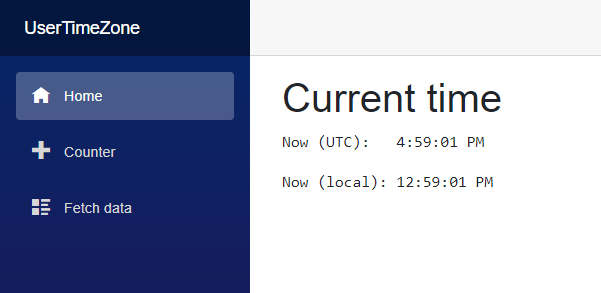
Finally, use the service to display a date:
Razor
@page "/"
@inject TimeZoneService TimeZoneService

<h1>Current time</h1>

<p>Now (UTC):   @DateTimeOffset.UtcNow.ToString("T")</p>
<p>Now (local): @now.ToString("T")</p>

@code {
    DateTimeOffset now;

    protected override async Task OnInitializedAsync()
    {
        // TODO: Require server render mode while instantiating the component to execute JavaScript in OnInitializedAsync.
        // In _Host.cshtml: <component type="typeof(App)" render-mode="Server" />
        now = await TimeZoneService.GetLocalDateTime(DateTimeOffset.UtcNow);
    }
}
Do you have a question or a suggestion about this post? Contact me!
