WPF generates a default Main method that starts the application. If you need to run code early – for example, to ensure only one instance of the application is running – using the Startup event is not ideal. By that point, all WPF DLLs are already loaded and part of the startup code has run, which can add a few hundred milliseconds of delay. For a good user experience, that overhead is worth avoiding. The solution is to provide a custom Main method.
The Main method is generated for the item whose Build Action is set to Application Definition. By default, App.xaml uses this build action, as shown in the properties window:
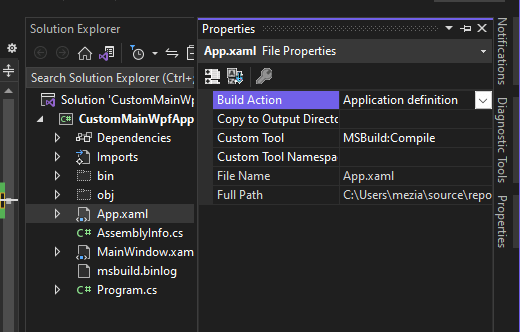
Change the build action to Page to prevent the auto-generated Main method:
csproj (MSBuild project file)
<Project Sdk="Microsoft.NET.Sdk">

  <PropertyGroup>
    <OutputType>WinExe</OutputType>
    <TargetFramework>net7.0-windows</TargetFramework>
    <Nullable>enable</Nullable>
    <UseWPF>true</UseWPF>
  </PropertyGroup>

  <ItemGroup>
    <ApplicationDefinition Remove="App.xaml"/>
    <Page Include="App.xaml"/>
  </ItemGroup>
</Project>
Then, implement your own Main method:
C#
[STAThread]
static void Main()
{
    // TODO Whatever you want to do before starting
    // the WPF application and loading all WPF dlls
    RunApp();
}

// Ensure the method is not inlined, so you don't
// need to load any WPF dll in the Main method
[MethodImpl(MethodImplOptions.NoInlining | MethodImplOptions.NoOptimization)]
static void RunApp()
{
    var app = new App();
    app.InitializeComponent();
    app.Run();
}
Do you have a question or a suggestion about this post? Contact me!
