It is common to use a dropdown list to select a value from an enumeration. In ASP.NET Core MVC, you can use Html.GetEnumSelectList to generate the options for an enumeration, which is both convenient and productive. However, this helper does not exist in Blazor. In this post, we will create something even easier to use. Yes, that is possible!
The built-in InputSelect component supports binding a property of type Enum. However, you must provide all options manually, which is error-prone and not very productive:
HTML
<EditForm Model="model">
    <InputSelect @bind-Value="model.Season">
        <option>Spring</option>
        <option>Summer</option>
        <option>Autumn</option>
        <option>Winter</option>
    </InputSelect>
</EditForm>

@code {
    Model model = new Model();

    class Model
    {
        public Season Season { get; set; }
    }

    enum Season
    {
        Spring,
        Summer,
        Autumn,
        Winter
    }
}
You can make this code more generic by iterating on Enum.GetValues:
HTML
<EditForm Model="model">
    <InputSelect @bind-Value="model.Season">
        @foreach (var value in Enum.GetValues(typeof(Season)))
        {
            <option>@value</option>
        }
    </InputSelect>
</EditForm>
This lets you reuse the code for any enumeration you want to bind to a select. However, the display text is not customizable and not localized, which makes it unfriendly for real-world use. As always in Blazor, the solution is to create a component. Components encapsulate reusable behavior, so you can use them across your application without duplicating code.
To create this component, I referenced how the InputSelect component is implemented on GitHub. The code is straightforward. It contains two methods: BuildRenderTree and TryParseValueFromString. We will modify the first to populate the option elements when building the render tree, instead of relying on the ChildContent template. The TryParseValueFromString method converts the string value from the select element into a valid enumeration value. We will adapt it to support nullable types.
A few points to note in the implementation:
- This component supports nullable types, unlike the built-in
InputSelect component. - This component reads the
[Display] attribute to determine option display names. If no attribute is defined, it decamelizes the enumeration member name. This allows you to localize the application.
In previous posts, we created components using Razor syntax. In this case, it is easier to write the component in pure C# code. You can place the file in the Shared folder to make the component accessible across all views. The code includes a few comments for clarity, and nothing in the implementation is overly complex.
C#
// file: Shared/InputSelectEnum.cs
using System;
using System.ComponentModel.DataAnnotations;
using System.Globalization;
using System.Reflection;
using Humanizer;
using Microsoft.AspNetCore.Components;
using Microsoft.AspNetCore.Components.Forms;
using Microsoft.AspNetCore.Components.Rendering;

// Inherit from InputBase so the hard work is already implemented 😊
// Note that adding a constraint on TEnum (where T : Enum) doesn't work when used in the view, Razor raises an error at build time. Also, this would prevent using nullable types...
public sealed class InputSelectEnum<TEnum> : InputBase<TEnum>
{
    // Generate html when the component is rendered.
    protected override void BuildRenderTree(RenderTreeBuilder builder)
    {
        builder.OpenElement(0, "select");
        builder.AddMultipleAttributes(1, AdditionalAttributes);
        builder.AddAttribute(2, "class", CssClass);
        builder.AddAttribute(3, "value", BindConverter.FormatValue(CurrentValueAsString));
        builder.AddAttribute(4, "onchange", EventCallback.Factory.CreateBinder<string>(this, value => CurrentValueAsString = value, CurrentValueAsString, null));

        // Add an option element per enum value
        var enumType = GetEnumType();
        foreach (var value in Enum.GetValues(enumType))
        {
            builder.OpenElement(5, "option");
            builder.AddAttribute(6, "value", value.ToString());
            builder.AddContent(7, GetDisplayName(value));
            builder.CloseElement();
        }

        builder.CloseElement(); // close the select element
    }

    protected override bool TryParseValueFromString(string value, out TEnum result, out string validationErrorMessage)
    {
        // Let's Blazor convert the value for us 😊
        if (BindConverter.TryConvertTo(value, CultureInfo.CurrentCulture, out TEnum parsedValue))
        {
            result = parsedValue;
            validationErrorMessage = null;
            return true;
        }

        // Map null/empty value to null if the bound object is nullable
        if (string.IsNullOrEmpty(value))
        {
            var nullableType = Nullable.GetUnderlyingType(typeof(TEnum));
            if (nullableType != null)
            {
                result = default;
                validationErrorMessage = null;
                return true;
            }
        }

        // The value is invalid => set the error message
        result = default;
        validationErrorMessage = $"The {FieldIdentifier.FieldName} field is not valid.";
        return false;
    }

    // Get the display text for an enum value:
    // - Use the DisplayAttribute if set on the enum member, so this support localization
    // - Fallback on Humanizer to decamelize the enum member name
    private string GetDisplayName(object value)
    {
        // Read the Display attribute name
        var member = value.GetType().GetMember(value.ToString())[0];
        var displayAttribute = member.GetCustomAttribute<DisplayAttribute>();
        if (displayAttribute != null)
            return displayAttribute.GetName();

        // Require the NuGet package Humanizer.Core
        // <PackageReference Include = "Humanizer.Core" Version = "2.8.26" />
        return value.ToString().Humanize();
    }

    // Get the actual enum type. It unwrap Nullable<T> if needed
    // MyEnum  => MyEnum
    // MyEnum? => MyEnum
    private Type GetEnumType()
    {
        var nullableType = Nullable.GetUnderlyingType(typeof(TEnum));
        if (nullableType != null)
            return nullableType;

        return typeof(TEnum);
    }
}
You can now use this component in another Blazor component:
HTML
<EditForm Model="model">
    <div>
        @* The type of the enum (TEnum) is detected by the type of the bound property which is just awesome! *@
        <InputSelectEnum @bind-Value="model.Season" />
        <span>Selected value: @model.Season</span>
    </div>
</EditForm>

@code {
    Model model = new Model();

    class Model
    {
        public Season Season { get; set; }
    }

    enum Season
    {
        [Display(Name = "Spring", ResourceType = typeof(Resources))]
        Spring,
        [Display(Name = "Summer", ResourceType = typeof(Resources))]
        Summer,
        [Display(Name = "Autumn", ResourceType = typeof(Resources))]
        Autumn,
        [Display(Name = "Winter", ResourceType = typeof(Resources))]
        Winter,
    }
}
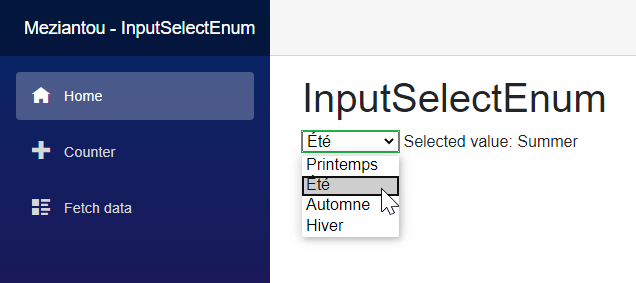
The screenshot shows that the enumeration values are localized in French thanks to the [Display] attribute. The value in the span is not localized because it calls ToString on the enumeration member directly, but that is outside the scope of this post.
Do you have a question or a suggestion about this post? Contact me!
