If you are familiar with classic ASP.NET, you know the <asp:Repeater> control. This control iterates over a collection (which can come from any DataSource) and uses a template to generate the page.
ASP.NET
<%-- This is ASP.NET code (not ASP.NET Core) --%>
<asp:Repeater runat="server" DataSourceID="ObjectDataSource1">
    <HeaderTemplate>
        <table>
            <tr>
    </HeaderTemplate>
    <ItemTemplate>
                <td><%# Eval("CategoryName") %></td>
    </ItemTemplate>
    <FooterTemplate>
            </tr>
        </table>
    </FooterTemplate>
</asp:Repeater>
Of course, nobody wants to write classic ASP.NET code today. Instead, you can use modern technologies such as ASP.NET Core and Blazor. The default Blazor application template uses a foreach loop to iterate over the collection and display data. It also needs to handle the case where data is still loading, showing a loading message instead of the table. Here's the code of the FetchData page:
Razor
@if (forecasts == null)
{
    <p><em>Loading...</em></p>
}
else
{
    <table class="table">
        <thead>
            <tr>
                <th>Date</th>
                <th>Temp. (C)</th>
                <th>Summary</th>
            </tr>
        </thead>
        <tbody>
            @foreach (var forecast in forecasts)
            {
                <tr>
                    <td>@forecast.Date.ToShortDateString()</td>
                    <td>@forecast.TemperatureC</td>
                    <td>@forecast.Summary</td>
                </tr>
            }
        </tbody>
    </table>
}

@code {
    private WeatherForecast[] forecasts;

    protected override async Task OnInitializedAsync()
    {
        forecasts = await ForecastService.GetForecastAsync(DateTime.UtcNow);
    }
}
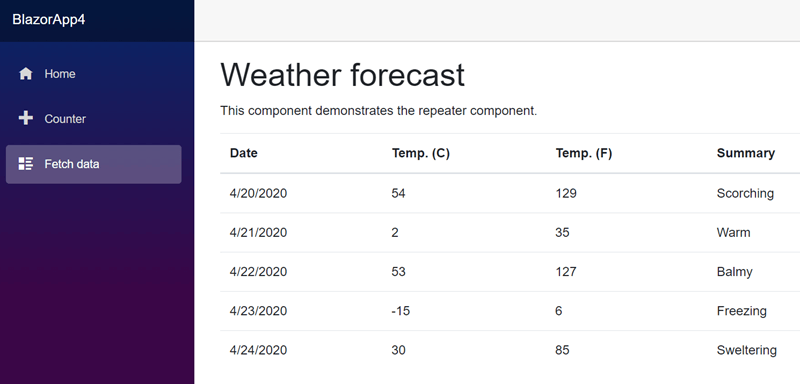
This code is easy to read, but you may need to repeat it many times across your application. More code means more potential bugs. Instead of duplicating this logic everywhere, you can create a component to encapsulate it.
#Creating the Repeater component
The component usage looks like the following:
Razor
<Repeater Items="@items">

    <LoadingTemplate>
        <p><em>Loading...</em></p>
    </LoadingTemplate>

    <RepeaterContainerTemplate Context="ItemsContent">
        <table class="table">
            <thead>
                <tr>
                    <th>Date</th>
                    <th>Temp. (C)</th>
                    <th>Summary</th>
                </tr>
            </thead>
            <tbody>
                @ItemsContent
            </tbody>
        </table>
    </RepeaterContainerTemplate>

    @* Context allows to rename the default @context variable to a more meaningful name. In this cas @forecase *@
    <ItemTemplate Context="forecast">
        <tr>
            <td>@forecast.Date.ToShortDateString()</td>
            <td>@forecast.TemperatureC</td>
            <td>@forecast.Summary</td>
        </tr>
    </ItemTemplate>

</Repeater>
It uses templates, making it reusable and more readable. There is no imperative code, only declarative templates that reduce the chance of introducing bugs.
The Repeater component is very simple. It's composed of only one file named Repeater.razor with the following content:
Razor
@* T is the type of objects to enumerate in the repeater *@
@* It should be inferred automatically based on the Items property *@
@* You can specify it manually by using <Repeater T=Person /> *@
@typeparam T

@if (Items == null)
{
    @LoadingTemplate
}
else
{
    if (EmptyTemplate != null && !Items.Any())
    {
        @EmptyTemplate
    }
    else
    {
        @* "@:" allows to switch from C# to Razor. In this case this creates block that will evaluate as a RenderFragment *@
        @RepeaterContainerTemplate(
            @: @{
                var first = true;
                foreach (var item in Items)
                {
                    if(!first && ItemSeparatorTemplate != null)
                    {
                        @ItemSeparatorTemplate
                    }

                    @ItemTemplate(item);
                    first = false;
                }
            }
            )
    }
}

@code {
    [Parameter]
    public IEnumerable<T> Items { get; set; }

    [Parameter]
    public RenderFragment LoadingTemplate { get; set; }

    [Parameter]
    public RenderFragment<RenderFragment> RepeaterContainerTemplate { get; set; }

    [Parameter]
    public RenderFragment<T> ItemTemplate { get; set; }

    [Parameter]
    public RenderFragment ItemSeparatorTemplate { get; set; }

    [Parameter]
    public RenderFragment EmptyTemplate { get; set; }

    protected override void OnParametersSet()
    {
        // Create empty template in case the user doesn't provide it
        if (RepeaterContainerTemplate == null)
        {
            RepeaterContainerTemplate = new RenderFragment<RenderFragment>(fragment => fragment);
        }
    }
}
The code is straightforward. You can extend it with additional features such as an AlternateItemTemplate.
This component is minimal, but you can create similar ones for different layouts (WrapPanel, Grid, etc.) to extract complex rendering logic into reusable components. Don't hesitate to build a few of them when the need arises.
Do you have a question or a suggestion about this post? Contact me!
