Cryptography is fundamental to information security. Information security is composed of 4 parts:
- Integrity: ensure a document is not altered
- Confidentiality: ensure only authorized people can read a document
- Authentication: ensure the document was written by an identified person
- Non-Repudiation: prove who/where a document came from as well as the authenticity of that message, so the sender cannot deny they have sent it
Let's see what .NET provides for each part!
#Generating random numbers
Random number generation is commonly used to create cryptographic keys. These keys must be as unpredictable as possible. Don't use System.Random for generating cryptographic numbers. Instead, use System.Security.Cryptography.RNGCryptoServiceProvider.
C#
byte[] GetRandomData(int length)
{
    using (var rngCsp = new System.Security.Cryptography.RNGCryptoServiceProvider())
    {
        var randomData = new byte[length];
        rngCsp.GetBytes(randomData);
        return randomData;
    }
}

// .NET Core 2.1+
byte[] GetRandomData(int length)
{
    var randomData = new byte[length];
    RandomNumberGenerator.Fill(randomData);
    return randomData;
}

// .NET 6
byte[] GetRandomData(int length)
{
    return RandomNumberGenerator.GetBytes(length);
}
#Generating a cryptographic key from a password
A password has a variable length and typically consists only of characters the user can type on a keyboard. In this form, it cannot be used directly to encrypt data. For example, encrypting data with AES-128 requires a fixed-length key of 128 bits. You must first derive a cryptographic key of the required size from the password. This is what "Password-Based Key Derivation Function 2" (PBKDF2) does. In .NET, the class that implements this algorithm is Rfc2898DeriveBytes.
C#
string password = "foobar";

byte[] salt;
using (var derivedBytes = new System.Security.Cryptography.Rfc2898DeriveBytes(password, saltSize: 16, iterations: 50000, HashAlgorithmName.SHA256))
{
    salt = derivedBytes.Salt;
    byte[] key = derivedBytes.GetBytes(16); // 128 bits key
    Console.WriteLine(Convert.ToBase64String(key)); // Qs117rioEMXqseslxc5X4A==
}
You can recreate the same key by using the same password, the same number of iterations, the same salt, and the same algorithm. This means you need to store this information (except the password!) somewhere to be able to reuse it later.
C#
using (var derivedBytes = new Rfc2898DeriveBytes(password, salt, iterations: 50000, HashAlgorithmName.SHA256))
{
    byte[] key = derivedBytes.GetBytes(16); // Same as the first generated key
    Console.WriteLine(Convert.ToBase64String(key)); // Qs117rioEMXqseslxc5X4A==
}

// .NET 6+
Rfc2898DeriveBytes.Pbkdf2(password, salt, iterations: 50000, HashAlgorithmName.SHA256, outputLength: 16);
Console.WriteLine(Convert.ToBase64String(key)); // Qs117rioEMXqseslxc5X4A==
If you change one of the parameters, you should get another key:
C#
// Number of iteration changed (49999 instead of 50000)
using (var derivedBytes = new Rfc2898DeriveBytes(password, salt, iterations: 49999, HashAlgorithmName.SHA256))
{
    byte[] key = derivedBytes.GetBytes(16);
    Console.WriteLine(Convert.ToBase64String(key)); // N3Zi7D9jcf4WMV26YAKmDg==
}
You can also use this algorithm to validate a password, but this is for another post.
#Hash algorithms
Hash algorithms convert a binary message of an arbitrary length to a smaller binary value of a fixed length. The same input must output the same hash. If you change a single byte of the input, the hash should be different. If the hash is cryptographically strong, its value will change significantly. A hash algorithm should have the following characteristics:
- It should be infeasible to generate a specific hash
- It should be infeasible to modify a message without changing the hash
- It should be infeasible to find 2 different inputs with identical hashes
When a sender wants to send data, they can include the data along with its hash. The receiver computes the hash of the received data and compares it to the hash sent by the sender. If they match, the receiver can be confident the data was not altered in transit, ensuring integrity.
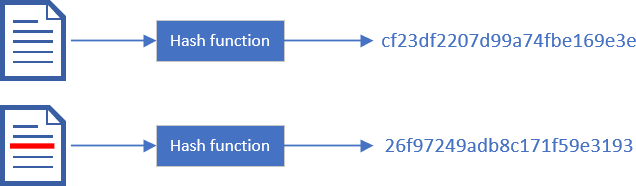
In .NET you can use any class that inherits from HashAlgorithm. However, some algorithms, such as MD5 or SHA1, are considered vulnerable because they do not respect the previous characteristics. You can use any algorithms derived from SHA2 such as SHA256, SHA384, or SHA512. SHA3 algorithms are supported on .NET 8.
C#
byte[] ComputeHash(byte[] data)
{
    using (var sha256 = SHA256.Create())
    {
        return sha256.ComputeHash(data);
    }
}

// .NET 5.0+
byte[] ComputeHash(byte[] data) => Sha256.HashData(data);
#Authenticated Hashing (HMAC)
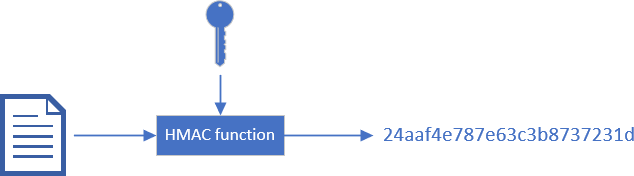
Hash-based message authentication code (HMAC) may be used to verify both the data integrity and the authentication of a message. It works like a classic hash algorithm except you need a secret key to generate and validate the hash: HMAC = Hash + Cryptographic key. Only someone with the secret key can generate and validate the hash. As long as the key is secret, you know who has generated the hash.
HMAC is useful when you send a message to someone and expect it to be returned. You can then verify the message was indeed generated by you and has not been altered. For instance, ASP.NET WebForms send the ViewState and its HMAC to the client. When the client sends a POST request to the server, it sends back the value of the ViewState. The server can validate the HMAC of the ViewState to confirm it was generated by the server and has not been altered by the client.
C#
byte[] ComputeHmac256(byte[] key, byte[] data)
{
    using (var hmac = new HMACSHA256(key))
    {
        return hmac.ComputeHash(data);
    }
}

// .NET 6
byte[] ComputeHmac256(byte[] key, byte[] data)
{
    return HMACSHA256.HashData(key, data);
}
#Encryption
Encryption scrambles the content of a file so only authorized people can read it. There are 2 ways to encrypt data. The first is symmetric encryption, where the same key is used to encrypt and decrypt. This means you need a secure way to transmit the key to other people. The other way is asymmetric encryption. The keys to encrypt and decrypt data are different. We often use the terms public key and private key. The public key allows you to encrypt data, so you can share it with anyone. The private key allows you to decrypt data, so you must keep it secret.
The main symmetric algorithm is AES, and RSA is the most widely used asymmetric algorithm. AES is very fast and can be used with data of any length. RSA is far slower and cannot encrypt data that is longer than the size of the key.
##Symmetric encryption
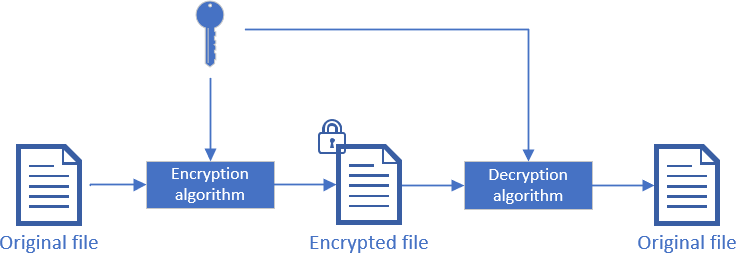
.NET provides multiple symmetric algorithms and multiple implementations for some algorithms:
- AES:
AESManaged, AesCng, AesCryptoServiceProvider - AES-GCM:
AesGcm - DES:
DESCryptoServiceProvider - RC2:
RC2CryptoServiceProvider - Rijndael:
RijndaelManaged - TripleDES:
TripleDESCng, TripleDESCryptoServiceProvider
If you don't know which one to use, you may want to start with AES. AESManaged is fully implemented in .NET, however, the implementation is not FIPS compliant. AESCryptoServiceProvider uses the Windows implementation (CryptoAPI) which is FIPS compliant. Or you can create an instance of the best available provider using AES.Create().
There are multiple AES modes, each suited to different use cases. This Stack Overflow answer describes each mode well. Note that some of them are not yet implemented in .NET.
C#
static void Main()
{
    var key = GetRandomData(256 / 8);

    var data = new byte[] { 1, 2, 3 };
    var encryptedData = Encrypt(data, key, out var iv);
    var decryptedData = Decrypt(encryptedData, key, iv);
}

static byte[] Encrypt(byte[] data, byte[] key, out byte[] iv)
{
    using var aes = Aes.Create();

    // You should adjust the mode depending on what you want to encrypt.
    // However, some mode may be weak or require additional security steps such as CBC: https://learn.microsoft.com/en-us/dotnet/standard/security/vulnerabilities-cbc-mode?WT.mc_id=DT-MVP-5003978
    aes.Mode = CipherMode.CBC;

    aes.Key = key;
    aes.GenerateIV(); // You must use a new IV for each encryption for security purpose

    using (var cryptoTransform = aes.CreateEncryptor())
    {
        iv = aes.IV;
        return cryptoTransform.TransformFinalBlock(data, 0, data.Length);
    }
}

static byte[] Decrypt(byte[] data, byte[] key, byte[] iv)
{
    using var aes = Aes.Create();
    aes.Key = key;
    aes.IV = iv;
    aes.Mode = CipherMode.CBC; // same as for encryption

    using (var cryptoTransform = aes.CreateDecryptor())
    {
        return cryptoTransform.TransformFinalBlock(data, 0, data.Length);
    }
}
###AES-GCM (AEAD)
AES-GCM provides confidentiality and integrity. Like other AES modes, it encrypts data using a key (confidentiality). When decrypting, it also verifies the message has not been altered (integrity), unlike other AES modes. You can consider it a safe way to combine AES and HMAC.
C#
static void Main()
{
    var key = GetRandomData(256 / 8);

    var data = new byte[] { 1, 2, 3 };
    byte[]? associatedData = null; // Optional. If possible, provide something associated to the current context such as the current user id https://crypto.stackexchange.com/a/6716/16630
    var encryptedAesGcmData = EncryptAesGcm(data, key, associatedData, out var tag, out var nonce);
    var decryptedAesGcmData = DecryptAesGcm(encryptedAesGcmData, key, associatedData, tag, nonce);
}

public static byte[] EncryptAesGcm(byte[] data, byte[] key, byte[]? associatedData, out byte[] tag, out byte[] nonce)
{
    tag = new byte[AesGcm.TagByteSizes.MaxSize];
    nonce = new byte[AesGcm.NonceByteSizes.MaxSize];
    RandomNumberGenerator.Fill(nonce);

    byte[] cipherText = new byte[data.Length];
    using var cipher = new AesGcm(key);
    cipher.Encrypt(nonce, data, cipherText, tag, associatedData);
    return cipherText;
}

public static byte[] DecryptAesGcm(byte[] data, byte[] key, byte[]? associatedData, byte[] tag, byte[] nonce)
{
    byte[] decryptedData = new byte[data.Length];
    using var cipher = new AesGcm(key);
    cipher.Decrypt(nonce, data, tag, decryptedData, associatedData);
    return decryptedData;
}
###ChaCha20Poly1305 (AEAD)
ChaCha20Poly1305 (RFC 8439) is an Authenticated Encryption with Associated Data (AEAD) cipher amenable to fast, constant-time implementations in software, based on the ChaCha20 stream cipher and Poly1305 universal hash function. ChaCha20Poly1305 is a good alternative to AES-GCM when the machine lacks hardware AES support. AES is vulnerable to timing-based side channels if implemented in software. Cloudflare wrote two good posts about ChaCha20Poly1305: It takes two to ChaCha (Poly), Do the ChaCha: better mobile performance with cryptography.
C#
static void Main()
{
    var key = GetRandomData(32);

    var data = new byte[] { 1, 2, 3 };
    byte[]? associatedData = null; // Optional. If possible, provide something associated to the current context such as the current user id https://crypto.stackexchange.com/a/6716/16630
    var encryptedChaCha20Poly1305 = EncryptChaCha20Poly1305(data, key, associatedData, out var tag, out var nonce);
    var decryptedChaCha20Poly1305 = DecryptChaCha20Poly1305(encryptedChaCha20Poly1305, key, associatedData, tag, nonce);
}

public static byte[] EncryptChaCha20Poly1305(byte[] data, byte[] key, byte[]? associatedData, out byte[] tag, out byte[] nonce)
{
    tag = new byte[16];
    nonce = GetRandomData(12);
    byte[] cipherText = new byte[data.Length];
    using var cipher = new  ChaCha20Poly1305(key);
    cipher.Encrypt(nonce, data, cipherText, tag, associatedData);
    return cipherText;
}

public static byte[] DecryptChaCha20Poly1305(byte[] data, byte[] key, byte[]? associatedData, byte[] tag, byte[] nonce)
{
    byte[] decryptedData = new byte[data.Length];
    using var cipher = new ChaCha20Poly1305(key);
    cipher.Decrypt(nonce, data, tag, decryptedData, associatedData);
    return decryptedData;
}
##Asymmetric encryption
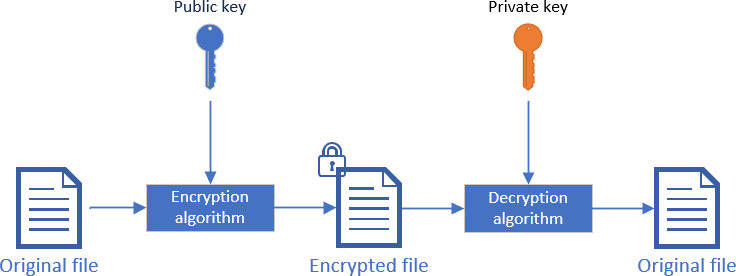
.NET provides multiple asymmetric algorithms and multiple implementations for some algorithms:
- DSA:
DSACng, DSACryptoServiceProvider, DSAOpenSsl - ECDiffieHellman:
ECDiffieHellmanCng, ECDiffieHellmanOpenSsl - ECDsa:
ECDsaCng, ECDsaOpenSsl - RSA:
RSACng, RSACryptoServiceProvider, RSAOpenSsl
To encrypt data, you can use RSA. For the key length, you should use at least 2048 (NSA recommends 3072 or larger ref). Note that RSA can only encrypt data up to the key length (including padding). So, with a key of 2048 bits, you cannot encrypt a blob of 4096 bits. You'll need to split it into 2 blobs and encrypt them separately.
C#
static void Main(string[] args)
{
    var data = new byte[] { 1, 2, 3 };
    var (publicKey, privateKey) = GenerateKeys(2048);

    var encryptedData = Encrypt(data, publicKey);
    var decryptedData = Decrypt(encryptedData, privateKey);
}

static (RSAParameters publicKey, RSAParameters privateKey) GenerateKeys(int keyLength)
{
    using (var rsa = RSA.Create())
    {
        rsa.KeySize = keyLength;
        return (
            publicKey: rsa.ExportParameters(includePrivateParameters: false),
            privateKey: rsa.ExportParameters(includePrivateParameters: true)
        );
    }
}

static byte[] Encrypt(byte[] data, RSAParameters publicKey)
{
    using (var rsa = RSA.Create())
    {
        rsa.ImportParameters(publicKey);

        var result = rsa.Encrypt(data, RSAEncryptionPadding.OaepSHA256);
        return result;
    }
}

static byte[] Decrypt(byte[] data, RSAParameters privateKey)
{
    using (var rsa = RSA.Create())
    {
        rsa.ImportParameters(privateKey);
        return rsa.Decrypt(data, RSAEncryptionPadding.OaepSHA256);
    }
}
##Hybrid encryption
Hybrid encryption combines symmetric and asymmetric encryption. You generate a symmetric key and encrypt it using an asymmetric algorithm. This lets you use asymmetric encryption to securely exchange the key, while leveraging AES's speed to encrypt the actual data. The symmetric key is also small enough to be encrypted with RSA. Note that you can HMAC the encrypted data using the symmetric key to validate its integrity.
#Digital signature
A digital signature allows you to verify the authenticity of a document. You know who signed the document and can confirm it has not been altered after signing. A signature works similarly to asymmetric encryption. You sign the document (or a hash of the document) using your private key, and anyone can validate the signature using your public key. If the public key is associated with a certificate, you can also verify the identity of the person who signed the document.
C#
static void Main(string[] args)
{
    var (publicKey, privateKey) = GenerateKeys(2048);

    var data = new byte[] { 1, 2, 3 };
    var signedData = Sign(data, privateKey);
    var isValid = VerifySignature(data, signedData, publicKey);
}

static (RSAParameters publicKey, RSAParameters privateKey) GenerateKeys(int keyLength)
{
    using (var rsa = RSA.Create())
    {
        rsa.KeySize = keyLength;
        return (
            publicKey: rsa.ExportParameters(includePrivateParameters: false),
            privateKey: rsa.ExportParameters(includePrivateParameters: true));
    }
}

static byte[] Sign(byte[] data, RSAParameters privateKey)
{
    using (var rsa = RSA.Create())
    {
        rsa.ImportParameters(privateKey);

        // the hash to sign
        byte[] hash;
        using (var sha256 = SHA256.Create())
        {
            hash = sha256.ComputeHash(data);
        }

        var rsaFormatter = new RSAPKCS1SignatureFormatter(rsa);
        rsaFormatter.SetHashAlgorithm("SHA256");
        return rsaFormatter.CreateSignature(hash);
    }
}

private static bool VerifySignature(byte[] data, byte[] signature, RSAParameters publicKey)
{
    using (var rsa = RSA.Create())
    {
        rsa.ImportParameters(publicKey);

        // the hash to sign
        byte[] hash;
        using (var sha256 = SHA256.Create())
        {
            hash = sha256.ComputeHash(data);
        }

        var rsaFormatter = new RSAPKCS1SignatureDeformatter(rsa);
        rsaFormatter.SetHashAlgorithm("SHA256");
        return rsaFormatter.VerifySignature(hash, signature);
    }
}
##XML document signature
There is a standard for signing XML documents. It works much the same as the general signature algorithm, except the signature can be included in the document. You can also sign only a subset of the document if needed.
C#
static void Main(string[] args)
{
    var (publicKey, privateKey) = GenerateKeys(2048);

    var document = new XmlDocument();
    document.LoadXml("<Root><Author>Meziantou</Author></Root>");

    SignXml(document, privateKey);
    var isValidXmlSignature = VerifyXmlSignature(document, publicKey);
}

public static void SignXml(XmlDocument xmlDocument, RSAParameters privateKey)
{
    using (var rsa = RSA.Create())
    {
        rsa.ImportParameters(privateKey);

        var signedXml = new SignedXml(xmlDocument);
        signedXml.SigningKey = rsa;

        // Create a reference to be signed
        var reference = new Reference(""); // "" means entire document, https://learn.microsoft.com/en-us/dotnet/api/system.security.cryptography.xml.reference.uri?WT.mc_id=DT-MVP-5003978&view=dotnet-plat-ext-6.0
        var env = new XmlDsigEnvelopedSignatureTransform();
        reference.AddTransform(env);

        // Add the reference to the SignedXml object and compute the signature
        signedXml.AddReference(reference);
        signedXml.ComputeSignature();

        // Get the XML representation of the signature and add it to the document
        XmlElement xmlDigitalSignature = signedXml.GetXml();
        xmlDocument.DocumentElement.AppendChild(xmlDocument.ImportNode(xmlDigitalSignature, deep: true));
    }
}

public static bool VerifyXmlSignature(XmlDocument xmlDocument, RSAParameters publicKey)
{
    using (var rsa = RSA.Create())
    {
        rsa.ImportParameters(publicKey);

        var signatureElement = xmlDocument.GetElementsByTagName("Signature").OfType<XmlElement>().FirstOrDefault();
        var signedXml = new SignedXml(xmlDocument);
        signedXml.LoadXml(signatureElement);

        return signedXml.CheckSignature(rsa);
    }
}
Here's the signed xml document:
XML
<Root>
  <Author>Meziantou</Author>
  <Signature xmlns="http://www.w3.org/2000/09/xmldsig#">
    <SignedInfo>
      <CanonicalizationMethod Algorithm="http://www.w3.org/TR/2001/REC-xml-c14n-20010315" />
      <SignatureMethod Algorithm="http://www.w3.org/2001/04/xmldsig-more#rsa-sha256" />
      <Reference URI="">
        <Transforms>
          <Transform Algorithm="http://www.w3.org/2000/09/xmldsig#enveloped-signature" />
        </Transforms>
        <DigestMethod Algorithm="http://www.w3.org/2001/04/xmlenc#sha256" />
        <DigestValue>/nqzc97wNrLZ03VLo8ycnAFEOduEHAyUeP4nnPaiWU8=</DigestValue>
      </Reference>
    </SignedInfo>
    <SignatureValue>MdtKVRg+esWEDv8+TqAt0XLWd7kzgWvluBk6i0IyirUMPnUKifnkA7DfRRKifXQagP+1jZ4LZ9dLNCzul1Y8w8ZZeE7dy40pdgYcppHl+1dq4qRnymz2yDwU3bg50ZoAAyLVcW3fn7AuN1QS4eOj5fhird9epIQQdVZz8f8hZMGHgpAhR+c2MFPW6EmzeAQ7XBrhMtc9GhIrwMCUczkSYFOHYp+jaTYPb8hfVvW2ACmApsKw5/a3uxQS/9+n4CTy4y5mdksjKZLRMOtLRlzStg4CSUnsYYsJK+1y3yfyQlIQuglTVi+K8yEX8ZI+C4jz8rTV3U5hbilNRZ3LMlVusA==</SignatureValue>
  </Signature>
</Root>
#Conclusion
.NET contains all the classes you need to work with the main cryptographic algorithms. Most algorithms require careful configuration. Be sure to check the documentation for the recommended values. If you need an algorithm not provided by the framework, use a well-tested and actively maintained external library.
#Additional resources
Do you have a question or a suggestion about this post? Contact me!
