C# 9 introduces many new language features. One of them is the ability to suppress the .locals init flag. This feature improves method performance by skipping the zeroing of local variables before execution. Even though zeroing locals has been improved in .NET 5, skipping it entirely is still faster.
#What is locals init?
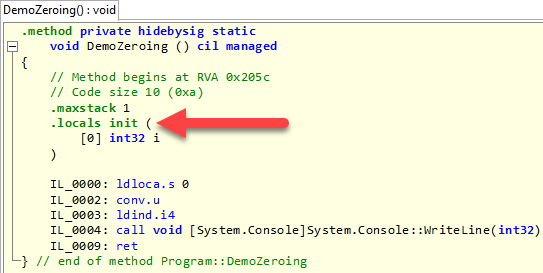
By default, the C# compiler emits the .locals init directive. This instructs the JIT to generate a prolog that sets all local variables to their default value. This is safer because it prevents accidental use of uninitialized memory. You can verify this behavior using unsafe code. The following method always prints "0" to the console, since the JIT initializes the variable i to its default value.
C#
static unsafe void DemoZeroing()
{
    int i;
    Console.WriteLine(*&i);
    // Display 0 as the local variable is automatically initialized with the default value
}
#Suppress emitting localsinit flag
In C# 9, you can use the new [System.Runtime.CompilerServices.SkipLocalsInit] attribute to instruct the compiler to suppress the .locals init flag. This attribute can be applied at module, class, or method level:
C#
[AttributeUsage(
      AttributeTargets.Module
    | AttributeTargets.Class
    | AttributeTargets.Struct
    | AttributeTargets.Interface
    | AttributeTargets.Constructor
    | AttributeTargets.Method
    | AttributeTargets.Property
    | AttributeTargets.Event, Inherited = false)]
public sealed class SkipLocalsInitAttribute : Attribute
{
    public SkipLocalsInitAttribute() { }
}
Here's how to use it on a method:
C#
[System.Runtime.CompilerServices.SkipLocalsInit]
static unsafe void DemoZeroing()
{
    int i;
    Console.WriteLine(*&i); // Unpredictable output as i is not initialized
}
You can apply the attribute per method, per class, or per module (project). For finer control, you can also use Unsafe.SkipInit on specific local variables.
C#
// For the project
[module: System.Runtime.CompilerServices.SkipLocalsInit]

// For a class
[System.Runtime.CompilerServices.SkipLocalsInit]
class Sample
{
    // ...
}

// For a method
[System.Runtime.CompilerServices.SkipLocalsInit]
void Sample()
{
}

// For a variable
void Sample()
{
    int i;
    System.Runtime.CompilerServices.Unsafe.SkipInit(out i);
}
When decompiling the application, you can see that the method now uses locals instead of .locals init, which means the variables will no longer be automatically initialized by the JIT.

BenchmarkDotnet lets you quickly measure the performance impact based on local variable size. The easiest way is to use a stackalloc.
C#
public class SkipLocalsInitBenchmark
{
    [Params(4, 8, 12, 16, 20, 24, 32, 64, 128, 256, 512, 1024)]
    public int Size { get; set; }

    [Benchmark]
    public byte InitLocals()
    {
        Span<byte> s = stackalloc byte[Size];
        return s[0];
    }

    [Benchmark]
    [SkipLocalsInit]
    public byte SkipInitLocals()
    {
        Span<byte> s = stackalloc byte[Size];
        return s[0];
    }
}

Unless you heavily use the stack, the gain is very small.
#Is it safe to use this attribute globally?
The C# compiler ensures you don't use a variable before initializing it, so using this attribute is safe in most cases. However, there are a few exceptions that require manual review:
unsafe codestackalloc- P/Invoke
struct with explicit layout
In unsafe code, you can access uninitialized variables. Review every location where you take the address of a variable to ensure your code does not rely on it being implicitly zeroed. Initialize the variable manually where needed.
C#
static unsafe void Pointer()
{
    int i;
    int* pointer_i = &i; // ⚠ The value of i is not initialized to 0

    int j = 0;
    int* pointer_j = &j; // ok
}
Starting with C# 8, you can use stackalloc without using the unsafe keyword as shown previously in this post.
C#
struct MyStruct
{
    public int Field1;
    public int Field2;
}

Span<MyStruct> array = stackalloc MyStruct[10];
array[0].Field1 = 42; // ⚠ Other fields are uninitialize which could be problematic
Console.WriteLine(array[0].Field2); // ⚠ Unpredictable output as Field2 is not initialized

array[1] = new MyStruct { Field1 = 42 }; // Ok as the ctor will initialize the values correctly
If you call a P/Invoke method with an out parameter, make sure the native method always writes to that parameter in every code path where you expect the value to be set.
C#
int a;
NativeMethods.Sample(out a); // ⚠ Be sure that Sample writes the out parameter in any case where you need it
Console.WriteLine(a); // ⚠ Unpredictable output if Sample doesn't set the value of the variable
If you declare a StructLayout size larger than the actual fields, part of the struct may remain uninitialized:
C#
[StructLayout(LayoutKind.Sequential, Size = 8)]
struct Sample
{
    public int A;

    public Sample(int value)
    {
        A = value;
        // ⚠ Only the first 4 bytes are initialized. The 4 last bytes are not initialized.
    }
}
If a struct with an explicit layout has gaps between fields, those bytes may not be initialized:
C#
[StructLayout(LayoutKind.Explicit)]
struct Sample
{

    [FieldOffset(0)]public int A; // 0-3
    // There is a 4 bytes hole in the struct layout (4-7)
    [FieldOffset(8)]public int B; // 8-12

    public Sample(int a, int b)
    {
        A = a;
        B = b;
        // ⚠ Bytes 4 to 7 are not initialized
    }
}
#Conclusion
Use the [SkipLocalsInit] attribute if you need to get the maximum performance possible. It's a quick win, but the gains are also very small for most use cases.
#Additional resources
Do you have a question or a suggestion about this post? Contact me!
