ASP.NET Core uses one or more configuration providers to manage application settings. These providers read configuration data from various sources such as appsettings.json, environment variables, vaults, and more, merging them into a single IConfiguration object. To inspect the contents of that object, you can use the GetDebugView extension method, which outputs the name, value, and source of each configuration entry.
One way to expose this information is by adding a dedicated route to your application. Be careful not to expose this route in production, as the configuration may contain sensitive information such as secrets.
C#
public class Startup
{
    public IConfiguration Configuration { get; }

    public Startup(IConfiguration configuration) => Configuration = configuration;

    public void ConfigureServices(IServiceCollection services) => services.AddControllers();

    public void Configure(IApplicationBuilder app, IWebHostEnvironment env)
    {
        app.UseRouting();
        app.UseEndpoints(endpoints =>
        {
            // 👇 Be sure to not publish this route in production as it may disclose some secrets
            if (env.IsDevelopment())
            {
                endpoints.MapGet("debug/configuration", async request =>
                {
                    var config = ((IConfigurationRoot)Configuration).GetDebugView();
                    await request.Response.WriteAsync(config, request.RequestAborted);
                });
            }

            endpoints.MapControllers();
        });
    }
}
You can now open this URL in your browser to view the configuration:
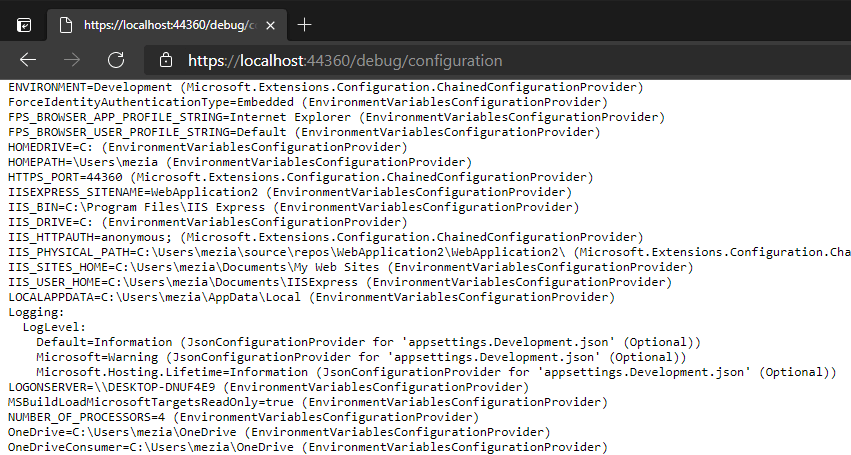
note: This post is inspired from the Cecil L. Phillip's tweet
#Customize the output
You can also implement a custom debug view by iterating over configuration sections and providers.
C#
public static string GetCustomDebugView(IConfigurationRoot root)
{
    var builder = new StringBuilder();
    RecurseChildren(builder, root.GetChildren());
    return builder.ToString();

    void RecurseChildren(StringBuilder stringBuilder, IEnumerable<IConfigurationSection> sections)
    {
        foreach (IConfigurationSection section in sections)
        {
            if (section.Value != null)
            {
                var provider = GetProvider(root, section.Path);
                stringBuilder
                    .Append(section.Path)
                    .Append('=')
                    .Append(section.Value)
                    .Append(" (")
                    .Append(provider)
                    .Append(')')
                    .AppendLine();
            }

            RecurseChildren(stringBuilder, section.GetChildren());
        }
    }
}

private static IConfigurationProvider GetProvider(IConfigurationRoot root, string key)
{
    foreach (IConfigurationProvider provider in root.Providers.Reverse())
    {
        if (provider.TryGet(key, out _))
            return provider;
    }

    return null;
}
#Additional resources
Do you have a question or a suggestion about this post? Contact me!
