TypeScript can help you write fewer bugs! Each version improves the detection of common errors. However, not all checks are enabled by default. In this post, we will explore the available compiler options and the types of errors they help catch. The options are presented in no particular order, as all of them are valuable.
If you're still not using TypeScript, you can read my previous post: Still not using TypeScript?.
#Invalid arguments, unknown method/property, or typo
TypeScript knows what is valid because it tracks the types of variables and functions. This prevents typos, calls to unknown methods or properties, and type mismatches such as passing a string where a number is expected. You do not need to run your code to catch these issues.
TypeScript
var author = { nickname: "meziantou", firstname: "Gérald", lastname: "Barré" };
console.log(author.lastName);     // Error: property 'lastName' does not exist on type '...'. Did you mean 'lastname'?
author.nickname.trimStart();      // Error: property 'trimStart' doest not exist on type 'string'.
author.firstname.charCodeAt("1"); // Error: Argument of type 'string' is not assignable to parameter of type 'number'.
#Null- and undefined-aware types
I think strictNullChecks is the most important TypeScript compiler flag. It helps catch many potential errors. We often assume a value is not null or undefined, but that is not always the case. The strictNullChecks option treats null and undefined as distinct types. If a variable can be null, you must explicitly declare it as type | null.
JSON
{
    "compilerOptions": {
        "strictNullChecks": true
    }
}
TypeScript
function a(s: string) {
    console.log(s.length); // ok
}

a(null); // error: null is not assignable to string

function b(s: string | null) {
    console.log(s.length); // error: s is probably 'null'
}

function c(s?: string) {
    console.log(s.length); // error: s is probably 'undefined'
}
#Report error when not all code paths in function return a value
The noImplicitReturns compiler option requires a return statement in every branch of a function when at least one branch returns a value.
JSON
{
    "compilerOptions": {
        "noImplicitReturns": true
    }
}
TypeScript
// Error: Not all code paths return a value.
function noImplicitReturns(a: number) {
    if (a > 10) {
        return a;
    }
    // No return in this branch
}
#Report error on unreachable code.
The allowUnreachableCode compiler option prevents dead code in a function. It detects unreachable code such as if (constant) or code after returns. Note that in JavaScript, the return statement ends at the end of the line. If you place the return value on the next line, the function returns undefined and the following line is never executed.
JSON
{
    "compilerOptions": {
        "allowUnreachableCode": false
    }
}
TypeScript
function allowUnreachableCode() {
    if (false) {
        console.log("Unreachable code");
    }

    var a = 1;
    if (a > 0) {
        return
            10; // Unreachable code
    }

    return 0;
    console.log("Unreachable code");
}
#Report errors on unused locals or unused parameters
The noUnusedLocals and noUnusedParameters compiler options flag unused variables and parameters. These often appear after refactoring or when part of an algorithm is forgotten. The compiler considers a parameter or variable unused when it is never read.
JSON
{
    "compilerOptions": {
        "noUnusedLocals": true,
        "noUnusedParameters": true
    }
}
TypeScript
function f() {
    var a = "foo"; // Error: 'a' is declared but its value is never read
    return "bar";
}

function f(n: number) {
    n = 0; // Never read
}

class C {
    private m: number; // this.m is never read
    constructor() {
        this.m = 0;
    }
}
#Report errors on excess property for object literals
The suppressExcessPropertyErrors compiler option ensures you don't have unexpected properties in an object. This helps you detect typos in your code.
JSON
{
    "compilerOptions": {
        "suppressExcessPropertyErrors": false
    }
}
TypeScript
var x: { foo: number };
x = { foo: 1, baz: 2 };  // Error, excess property 'baz'

var y: { foo: number, bar?: number };
y = { foo: 1, baz: 2 };  // Error, excess property 'baz'
#Report errors on this expressions with an implied any type
A function's this keyword behaves a little differently in JavaScript compared to other languages. In most cases, the value of this is determined by how a function is called. It can't be set by assignment during execution, and it may be different each time the function is called.
You can read more about this in the MDN documentation.
TypeScript cannot automatically determine the type of this in a function because its value depends on how the function is called. In this case, TypeScript falls back to the any type, which prevents proper usage checking. You can prevent this by explicitly typing this, which restores full type checking benefits.
JSON
{
    "compilerOptions": {
        "noImplicitThis": true
    }
}
TypeScript
function noImplicitThis() {
    return this.length; // Error: 'this' implicitly has type 'any' because it does not have a type annotation
}
You can correct your code by typing this:
TypeScript
function noImplicitThis(this: string[]) {
    return this.length; // ok
}
#Report errors for fall through cases in switch statement
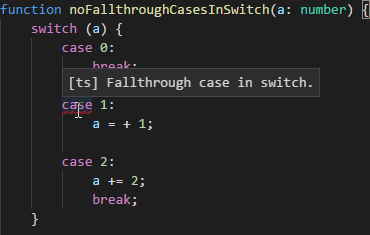
It is easy to forget the break keyword in a switch case. This can lead to unintended behavior. With the noFallthroughCasesInSwitch compiler option, TypeScript detects the missing break and reports an error.
JSON
{
    "compilerOptions": {
        "noFallthroughCasesInSwitch": true
    }
}
#Disable bivariant parameter checking for function types
The strictFunctionTypes compiler option ensures you are using compatible functions (arguments and return types).
JSON
{
    "compilerOptions": {
        "strictFunctionTypes": true
    }
}
TypeScript
interface Animal { name: string; };
interface Dog extends Animal { breed: string; };

var f = (animal: Animal) => animal.name;
var g = (dog: Dog) => dog.breed;

f = g; // error: g is not compatible with f
// error: Type '(dog: Dog) => any' is not assignable to type '(animal: Animal) => any'.
// Types of parameters 'dog' and 'animal' are incompatible.
//   Type 'Animal' is not assignable to type 'Dog'.
//     Property 'dogProp' is missing in type 'Animal'.
The following blog post explains in detail why these two functions are incompatible: https://blogs.msdn.microsoft.com/typescript/2017/10/31/announcing-typescript-2-6/
- Is it okay for a value of type (dog: Dog) => any to say it can be used in place of a (animal: Animal) => any?
    - Is it okay to say my function only expects an Animal when it may use properties that on Dog?
        - Only if an Animal can be used in place of a Dog – so is Animal assignable to Dog?
            - No! It's missing dogProp.
#Report errors for indexing objects lacking index signatures
The suppressImplicitAnyIndexErrors option prevents property access via indexer syntax unless the property or an indexer is explicitly defined.
JSON
{
    "compilerOptions": {
        "suppressImplicitAnyIndexErrors": false
    }
}
TypeScript
var x = { a: 0 };
x["a"] = 1; // ok
x["b"] = 1; // Error, type '{ a: number; }' has no index signature.
#Parse in strict mode and emit "use strict" for each source file
The alwaysStrict compiler option instructs the compiler to always parse files in strict mode and emit "use strict";, so you don't need to add it manually to every file. If you are unfamiliar with strict mode, check out this post from John Resig: https://johnresig.com/blog/ecmascript-5-strict-mode-json-and-more/
Strict mode helps out in a couple of ways:
- It catches some common coding bloopers, throwing exceptions.
- It prevents, or throws errors when relatively "unsafe" actions are taken (such as gaining access to the global object).
- It disables features that are confusing or poorly thought out.
JSON
{
    "compilerOptions": {
        "alwaysStrict": true
    }
}
#Report errors on unused labels
Labels are rarely used in JavaScript. If you are unfamiliar with them, that is fine. If you are curious, you can jump to the documentation. TypeScript provides a compiler option to flag unused labels in your code.
JSON
{
    "compilerOptions": {
        "allowUnusedLabels": false
    }
}
TypeScript
loop1:
for (let i = 0; i < 3; i++) {
    loop2: // Error: Unused label.
    for (let j = 0; j < 3; j++) {
        break loop1;
    }
}
#Report errors on expressions and declarations with an implied any type
When the TypeScript compiler cannot determine the type of a value, it falls back to any, which removes the benefits of type checking. Enabling noImplicitAny causes the compiler to raise an error in these cases. You can resolve this by explicitly specifying the type.
JSON
{
    "compilerOptions": {
        "noImplicitAny": true
    }
}
TypeScript
function noImplicitAny(args) { // Error: Parameter 'args' implicitly has an 'any' type.
    console.log(args);
}
TypeScript
function noImplicitAny(args: string[]) { // ok with the type information
    console.log(args);
}
#Report errors in *.js files
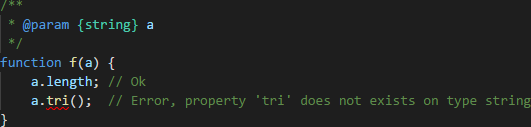
If you use JavaScript files alongside TypeScript files, you can have TypeScript check them as well. The compiler will use information from JSDoc, imports, and usages to validate your code. The checks will not be as thorough as for TypeScript files, but it is a good starting point. You can read more about how the compiler handles JavaScript files in the wiki: https://github.com/Microsoft/TypeScript/wiki/Type-Checking-JavaScript-Files
JSON
{
    "compilerOptions": {
        "allowJs": true,
        "checkJs": true
    }
}
#Conclusion
TypeScript offers many options to improve the robustness of your code. Enabling all of them will reduce the number of runtime errors. You can also use additional techniques to write even better code, such as the pseudo nameof operator.
Do you have a question or a suggestion about this post? Contact me!
