Writing a console application is straightforward enough, but there is always one tedious task: parsing command-line arguments. On top of that, there is the --help command, which is supposed to display a clear, comprehensive description of every option the application accepts – and stay up to date:
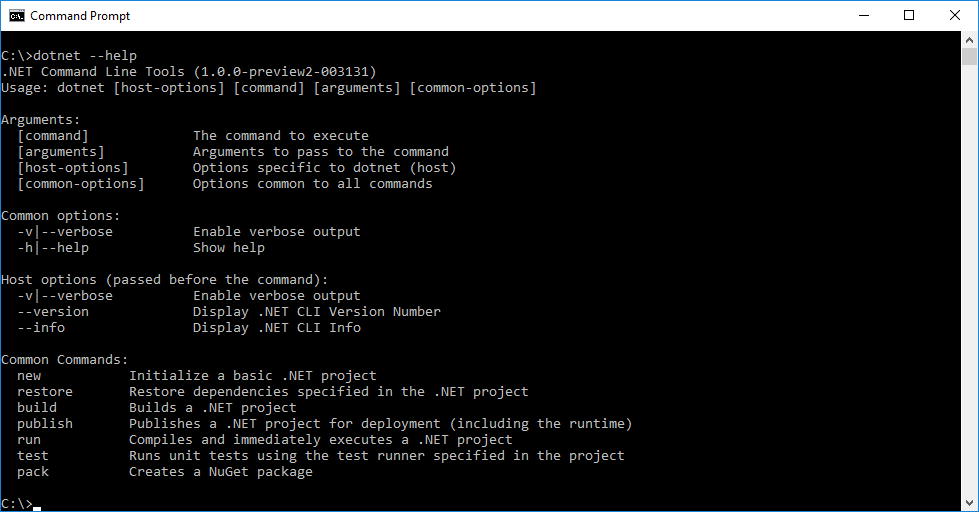
The Microsoft team faced the same challenge while developing .NET Core, so they built a library for it: Microsoft.Extensions.CommandLineUtils.
At the time of writing, documentation is sparse beyond the test project itself, but the examples below cover the most common use cases.
The first step is to install the NuGet package:
PowerShell
Install-Package Microsoft.Extensions.CommandLineUtils
The second step is to declare the application metadata (name and description) along with the standard options you want to support (--help and --version):
C#
static void Main(string[] args)
{
    // Description of the application
    var app = new CommandLineApplication()
    {
        Name = "SampleApp.exe",
        FullName = "Sample App",
        Description = "Description of the application"
    };

    // Handle help and version arguments
    // You can declare alias using "|"
    app.HelpOption("-?|-h|--help");
    app.VersionOption("--version", "1.0.0");

    // Code of the console application when there is no argument
    app.OnExecute(() =>
    {
        Console.WriteLine("App executed");
        return 0;
    });

    // Parse the command line and execute the right code
    try
    {
        app.Execute(args);
    }
    catch (CommandParsingException ex)
    {
        Console.WriteLine(ex.Message);
        app.ShowHelp();
    }
}
With these few lines of configuration, the application already recognizes different options:
Shell
SampleApp.exe --help
SampleApp.exe -?
SampleApp.exe –-version
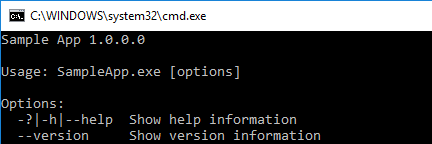
Let's go further and do something useful! An application often needs to support multiple commands. For example, the dotnet CLI has commands like restore, build, publish, and pack. Each command has its own arguments (paths, URLs, log level, etc.) and its own documentation. The library models this with subcommands:
C#
var app = new CommandLineApplication();

app.HelpOption();
app.VersionOption("--version", "1.0.0");

// sampleapp.exe restore [root] --source <SOURCE>
app.Command("restore", command =>
{
    command.Description = "Restore package";
    command.HelpOption("-?|-h|--help"); // AppSample.exe restore --help

    var rootArg = command.Argument("[root]", "A list of projects or project folders to restore");
    var sourceOption = command.Option("-s|--source <SOURCE>", "Specifies a NuGet package source to use during the restore operation", CommandOptionType.SingleValue);

    command.OnExecute(() =>
    {
        var root = rootArg.Value;
        var source = sourceOption.Value();
        Console.WriteLine($"Restore: Root:{root}; Source:{source}");
        return 0;
    });
});

// TODO add other commands

// Executed when no commands are specified
app.OnExecute(() =>
{
    app.ShowHelp();
    return 0;
});
With just those few lines, the restore command is fully wired up. The result is immediate:

As you can see, the library is very easy to use. It lets you organize commands, arguments, and options cleanly, and it generates readable, always-up-to-date help text directly from your code.
In summary, this library makes command-line development a pleasure 😃
Do you have a question or a suggestion about this post? Contact me!
