The Main method is the entry point of a C# application. When the application starts, the Main method is the first method that is invoked.
Documentation
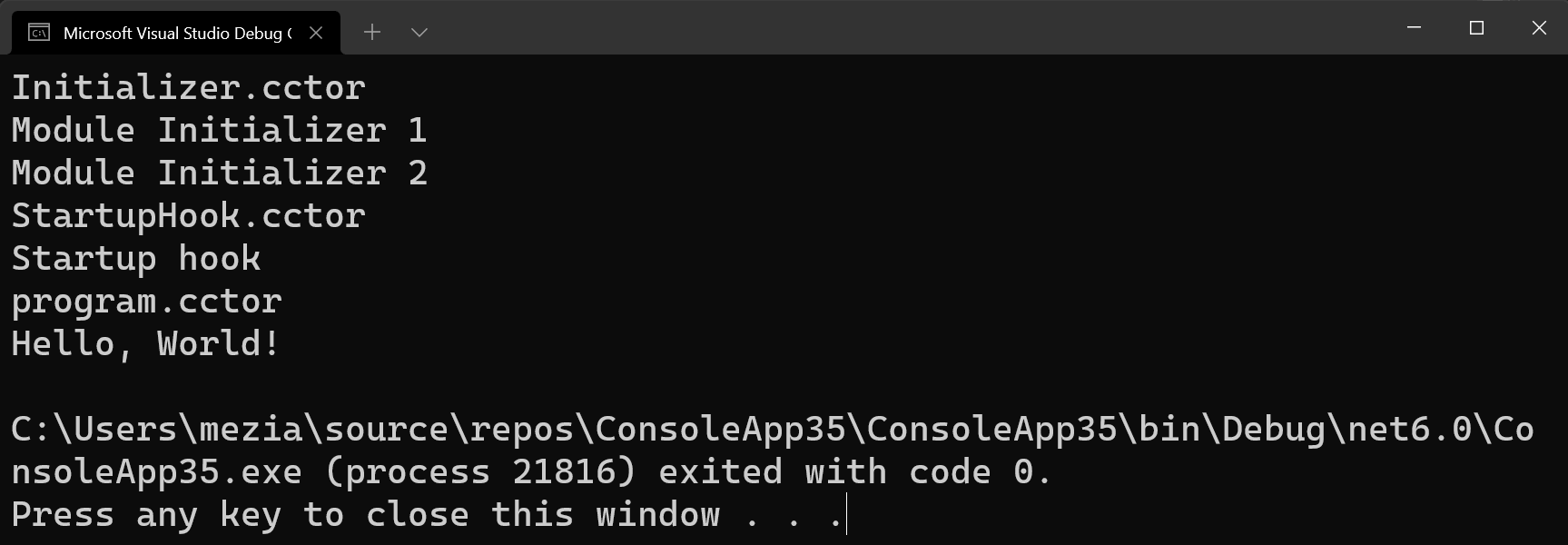
In fact, Main may not be the first method executed when an application starts. Here are different ways to run code before Main. It's not always necessary, but it's possible 😃
#Static constructor
A static constructor initializes static data or performs a one-time action. It is called automatically before the first instance is created or any static members are referenced, so it always runs before Main.
Program.cs (C#)
class Program
{
    static Program() => Console.WriteLine("program.cctor");

    static void Main() => Console.WriteLine("Hello, World!");
}
#Module initializers
Module initializers allow libraries to perform eager, one-time initialization when loaded, without requiring any explicit calls from the user. When the runtime loads the module (DLL), it calls the module initializer methods before executing any other code from that module.
C#
class Initializer
{
    // The static ctor runs before the module initializer
    static Initializer() => Console.WriteLine("Initializer.cctor");

    [ModuleInitializer]
    public static void Initialize1() => Console.WriteLine("Module Initializer 1");

    [ModuleInitializer]
    public static void Initialize2() => Console.WriteLine("Module Initializer 2");
}

class Program
{
    static void Main() => Console.WriteLine("Hello, World!");
}
#Startup Hooks
The DOTNET_STARTUP_HOOKS environment variable specifies a list of managed assemblies that contain a StartupHook type with a public static void Initialize() method. Each of these methods is called in the listed order, before the Main entry point.
C#
class StartupHook
{
    static StartupHook() => Console.WriteLine("StartupHook.cctor");

    // Start the application with the environment variable
    // DOTNET_STARTUP_HOOKS=myapp.dll (use full path to the assembly)
    public static void Initialize() => Console.WriteLine("Startup hook");
}

class Program
{
    static void Main() => Console.WriteLine("Hello, World!");
}
You can disable startup hooks by setting <StartupHookSupport>false</StartupHookSupport> in the .csproj file. This adds the System.StartupHookProvider.IsSupported runtime configuration switch.
MyProject.csproj (csproj (MSBuild project file))
<Project Sdk="Microsoft.NET.Sdk.Web">
  <PropertyGroup>
    <TargetFramework>net$(NETCoreAppMaximumVersion)</TargetFramework>
    <StartupHookSupport>false</StartupHookSupport>
  </PropertyGroup>
</Project>
You can also validate the value at runtime:
C#
// method 1
// https://github.com/dotnet/runtime/blob/2f6f3c55e4c230ac9134abeaef494c17c01c97f7/src/libraries/System.Private.CoreLib/src/System/StartupHookProvider.cs#L21
var isSupported = Type.GetType("System.StartupHookProvider")
    ?.GetProperty("IsSupported", BindingFlags.Static | BindingFlags.NonPublic)
    ?.GetValue(null) ?? false;

// method 2
var isSupported = System.AppContext.TryGetSwitch("System.StartupHookProvider.IsSupported", out bool isHookSupported) && isHookSupported;
#Demo
#Additional resources
Do you have a question or a suggestion about this post? Contact me!
