Coyote is a .NET library and tool designed to help ensure that your code is free of concurrency bugs. Concurrency bugs are hard to find and reproduce because they often depend on non-deterministic factors such as timeouts or message ordering. For instance, if multiple threads are waiting for a locked object, which one will acquire it first?
Coyote can run a multi-threaded application in a deterministic way, trying different schedules to expose concurrency bugs. It also lets you reproduce specific bugs deterministically so you can debug them. However, Coyote is not a verification system. It does not use theorem proving to make correctness guarantees. Instead, it uses intelligent search strategies to drive systematic testing, so it does not replace tools such as TLA+.
This post is a short introduction to the basics of Coyote.
#Sample application
Here's a method that may deadlock depending on the execution order. If you run this application, a deadlock is unlikely due to the Task.Delay, but it is possible.
C#
private static object a = new();
private static object b = new();

public static async Task MyMethod()
{
    var t1 = Task.Run(Task1); // The task is not awaited
    await Task.Delay(1000);   // Wait for 1 second before starting Task2
    var t2 = Task.Run(Task2); // Task2 may run concurrently with Task1

    await Task.WhenAll(t1, t2);
}

private static void Task1()
{
    lock (a)
        lock (b) // Can deadlock if Task2 has already acquired the lock on "b" bit not on "a"
            Console.WriteLine("Task1");
}

private static void Task2()
{
    lock (b)
        lock (a) // Can deadlock if Task1 has already acquired the lock on "a" bit not on "b"
            Console.WriteLine("Task2");
}
#Testing the application using Coyote
You can create a new test project to write your tests with the following NuGet references:
csproj (MSBuild project file)
<ItemGroup>
  <PackageReference Include="Microsoft.Coyote" Version="1.2.6" />
  <PackageReference Include="Microsoft.Coyote.Test" Version="1.2.6" />
</ItemGroup>
Then, you can write your first test:
C#
[Microsoft.Coyote.SystematicTesting.Test]
public static async Task MyFirstCoyoteTest()
{
    await MyMethod();
    // You can add asserts to the test
    // In this case, we just want to find a deadlock, so we don't have anything to assert.
}
You cannot run this test from Visual Studio. You need to use the Coyote CLI. First, you need to install the CLI:
PowerShell
dotnet tool install --global Microsoft.Coyote.CLI
Then, you need to rewrite your dlls. This step replaces the .NET primitives with the Coyote equivalent. This way Coyote can control how your application runs. If you decompile the rewritten dll, you can see that it replaced types such as Monitor, Semaphore, Thread, TaskMethodBuilder, etc. Currently, it doesn't rewrite SemaphoreSlim, but you can do it manually as stated in the following issue.
PowerShell
coyote rewrite bin/Debug/net5.0/CoyoteSample.dll
Finally, you can run the test. There are many options to control how Coyote explores the code and finds potential issues. Depending on the complexity of the application, this can take anywhere from a few seconds to a few minutes.
PowerShell
coyote test bin/Debug/net5.0/CoyoteSample.dll --method MyFirstCoyoteTest --iterations 100
If everything goes well, it should report a bug:
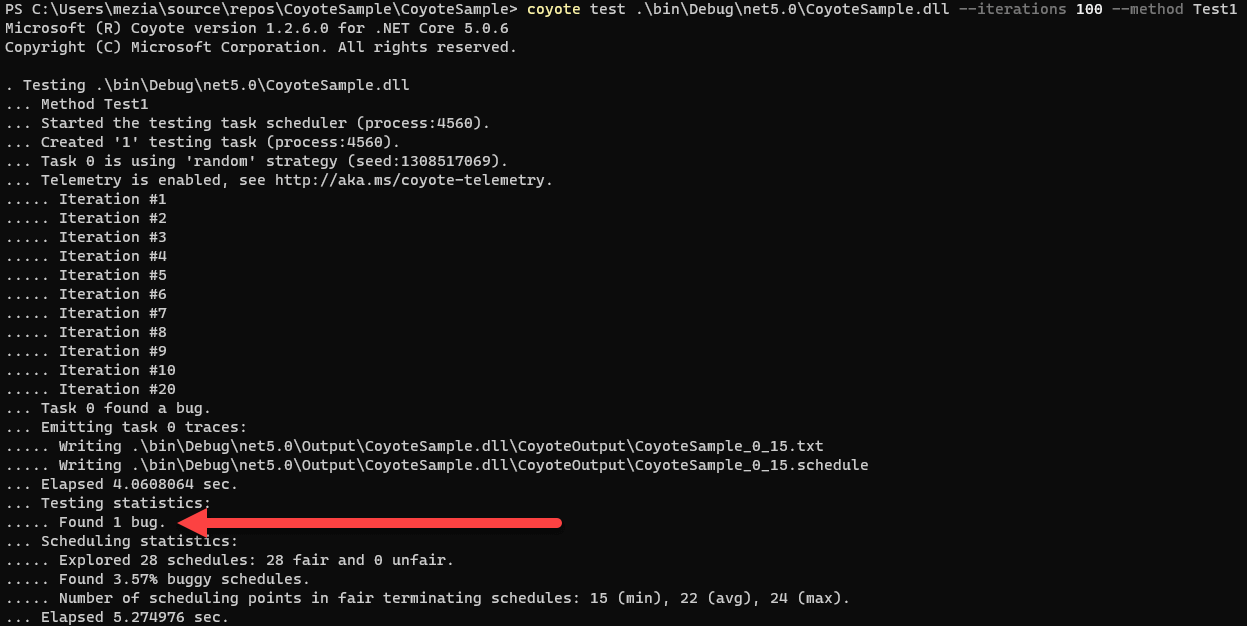
Coyote logs its output in the Output folder next to the dll. You will find a txt file with the bug explanation and a schedule file to reproduce the bug. In this case, the log file shows a deadlock, but the call stack is not very useful:
<TestLog> Running test 'CoyoteSample.UnitTest1.MyFirstCoyoteTest'.
<ErrorLog> Deadlock detected. Task(0) and Task(5) are waiting for a task to complete, but no other controlled tasks are enabled. Task(1) and Task(4) are waiting to acquire a resource that is already acquired, but no other controlled tasks are enabled.
<StackTrace>    at System.Threading.Tasks.Task.InnerInvoke()
   at System.Threading.Tasks.Task.<>c.<.cctor>b__277_0(Object obj)
   at System.Threading.ExecutionContext.RunFromThreadPoolDispatchLoop(Thread threadPoolThread, ExecutionContext executionContext, ContextCallback callback, Object state)
   at System.Threading.Tasks.Task.ExecuteWithThreadLocal(Task& currentTaskSlot, Thread threadPoolThread)
   at System.Threading.Tasks.Task.ExecuteEntryUnsafe(Thread threadPoolThread)
   at System.Threading.Tasks.Task.ExecuteFromThreadPool(Thread threadPoolThread)
   at System.Threading.ThreadPoolWorkQueue.Dispatch()
   at System.Threading._ThreadPoolWaitCallback.PerformWaitCallback()
Now you can debug the application using the replay command and the generated schedule file. The schedule file allows Coyote to deterministically re-run the application.
Shell
coyote replay bin/Debug/net5.0/CoyoteSample.dll --method MyFirstCoyoteTest --schedule /bin/Debug/net5.0/Output/CoyoteSample.dll/CoyoteOutput/CoyoteSample_0_15.schedule"
#Integration with existing test frameworks (xUnit, MSTests, etc.)
C#
[Fact]
public void Test()
{
    RunSystematicTest(MyMethod);
}

private static void RunSystematicTest(Func<Task> test, [CallerMemberName]string testName = null)
{
    var configuration = Configuration.Create()
        .WithTestingIterations(1000)
        .WithVerbosityEnabled();

    var testingEngine = TestingEngine.Create(configuration, test);
    testingEngine.Run();

    if (testingEngine.TestReport.NumOfFoundBugs > 0)
    {
        var error = testingEngine.TestReport.BugReports.First();
        File.WriteAllText(testName + ".schedule", testingEngine.ReproducibleTrace);
        Assert.True(false, $"Found bug: {error}");
    }
}
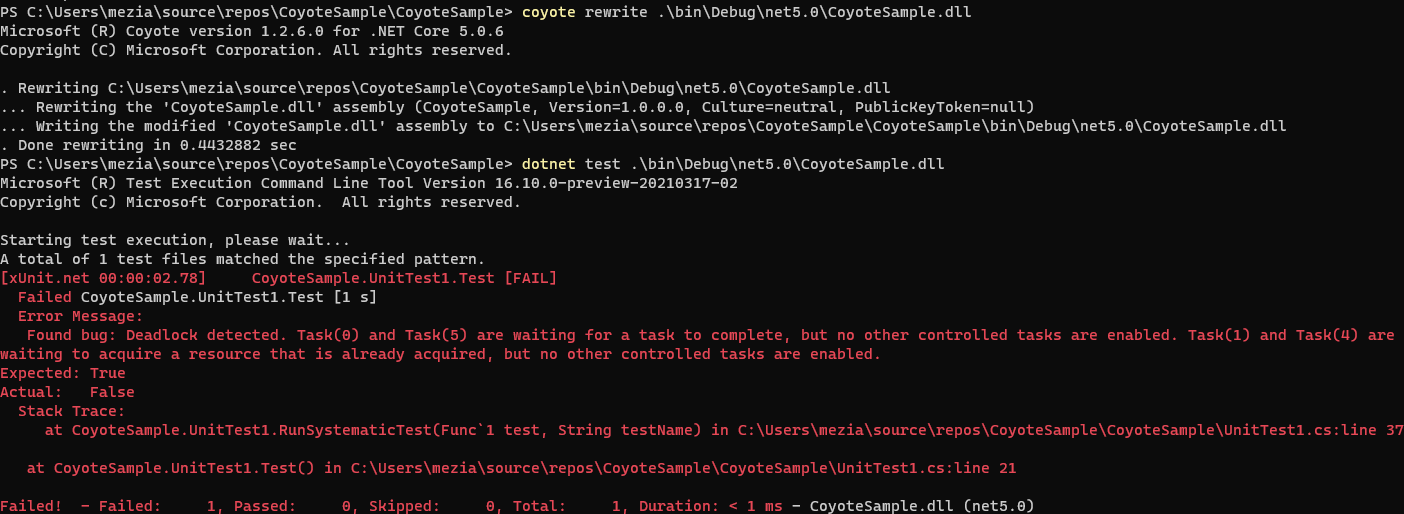
You still need to run coyote rewrite before running dotnet test
coyote rewrite bin/Debug/net5.0/CoyoteSample.dll
dotnet test bin/Debug/net5.0/CoyoteSample.dll
#Conclusion
Coyote is a valuable tool to add to your toolbox. It helps you gain confidence in your multithreaded code. Coyote is still actively developed, but the current version works well and helped me find a potential issue in one of my projects! If you have any issues or ideas for improvement, feel free to open an issue.
#Additional resources
Do you have a question or a suggestion about this post? Contact me!
