When a user makes an HTTP request to an ASP.NET Core application, the server parses the request, generates a response, and sends the result to the client. The user can abort the request while the server is processing it, for example by navigating to another page or closing the tab. In that case, you may want to stop all work in progress to avoid wasting resources, such as cancelling SQL queries, HTTP calls, or CPU-intensive operations.
ASP.NET Core provides the HttpContext.RequestAborted property to detect when the client disconnects. You can check the IsCancellationRequested property to determine whether the client has aborted the connection, or pass the cancellation token directly to database queries, HTTP service calls, and similar operations.
C#
[ApiController]
[Route("[controller]")]
public class WeatherForecastController : ControllerBase
{
    [HttpGet]
    public async Task<IReadOnlyCollection<WeatherForecast>> Get()
    {
        CancellationToken cancellationToken = HttpContext.RequestAborted;
        if (cancellationToken.IsCancellationRequested)
        {
            // The client has aborted the request
        }

        return await GetData(cancellationToken);
    }

    private async Task<IReadOnlyCollection<WeatherForecast>> GetData(CancellationToken cancellationToken)
    {
        await Task.Delay(1000, cancellationToken); // Simulate a long process
        return  Array.Empty<WeatherForecast>();
    }
}
You can also add a CancellationToken parameter to the action. The ModelBinder will automatically bind any CancellationToken parameter to HttpContext.RequestAborted.
C#
[ApiController]
[Route("[controller]")]
public class WeatherForecastController : ControllerBase
{
    // Get the cancellation token from ModelBinding
    [HttpGet("Get")]
    public async Task<IReadOnlyCollection<WeatherForecast>> Get(CancellationToken cancellationToken)
    {
        // cancellationToken == HttpContext.RequestAborted
        return await GetData(cancellationToken);
    }

    private async Task<IReadOnlyCollection<WeatherForecast>> GetData(CancellationToken cancellationToken)
    {
        // Simulate a long process
        await Task.Delay(1000, cancellationToken);
        return  Array.Empty<WeatherForecast>();
    }
}
This also works in a Razor page:
Razor
@page

<div>
    @* Using HttpContext.RequestAborted in a page *@
    @await Model.GetData(HttpContext.RequestAborted);
</div>

@functions {
    // Using a CancellationToken parameter
    public async Task OnGet(System.Threading.CancellationToken cancellationToken)
    {
        await GetData(cancellationToken);
    }

    public async Task<string> GetData(System.Threading.CancellationToken cancellationToken)
    {
        await Task.Delay(1000, cancellationToken);
        return "test";
    }
}
In a custom class, you can use the IHttpContextAccessor interface to get an instance of the current HttpContext, as described on this page.
C#
public class UserRepository : IUserRepository
{
    private readonly IHttpContextAccessor _httpContextAccessor;

    public UserRepository(IHttpContextAccessor httpContextAccessor)
    {
        _httpContextAccessor = httpContextAccessor;
    }

    public void GetCurrentUser()
    {
        var cancellationToken = _httpContextAccessor.HttpContext.RequestAborted;
        cancellationToken.ThrowIfCancellationRequested();
        // TODO Actual logic
    }
}
#Detecting missing CancellationToken using Meziantou.Analyzer
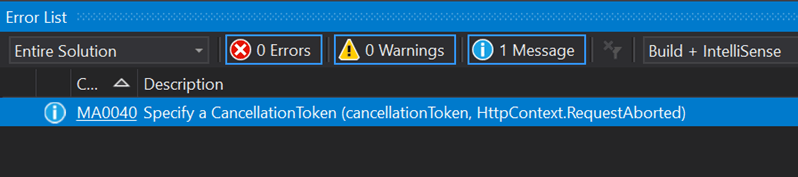
You can detect missing CancellationTokens in your application using a Roslyn analyzer. Meziantou.Analyzer includes a rule for this:
Install the Visual Studio extension or the NuGet package to analyze your code:
C#
public async Task<string> Get(CancellationToken cancellationToken)
{
    // MA0040 - Specify a CancellationToken (cancellationToken, HttpContext.RequestAborted)
    await GetDataAsync();
    return "";
}

static Task GetDataAsync(CancellationToken cancellationToken = default) => throw null;
Do you have a question or a suggestion about this post? Contact me!
