Enumerations are very useful for defining a set of named values. When displaying them in a UI, you quickly realize that the raw member names are often not suitable for display, and the interface may need to support multiple languages. You need a mechanism to handle both of these concerns.
Let's start by defining the enumeration:
C#
public enum Week
{
    [Display(ResourceType = typeof (Resources), Name = "TestEnum_First")]
    First,

    [Display(ResourceType = typeof(Resources), Name = "TestEnum_Second")]
    Second,

    [Display(ResourceType = typeof(Resources), Name = "TestEnum_Third")]
    Third,

    [Display(ResourceType = typeof(Resources), Name = "TestEnum_Fourth")]
    Fourth,

    [Display(ResourceType = typeof(Resources), Name = "TestEnum_Last")]
    Last
}
For each value, we define a display name using the [Display] attribute. This attribute lets you specify the display name either as a direct string or via a resource file for localization. You can then retrieve this attribute's value using reflection:
C#
Array enumValues = type.GetEnumValues();
foreach (object enumValue in enumValues)
{
    var fieldInfo = type.GetField(enumValue.ToString());
    DisplayAttribute displayAttribute = fieldInfo.GetCustomAttribute<DisplayAttribute>();
    if (displayAttribute != null)
    {
        string name = displayAttribute.GetName();
    }
    else
    {
        string name = enumValue.ToString();
    }
}
Let's see what this looks like in WPF without any conversion:
XAML
<TextBlock Text="{Binding Source={x:Static demo:Week.Second}}" />
As expected, the displayed value is "Second". We need to write a converter to display the localized name using the Display attribute.
C#
[ValueConversion(typeof(Enum), typeof(string))]
public class EnumValueConverter : IValueConverter
{
    public object Convert(object value, Type targetType, object parameter, CultureInfo culture)
    {
        var enumValue = value as Enum;
        if (enumValue != null)
        {
            // see the full code here: https://gist.github.com/meziantou/90730189693205fbf9d0
            return LocalizationUtilities.GetEnumMemberLocalization(enumValue);
        }
        return string.Format("{0}", value);
    }

    public object ConvertBack(object value, Type targetType, object parameter, CultureInfo culture)
    {
        throw new NotImplementedException();
    }
}
We can use this converter in XAML:
XAML
<Window.Resources>
    <demo:EnumValueConverter x:Key="EnumValueConverter"/>
</Window.Resources>

<TextBlock Text="{Binding Source={x:Static demo:Week.Second}, Converter={StaticResource EnumValueConverter}}" />
That covers the case of a single value. Another common need is to display all enumeration values in a ComboBox. MSDN shows how to do this in XAML using an ObjectDataProvider to call Enum.GetValues(typeof(Week)):
XAML
<Window.Resources>
    <demo:EnumValueConverter x:Key="EnumValueConverter" />
    <ObjectDataProvider MethodName="GetValues" ObjectType="{x:Type sys:Enum}" x:Key="WeekDataProvider">
        <ObjectDataProvider.MethodParameters>
            <x:Type TypeName="demo:Week" />
        </ObjectDataProvider.MethodParameters>
    </ObjectDataProvider>
</Window.Resources>

<ComboBox ItemsSource="{Binding Source={StaticResource WeekDataProvider}}">
    <ComboBox.ItemTemplate>
        <DataTemplate>
            <TextBlock Text="{Binding Converter={StaticResource EnumValueConverter}}"/>
        </DataTemplate>
    </ComboBox.ItemTemplate>
</ComboBox>
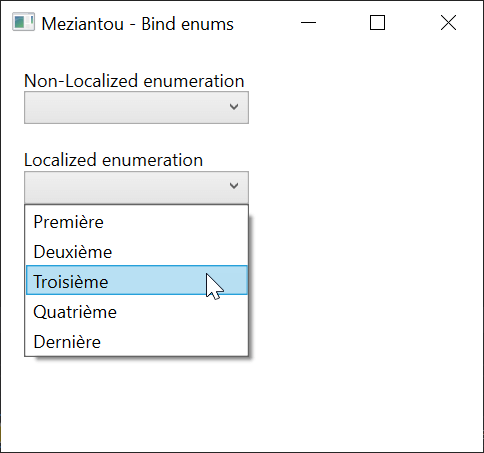
This works, but the XAML is quite verbose (13 lines). You could create a custom DataProvider to reduce it somewhat, but we can do better.
#Let's simplify the code with a Markup Extension
Markup extensions are used all the time, often without realizing it. Every time you write {Binding}, {StaticResource}, or {x:Type}, you are using a markup extension. Their purpose is to let you express things that plain XML cannot. For example, expressing a null value in XAML is awkward without {x:Null}. They also help reduce verbosity and simplify complex expressions. You can write your own markup extensions too:
C#
[MarkupExtensionReturnType(typeof(IEnumerable<LocalizedValue>)]
public class EnumExtension : MarkupExtension
{
    public EnumExtension()
    {
    }

    public EnumExtension(Type enumType)
    {
        this.EnumType = enumType;
    }

    [ConstructorArgument("enumType")]
    public Type EnumType { get; set; }

    public override object ProvideValue(IServiceProvider serviceProvider)
    {
        if (EnumType == null)
            throw new InvalidOperationException("The enum type is not set");

        return LocalizationUtilities.GetEnumLocalization(EnumType);
    }
}
Now you can use it:
XAML
<ComboBox ItemsSource="{demo:Enum demo:Week}" SelectedValuePath="Value" SelectedValue="{Binding MyEnumProperty}" />
SelectedValuePath refers to the Value property of the LocalizedValue class. For a DataGrid column, the XAML is similar:
XAML
<DataGrid>
  <DataGrid.Columns>
    <DataGridComboBoxColumn ItemsSource="{demo:Enum demo:Week}" SelectedValuePath="Value" SelectedValueBinding="{Binding MyEnumProperty}" />
  </DataGrid.Columns>
</DataGrid>
The XAML has been reduced from 13 lines to just 1, thanks to the markup extension.
#Simplified markup extension for non-localized enumerations
If you don't need to localize enumeration values, you can simplify the code as follows:
C#
[MarkupExtensionReturnType(typeof(IEnumerable<Enum>))]
public sealed class EnumValuesExtension : MarkupExtension
{
    public EnumValuesExtension() { }
    public EnumValuesExtension(Type enumType) => EnumType = enumType;

    [ConstructorArgument("enumType")]
    public Type? EnumType { get; set; }

    public override object ProvideValue(IServiceProvider serviceProvider) => Enum.GetValues(EnumType);
}
XAML
<ComboBox ItemsSource="{meziantou:EnumValues local:Week}" />
#Using Meziantou.Framework.WPF
Instead of copying the markup extensions above, you can use the NuGet package Meziantou.Framework.WPF:
XML
<Project>
    ...
    <ItemGroup>
        <PackageReference Include="Meziantou.Framework.WPF" Version="1.3.0" />
    </ItemGroup>
    ...
</Project>
XAML
<Window x:Class="WpfApp1.MainWindow"
        xmlns="http://schemas.microsoft.com/winfx/2006/xaml/presentation"
        xmlns:x="http://schemas.microsoft.com/winfx/2006/xaml"
        xmlns:local="clr-namespace:WpfApp1"
        xmlns:meziantou="clr-namespace:Meziantou.Framework.WPF;assembly=Meziantou.Framework.WPF"
        Title="MainWindow" Height="450" Width="800">
        <StackPanel>
            <ComboBox ItemsSource="{meziantou:EnumValues local:Week}" />
            <ComboBox ItemsSource="{meziantou:LocalizedEnumValues local:Week}" SelectedValuePath="Value" />
        </StackPanel>
</Window>
#Additional resources
Do you have a question or a suggestion about this post? Contact me!
