NuGet packages are a great way to add dependencies to your project. However, debugging a third-party package can be difficult when you don't have its source code.
Many NuGet packages host their source code on GitHub, making automatic source file retrieval possible. This is exactly what SourceLink provides. It embeds metadata in the PDB file to remap local paths to the corresponding files on GitHub, so Visual Studio can download them on demand.
The most downloaded NuGet package, Newtonsoft.Json, now uses SourceLink, so you can step into its code directly from Visual Studio. Let's see how to do the same for your own projects!
#Create a NuGet package with SourceLink enabled
SourceLink is straightforward to enable in your build. Just add a reference to the Microsoft.SourceLink.GitHub NuGet package. You can also add optional properties to control its behavior.
csproj (MSBuild project file)
<Project>
  <PropertyGroup>
    <!-- Optional: Declare that the Repository URL can be published to NuSpec -->
    <PublishRepositoryUrl>true</PublishRepositoryUrl>

    <!-- Optional: Embed source files that are not tracked by the source control manager to the PDB -->
    <!-- This is useful if you generate files during the build -->
    <EmbedUntrackedSources>true</EmbedUntrackedSources>

    <!-- Generate symbol packages (.snupkg) -->
    <!-- You must publish both packages, the package that contains the DLL (.nupkg) and the one that contains the symbols (.snupkg) -->
    <IncludeSymbols>true</IncludeSymbols>
    <SymbolPackageFormat>snupkg</SymbolPackageFormat>
  </PropertyGroup>

  <ItemGroup>
    <!-- Required if your repository is on GitHub -->
    <PackageReference Include="Microsoft.SourceLink.GitHub" Version="1.0.0-*" PrivateAssets="All"/>

    <!-- Required if your repository is on VSTS -->
    <!--<PackageReference Include="Microsoft.SourceLink.Vsts.Git" Version="1.0.0-*" PrivateAssets="All"/>-->

    <!-- Required if your repository is on GitLab -->
    <!--<PackageReference Include="Microsoft.SourceLink.GitLab" Version="1.0.0-*" PrivateAssets="All"/>-->
  </ItemGroup>
</Project>
To enable deterministic builds, use the Deterministic and ContinuousIntegrationBuild properties to compute paths in a reproducible way:
csproj (MSBuild project file)
<Project>
  <PropertyGroup>
    <Deterministic>true</Deterministic>

    <!-- The condition may change depending on the build system you use -->

    <!-- Uncomment if you build using Azure DevOps -->
    <!-- https://learn.microsoft.com/en-us/azure/devops/pipelines/build/variables?view=azure-devops&tabs=yaml&WT.mc_id=DT-MVP-5003978#system-variables -->
    <ContinuousIntegrationBuild Condition="'$(TF_BUILD)' == 'true'">True</ContinuousIntegrationBuild>

    <!-- Uncomment if you build using GitHub Actions -->
    <!-- https://help.github.com/en/actions/configuring-and-managing-workflows/using-environment-variables -->
    <ContinuousIntegrationBuild Condition="'$(GITHUB_ACTIONS)' == 'true'">True</ContinuousIntegrationBuild>

    <!-- Uncomment if you build using GitLab -->
    <!-- https://docs.gitlab.com/ee/ci/variables/predefined_variables.html -->
    <ContinuousIntegrationBuild Condition="'$(GITLAB_CI)' == 'true'">True</ContinuousIntegrationBuild>
  </PropertyGroup>

  ...
You can find more information in the SourceLink GitHub repository: https://github.com/dotnet/sourcelink/#using-sourcelink
Next, create the NuGet packages:
Shell
dotnet pack --configuration Release
Finally, you need to push both packages:
Shell
dotnet nuget push "package.nupkg" --api-key "<Insert your API Key>" --source https://api.nuget.org/v3/index.json --force-english-output
dotnet nuget push "package.snupkg" --api-key "<Insert your API Key>" --source https://api.nuget.org/v3/index.json --force-english-output
#Use SourceLink in Visual Studio
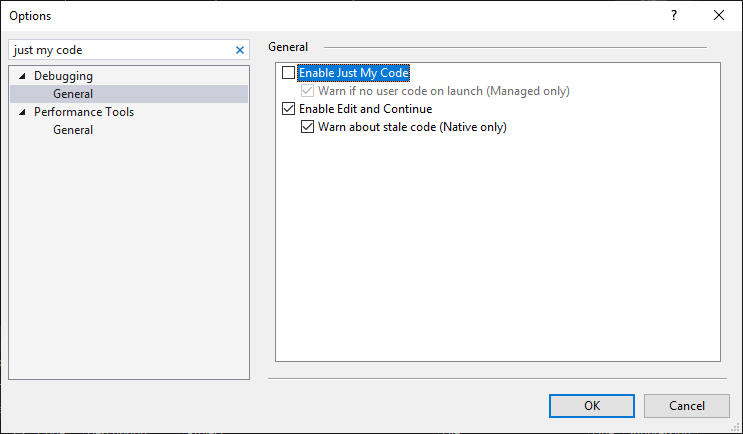
In Visual Studio, uncheck Enable Just My Code:
When you step into a method from a SourceLink-enabled DLL, a prompt appears:
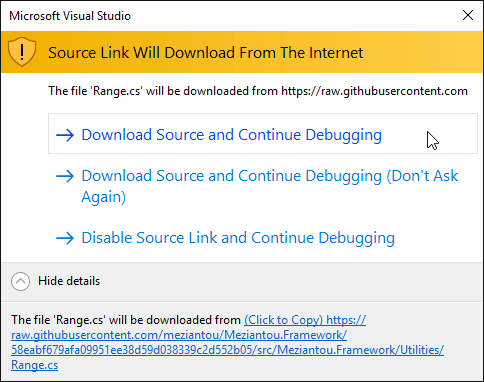
You can then continue debugging:

#Test SourceLink is enabled for a NuGet package
You can verify that your package is correctly configured using the SourceLink global tool. If you are not familiar with global tools, check my previous post about it. First, install the tool:
Shell
dotnet tool install --global sourcelink
C:\Users\mezia>sourcelink --help
Source Code On Demand

Usage:  [options] [command]

Options:
  -h|--help  Show help information

Commands:
  print-documents  print the documents stored in the pdb or dll
  print-json       print the Source Link JSON stored in the pdb or dll
  print-urls       print the URLs for each document based on the Source Link JSON
  test             test each URL and verify that the checksums match

Use " [command] --help" for more information about a command.
- Print the mapping document in the pdb file:
Shell
PS> sourcelink print-json meziantou.framework.1.4.2\lib\netstandard2.0\Meziantou.Framework.pdb
{"documents":{"D:\\a\\1\\s\\*":"https://raw.githubusercontent.com/meziantou/Meziantou.Framework/58eabf679afa09951ee38d59d038339c2d552b05/*"}}
- Test that the files are downloadable:
Shell
PS> sourcelink test meziantou.framework.1.4.2\lib\netstandard2.0\Meziantou.Framework.pdb
sourcelink test passed: meziantou.framework.1.4.2\lib\netstandard2.0\Meziantou.Framework.pdb
- Print the sha1 of every file in the pdb:
Shell
PS> sourcelink print-documents meziantou.framework.1.4.2\lib\netstandard2.0\Meziantou.Framework.pdb
da677f59aa0a2b2e266e869ebebae275f49adfc0 sha1 csharp D:\a\1\s\src\Meziantou.Framework\Utilities\AssemblyUtilities.cs
783e778429958369673e2a6baac5560af28c2c98 sha1 csharp D:\a\1\s\src\Meziantou.Framework\Utilities\ByteArrayExtensions.cs
753671f42091a5fe5dd71c2db4ae9bd34838c4a2 sha1 csharp D:\a\1\s\src\Meziantou.Framework\Utilities\CultureInfoUtilities.cs
a2e7fcc4b5535b5f3861d74fce424088ab6c6001 sha1 csharp D:\a\1\s\src\Meziantou.Framework\Utilities\DateTimeUtilities.cs
bb19ae0d30831c17c0bcc709a74c07bb6b87ae7a sha1 csharp D:\a\1\s\src\Meziantou.Framework\Utilities\DebounceExtensions.cs
3067c4d797a2fd9edae131a946ef584bf4c32760 sha1 csharp D:\a\1\s\src\Meziantou.Framework\Utilities\EnumerableExtensions.cs
a9124ea95b058ac8d4f46fc8fff801d9082bcefa sha1 csharp D:\a\1\s\src\Meziantou.Framework\Utilities\ExceptionExtensions.cs
...
- Print the URLs of every file in the pdb:
Shell
PS> sourcelink print-urls meziantou.framework.1.4.2\lib\netstandard2.0\Meziantou.Framework.pdb
da677f59aa0a2b2e266e869ebebae275f49adfc0 sha1 csharp D:\a\1\s\src\Meziantou.Framework\Utilities\AssemblyUtilities.cs
https://raw.githubusercontent.com/meziantou/Meziantou.Framework/58eabf679afa09951ee38d59d038339c2d552b05/src/Meziantou.Framework/Utilities/AssemblyUtilities.cs
783e778429958369673e2a6baac5560af28c2c98 sha1 csharp D:\a\1\s\src\Meziantou.Framework\Utilities\ByteArrayExtensions.cs
https://raw.githubusercontent.com/meziantou/Meziantou.Framework/58eabf679afa09951ee38d59d038339c2d552b05/src/Meziantou.Framework/Utilities/ByteArrayExtensions.cs
753671f42091a5fe5dd71c2db4ae9bd34838c4a2 sha1 csharp D:\a\1\s\src\Meziantou.Framework\Utilities\CultureInfoUtilities.cs
https://raw.githubusercontent.com/meziantou/Meziantou.Framework/58eabf679afa09951ee38d59d038339c2d552b05/src/Meziantou.Framework/Utilities/CultureInfoUtilities.cs
a2e7fcc4b5535b5f3861d74fce424088ab6c6001 sha1 csharp D:\a\1\s\src\Meziantou.Framework\Utilities\DateTimeUtilities.cs
https://raw.githubusercontent.com/meziantou/Meziantou.Framework/58eabf679afa09951ee38d59d038339c2d552b05/src/Meziantou.Framework/Utilities/DateTimeUtilities.cs
bb19ae0d30831c17c0bcc709a74c07bb6b87ae7a sha1 csharp
d19483e16d67ae4da6e044d3fdeb35dd87480282 sha1 csharp C:\Users\buildguest\AppData\Local\Temp\.NETStandard,Version=v2.0.AssemblyAttributes.cs embedded
...
Notice that the file AssemblyAttributes.cs is embedded in the PDB due to the <EmbedUntrackedSources>true</EmbedUntrackedSources> property.
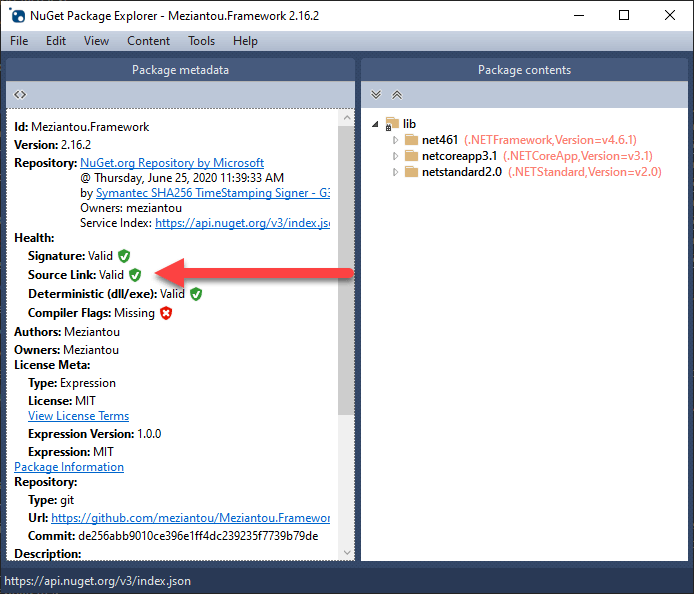
Another way to validate the NuGet package is to use NuGet Package Explorer:
#Conclusion
SourceLink is very useful if you publish a NuGet package whose code is hosted on GitHub, GitLab, or VSTS. It allows consumers to step into your code directly from Visual Studio. It is so easy to set up that there is no reason not to add it to your project.
Do you have a question or a suggestion about this post? Contact me!
