Automated tests are great for validating that your application behaves correctly. When a test fails, you need as much information as possible to understand what went wrong.
If your application logs data using the ILogger interface, such as in an ASP.NET Core application, it would be helpful to see those logs in the test output. xUnit supports writing output via the ITestOutputHelper interface, which is visible in the console, Visual Studio, and Azure DevOps. The solution is to implement ILogger in a way that writes log entries to an ITestOutputHelper instance.
#Implementing the custom ILogger
To correctly implement the logger, you need to implement:
ILoggerILogger<T>ILoggerProvider
Implementing these interfaces is straightforward. The main challenge is formatting log entries as readable text that includes all relevant information.
C#
internal class XUnitLogger : ILogger
{
    private readonly ITestOutputHelper _testOutputHelper;
    private readonly string _categoryName;
    private readonly LoggerExternalScopeProvider _scopeProvider;

    public static ILogger CreateLogger(ITestOutputHelper testOutputHelper) => new XUnitLogger(testOutputHelper, new LoggerExternalScopeProvider(), "");
    public static ILogger<T> CreateLogger<T>(ITestOutputHelper testOutputHelper) => new XUnitLogger<T>(testOutputHelper, new LoggerExternalScopeProvider());

    public XUnitLogger(ITestOutputHelper testOutputHelper, LoggerExternalScopeProvider scopeProvider, string categoryName)
    {
        _testOutputHelper = testOutputHelper;
        _scopeProvider = scopeProvider;
        _categoryName = categoryName;
    }

    public bool IsEnabled(LogLevel logLevel) => logLevel != LogLevel.None;

    public IDisposable BeginScope<TState>(TState state) => _scopeProvider.Push(state);

    public void Log<TState>(LogLevel logLevel, EventId eventId, TState state, Exception exception, Func<TState, Exception, string> formatter)
    {
        var sb = new StringBuilder();
        sb.Append(GetLogLevelString(logLevel))
          .Append(" [").Append(_categoryName).Append("] ")
          .Append(formatter(state, exception));

        if (exception != null)
        {
            sb.Append('\n').Append(exception);
        }

        // Append scopes
        _scopeProvider.ForEachScope((scope, state) =>
        {
            state.Append("\n => ");
            state.Append(scope);
        }, sb);

        _testOutputHelper.WriteLine(sb.ToString());
    }

    private static string GetLogLevelString(LogLevel logLevel)
    {
        return logLevel switch
        {
            LogLevel.Trace =>       "trce",
            LogLevel.Debug =>       "dbug",
            LogLevel.Information => "info",
            LogLevel.Warning =>     "warn",
            LogLevel.Error =>       "fail",
            LogLevel.Critical =>    "crit",
            _ => throw new ArgumentOutOfRangeException(nameof(logLevel))
        };
    }
}
C#
internal sealed class XUnitLogger<T> : XUnitLogger, ILogger<T>
{
    public XUnitLogger(ITestOutputHelper testOutputHelper, LoggerExternalScopeProvider scopeProvider)
        : base(testOutputHelper, scopeProvider, typeof(T).FullName)
    {
    }
}
C#
internal sealed class XUnitLoggerProvider : ILoggerProvider
{
    private readonly ITestOutputHelper _testOutputHelper;
    private readonly LoggerExternalScopeProvider _scopeProvider = new LoggerExternalScopeProvider();

    public XUnitLoggerProvider(ITestOutputHelper testOutputHelper)
    {
        _testOutputHelper = testOutputHelper;
    }

    public ILogger CreateLogger(string categoryName)
    {
        return new XUnitLogger(_testOutputHelper, _scopeProvider, categoryName);
    }

    public void Dispose()
    {
    }
}
#How to create an instance of ILogger
You can create an ILogger instance directly in your unit tests:
C#
public class DemoTests
{
    private readonly ITestOutputHelper _testOutputHelper;

    public DemoTests(ITestOutputHelper testOutputHelper)
    {
        _testOutputHelper = testOutputHelper;
    }

    [Fact]
    public async Task Test(string url)
    {
        // Arrange
        var logger = XUnitLogger.CreateLogger<Sample>(_testOutputHelper);
        var sut = new Sample(logger);

        // Act
        var response = await sut.Execute();

        // Assert
        response.EnsureSuccessStatusCode();
    }
}
#How to use the logger in ASP.NET Core integration tests
For integration tests, use WebApplicationFactory<T>, which lets you test an ASP.NET Core application against an in-memory test server. You can register XUnitLoggerProvider in the factory so that all loggers write their output to xUnit.
C#
public class CustomWebApplicationFactory<TStartup> : WebApplicationFactory<TStartup>
    where TStartup : class
{
    private readonly ITestOutputHelper _testOutputHelper;

    public CustomWebApplicationFactory(ITestOutputHelper testOutputHelper)
    {
        _testOutputHelper = testOutputHelper;
    }

    protected override void ConfigureWebHost(IWebHostBuilder builder)
    {
        // Register the xUnit logger
        builder.ConfigureLogging(loggingBuilder =>
        {
            loggingBuilder.Services.AddSingleton<ILoggerProvider>(serviceProvider => new XUnitLoggerProvider(_testOutputHelper));
        });
    }
}
Here's how to use this class to write a test:
C#
public class BasicTests
{
    private readonly ITestOutputHelper _testOutputHelper;

    public BasicTests(ITestOutputHelper testOutputHelper)
    {
        _testOutputHelper = testOutputHelper;
    }

    [Theory]
    [InlineData("/weatherforecast")]
    public async Task Get_EndpointsReturnSuccessAndCorrectContentType(string url)
    {
        using var factory = new CustomWebApplicationFactory<Startup>(_testOutputHelper);

        // Arrange
        var client = factory.CreateClient();

        // Act
        var response = await client.GetAsync(url);

        // Assert
        response.EnsureSuccessStatusCode();
    }
}
#How to view the logs
##Visual Studio
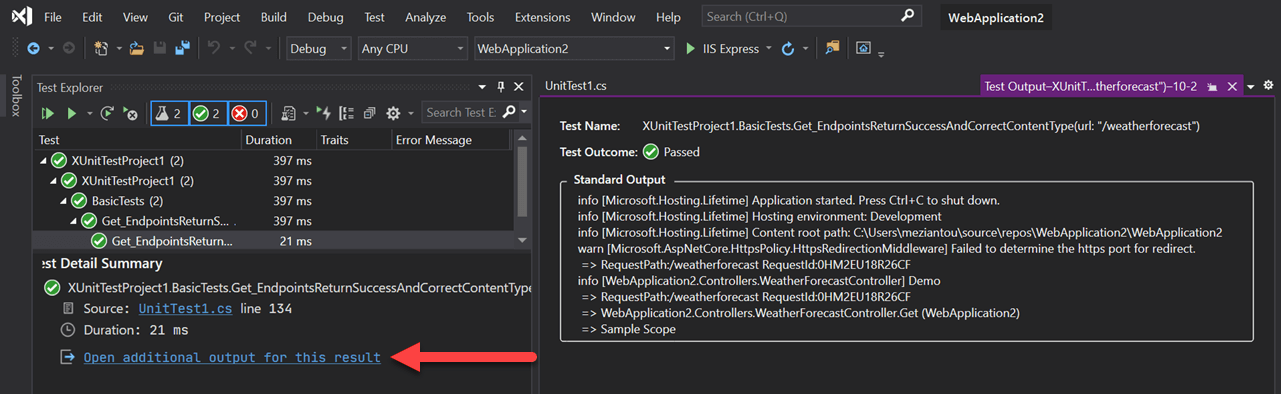
In Visual Studio, you can see the logs from the Test Explorer:
##Command line (dotnet test)
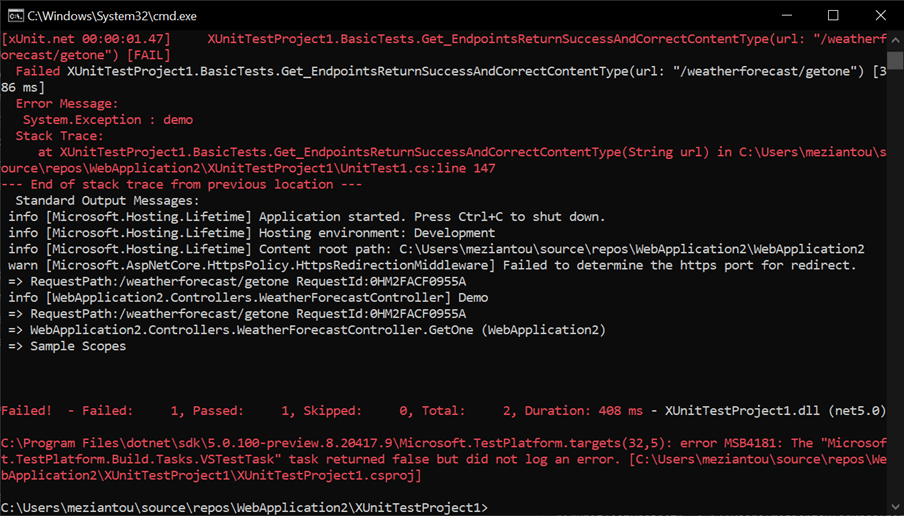
If you run the tests using dotnet test, it will only show the output for tests that fail:
##Azure DevOps
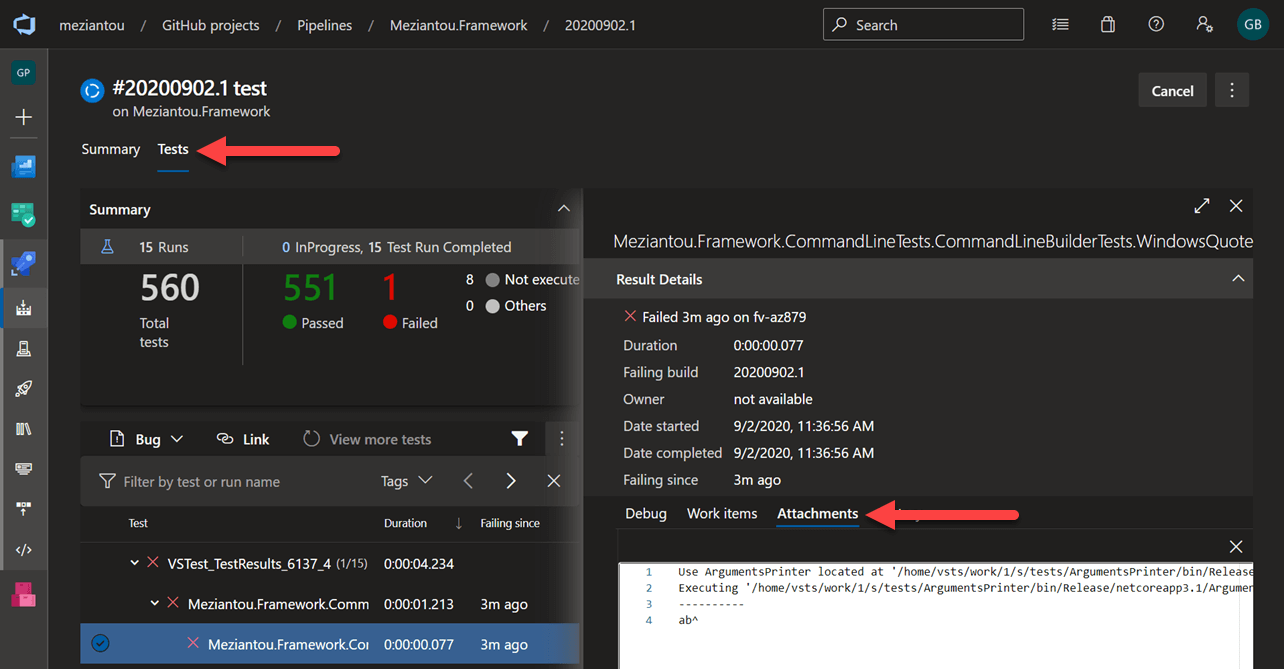
The test output is available in Azure DevOps if you use the Publish Test Results task in your CI, or a task that automatically publishes test results, such as the Visual Studio Test task or the .NET Core CLI task
#Additional resources
Do you have a question or a suggestion about this post? Contact me!
