This post is part of the series 'C# 8'. Be sure to check out the rest of the blog posts of the series!
In the previous post, I explained how to use Nullable Reference Types and why this is a valuable feature. However, it works well only with .NET Core 3.0.
Note that C# 8.0 is not meant for older targets, such as .NET Core 2.x or .NET Framework 4.x. So some additional language features may not work unless you are targeting .NET Core 3.0 or .NET Standard 2.1
https://devblogs.microsoft.com/dotnet/try-out-nullable-reference-types/#turn-on-nullable-reference-types
This does not mean you cannot use it with .NET Core 2.x, .NET Framework 4.x, or .NET Standard 2.0, but these are not the supported use cases. Since .NET Standard 2.0 remains the preferred target for library authors, this post shows how to use Nullable Reference Types with older frameworks.
#Multitarget .NET Core 3.0 to have BCL annotations
.NET Standard itself does not have any nullable annotations yet. If you are targeting .NET Standard, you can use multi-targeting for both .NET Standard and .NET Core 3.0, even if you do not need .NET Core-specific APIs. The benefit is that the compiler will use the nullable annotations from CoreFX to help you get your annotations right. For instance, when using string.IsNullOrEmpty in .NET Core 3.0, the compiler understands that the value is not null when the result is false, whereas .NET Standard 2.0 has no such annotation. To add .NET Core 3.0 as a target framework, open the csproj file and add netcoreapp3.0 to TargetFrameworks:
csproj (MSBuild project file)
<Project Sdk="Microsoft.NET.Sdk">
  <PropertyGroup>
    <OutputType>Exe</OutputType>
    <TargetFrameworks>netcoreapp3.0;netstandard2.0</TargetFrameworks> <!-- 👈 Include .NET Core 3.0 in the targets -->
    <LangVersion>8.0</LangVersion>
    <Nullable>enable</Nullable>
  </PropertyGroup>
</Project>
To get the correct IntelliSense, select .NET Core 3.0 in Visual Studio:

For instance, you'll get a warning if you select .NET Standard 2.0:
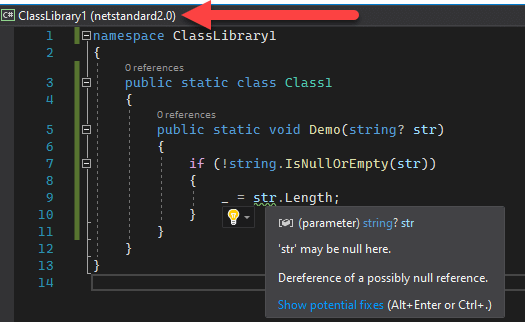
But there is no warning when you select .NET Core 3.0:
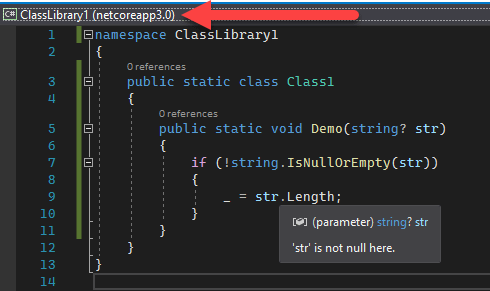
#Remove warnings in older frameworks
Even when .NET Core 3.0 is selected in the editor, warnings for other targets still appear in the error window. In this example, the warning applies only to "ClassLibrary1 (netstandard2.0)"; .NET Core 3.0 is clean:

You can remove these warnings only for older frameworks by editing the csproj:
csproj (MSBuild project file)
<Project Sdk="Microsoft.NET.Sdk">
  <PropertyGroup>
    <OutputType>Exe</OutputType>
    <TargetFrameworks>netcoreapp3.0;netstandard2.0</TargetFrameworks>
    <LangVersion>8.0</LangVersion>
    <Nullable>enable</Nullable>
  </PropertyGroup>

  <!-- 👇 disable the nullable warnings when compiling for .NET Standard 2.0 -->
  <PropertyGroup Condition="'$(TargetFramework)' == 'netstandard2.0'">
    <NoWarn>$(NoWarn);nullable</NoWarn>
  </PropertyGroup>
</Project>
This keeps warnings active for .NET Core 3.0 while suppressing them when targeting .NET Standard 2.0.
#Add Nullable attributes in the project
.NET Core 3.0 introduces new attributes to support Nullable Reference Types. See the previous post for more information. Using them in .NET Standard 2.0 causes a compilation error.

The solution is to conditionally include these attributes only for .NET Standard 2.0. They are available in the CoreFX repository. Defining them as internal and scoped to .NET Standard 2.0 is the recommended approach; here is a ready-to-use snippet: NullableAttributes.zip.
C#
// Full code: https://www.meziantou.net/assets/nullableattributes.zip

// Original code: https://github.com/dotnet/runtime/blob/419e949d258ecee4c40a460fb09c66d974229623/src/libraries/System.Private.CoreLib/src/System/Diagnostics/CodeAnalysis/NullableAttributes.cs

#define INTERNAL_NULLABLE_ATTRIBUTES
#if NETSTANDARD2_0

// Licensed to the .NET Foundation under one or more agreements.
// The .NET Foundation licenses this file to you under the MIT license.
// See the LICENSE file in the project root for more information.

namespace System.Diagnostics.CodeAnalysis
{
    /// <summary>Specifies that null is allowed as an input even if the corresponding type disallows it.</summary>
    [AttributeUsage(AttributeTargets.Field | AttributeTargets.Parameter | AttributeTargets.Property, Inherited = false)]
#if INTERNAL_NULLABLE_ATTRIBUTES
    internal
#else
    public
#endif
        sealed class AllowNullAttribute : Attribute
    { }

    /// <summary>Specifies that null is disallowed as an input even if the corresponding type allows it.</summary>
    [AttributeUsage(AttributeTargets.Field | AttributeTargets.Parameter | AttributeTargets.Property, Inherited = false)]
#if INTERNAL_NULLABLE_ATTRIBUTES
    internal
#else
    public
#endif
        sealed class DisallowNullAttribute : Attribute
    { }

    /// <summary>Specifies that an output may be null even if the corresponding type disallows it.</summary>
    [AttributeUsage(AttributeTargets.Field | AttributeTargets.Parameter | AttributeTargets.Property | AttributeTargets.ReturnValue, Inherited = false)]
#if INTERNAL_NULLABLE_ATTRIBUTES
    internal
#else
    public
#endif
        sealed class MaybeNullAttribute : Attribute
    { }

    ...
}
Download the file and add it to your project to enable the nullable attributes in both .NET Standard 2.0 and .NET Core 3.0.
For projects with multiple sub-projects, such as Meziantou.Framework, copying this file into every project is impractical. Instead, you can inject it using the Directory.Build.props file. Here is the file structure:
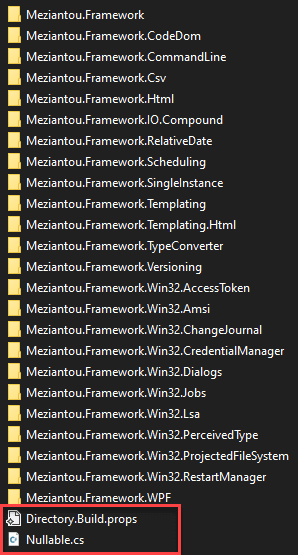
In the Directory.Build.props file, add the following code:
csproj (MSBuild project file)
<Project>

  <ItemGroup>
    <Compile Include="$(MSBuildThisFileDirectory)/Nullable.cs" />
  </ItemGroup>

  <!-- Ensure .NET Core 3.0 is a target of the project to support nullable reference types -->
  <Target Name="CheckNetCoreApp3_0" BeforeTargets="Build" Condition="$(TargetFrameworks.Contains('netcoreapp3.0')) == false">
    <Error Text="The project must target netcoreapp3.0" />
  </Target>

</Project>
#Conclusion
These three steps enable Nullable Reference Types support in projects targeting .NET Standard 2.0 or .NET Framework. The developer experience is good as long as you remember to select .NET Core 3.0 in Visual Studio.
Do you have a question or a suggestion about this post? Contact me!
