The multiple attribute (specification) on an <input> element indicates that multiple values can be selected. However, browsers do not support this attribute when a <datalist> element is used. Only one suggestion is shown at a time.
Let's enhance the native <input> to support datalists with multiple values! Here's the final result:Source code of the demo: demo.zip
HTML
<input type="text" list="Suggestions" multiple />

<datalist id="Suggestions">
  <option>option 1</option>
  <option>option 2</option>
  <option>option 3</option>
</datalist>
The approach dynamically updates the option elements of the datalist as you type, removing already-selected values and prefixing the remaining options with the current selections. For instance, if the input value is option 2,, the HTML will be:
HTML
<input type="text" list="Suggestions" multiple value="option 2," />

<datalist id="Suggestions">
  <option>option 2, option 1</option>
  <option>option 2, option 3</option>
</datalist>
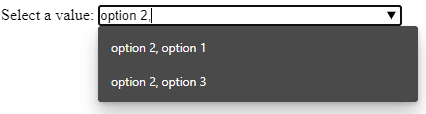
Here's the TypeScript code to dynamically update the datalist's children:
TypeScript
document.addEventListener("DOMContentLoaded", function () {
    const separator = ',';

    for (const input of document.getElementsByTagName("input")) {
        if (!input.multiple) {
            continue;
        }

        if (input.list instanceof HTMLDataListElement) {
            const optionsValues = Array.from(input.list.options).map(opt => opt.value);
            let valueCount = input.value.split(separator).length;

            input.addEventListener("input", () => {
                const currentValueCount = input.value.split(separator).length;

                // Do not update list if the user doesn't add/remove a separator
                // Current value: "a, b, c"; New value: "a, b, cd" => Do not change the list
                // Current value: "a, b, c"; New value: "a, b, c," => Update the list
                // Current value: "a, b, c"; New value: "a, b" => Update the list
                if (valueCount !== currentValueCount) {
                    const lsIndex = input.value.lastIndexOf(separator);
                    const str = lsIndex !== -1 ? input.value.substr(0, lsIndex) + separator : "";
                    filldatalist(input, optionsValues, str);
                    valueCount = currentValueCount;
                }
            });
        }
    }

    function filldatalist(input: HTMLInputElement, optionValues: string[], optionPrefix: string) {
        const list = input.list;
        if (list && optionValues.length > 0) {
            list.innerHTML = "";

            const usedOptions = optionPrefix.split(separator).map(value => value.trim());

            for (const optionsValue of optionValues) {
                if (usedOptions.indexOf(optionsValue) < 0) { // Skip used values
                    const option = document.createElement("option");
                    option.value = optionPrefix + optionsValue;
                    list.append(option);
                }
            }
        }
    }
});
Adding this script to your page will detect inputs with the multiple attribute and update their behavior to support the datalist.
Do you have a question or a suggestion about this post? Contact me!
