When you have a performance issue with a SQL query, the problem often, but not always, comes from missing indexes. An index, as the name implies, indexes the data of one or more columns. This enables faster data lookups, accelerating filters (WHERE), joins (JOIN), and groupings (GROUP BY). Consider the following query:
SQL
SELECT User_Email FROM [User] WHERE User_Email LIKE 'meziantou%'
Without an index, SQL Server must scan the entire table to filter rows, as shown in this execution plan:

Let's create an index on the Email column:
SQL
CREATE INDEX UserEmail ON [user] (User_Email)
SQL Server can use this one to filter rows. The table scan is replaced with an index seek:
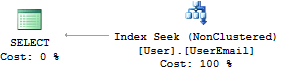
The challenge is knowing which indexes to create. Creating all possible indexes is not viable because each index consumes disk space and can reduce the performance of INSERT, UPDATE, and DELETE operations. On the other hand, creating no indexes is not satisfactory either. As is often the case, you face a storage vs. performance trade-off.
The goal is to identify the queries where the gain is meaningful. To do this, you can use metrics such as query execution time, number of executions, or potential gain.
SQL Server does some of this work for you. For each query, SQL Server computes an execution plan (a list of steps to execute the query). During this computation, it records indexes that could have been used if they existed. You can then simply query SQL Server for this list.
SQL
SELECT
  'CREATE INDEX [missing_index] ON ' + mid.statement
  + '('
   + ISNULL(mid.equality_columns, '')
   + CASE WHEN mid.equality_columns IS NOT NULL AND mid.inequality_columns IS NOT NULL THEN ', ' ELSE '' END
   + ISNULL(mid.inequality_columns, '')
  + ')'
  + ISNULL(' INCLUDE (' + mid.included_columns + ')', '') AS create_index_statement,
  migs.*, mid.database_id, mid.[object_id]
FROM sys.dm_db_missing_index_groups mig
INNER JOIN sys.dm_db_missing_index_group_stats migs ON migs.group_handle = mig.index_group_handle
INNER JOIN sys.dm_db_missing_index_details mid ON mig.index_handle = mid.index_handle

Some notes about the columns in this query:
This view, although practical, has some limitations:
- Should the index be clustered or not?
- In the case of a multi-column index, what is the order of the columns of the optimal index? (the index (a,b) is not identical to the index (b,a))
- Which index will bring the most benefit? The view provides metrics to help answer this:
avg_total_user_cost, avg_user_impact, user_seeks, user_scans
Remember that you can also use the Database Engine Tuning Advisor for targeted advice on optimizing a query. Also, be sure to monitor the usage of your existing indexes using sys.dm_db_index_operational_stats and sys.dm_db_index_usage_stats.
Do you have a question or a suggestion about this post? Contact me!
