TypeScript 2.4 introduced dynamic imports. In a previous post, we saw how to use static imports in TypeScript. Static imports allow you to use a module by declaring all dependencies at the top of the TypeScript file:
TypeScript
import { ZipCodeValidator } from "./ZipCodeValidator";
const myValidator = new ZipCodeValidator();
Dynamic imports, on the other hand, are not declared at the top of the file but right before their usage. This is useful for loading a module only when needed. For instance, if a feature is rarely used, you can load its code only when the user triggers it. This way, users do not need to download all the code on page load, which reduces initial load time.
TypeScript
if (condition) {
    let zipCodeValidator = await import("./ZipCodeValidator");
    let myValidator = new zipCodeValidator();
}
#What is a polyfill?
From wikipedia:
In web development, a polyfill is a code that implements a feature on web browsers that do not support the feature. Most often, it refers to a JavaScript library that implements an HTML5 web standard, either an established standard (supported by some browsers) on older browsers, or a proposed standard (not supported by any browsers) on existing browsers. Formally, "a polyfill is a shim for a browser API".
Polyfills allow web developers to use an API regardless of whether it is supported by a browser or not, and usually with minimal overhead. Typically they first check if a browser supports an API, and use it if available, otherwise using their own implementation.
For instance, String.includes is not available in Internet Explorer 11. It is a very convenient method, so you may want to use it regardless. The idea is to run the polyfill before the rest of the code so the function is available everywhere. You can find a polyfill on MDN.
TypeScript
// Test if String.includes is available
if (!String.prototype.includes) {

    // Add the find method to the prototype
    String.prototype.includes = function(search, start) {
        'use strict';
        if (typeof start !== 'number') {
            start = 0;
        }

        if (start + search.length > this.length) {
            return false;
        } else {
            return this.indexOf(search,start) !== -1;
        }
    };
}
#Load polyfills dynamically
The previous polyfill is not very long. However, if you need to include ten polyfills, or a much larger one, the JavaScript bundle size grows and your site will load more slowly. Plus, String.includes is well supported by modern browsers. You can check browser support on caniuse:
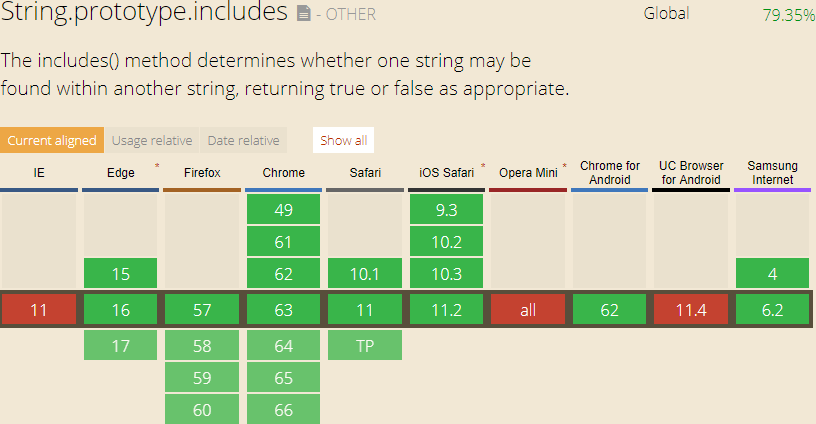
This polyfill is only needed for a small fraction of users. There is no reason to penalize the vast majority of your audience. This is where dynamic imports are useful: you can create each polyfill as a module and import it only when needed.
Here's the structure I use:
src
├── polyfills
│   ├── array.from.js
│   ├── array.prototype.find.js
│   ├── string.prototype.includes.js
│   └── ...
└── main.ts
Polyfills are often pasted from the internet, so you can use JavaScript or TypeScript depending on the source.
Then, you can import them dynamically if needed in the main file:
TypeScript
function importPolyfills() {
    let promises = [];
    if (!String.prototype.includes) {
        promises.push(import("./polyfills/string.prototype.includes"));
    }

    if (!Array.from) {
        promises.push(import("./polyfills/array.from"));
    }

    if (!Array.prototype.find) {
        promises.push(import("./polyfills/array.prototype.find"));
    }

    // ...

    return Promise.all(promises);
}

importPolyfills().then(() => {
    console.log("meziantou".includes("an"));
});
This way, only users on browsers that do not support a given feature will download its polyfill. For them, load time increases slightly, but for the vast majority of users, it is reduced. As browsers add native support, the polyfill is no longer downloaded. You can also track how many users download a polyfill to decide whether it is still needed.
Do you have a question or a suggestion about this post? Contact me!
