Using HTTPS on your website provides additional security for your users: confidentiality, integrity, and authentication. Using Let's Encrypt, you can get a free certificate and start using HTTPS. If you aren't using HTTPS yet, you can read my previous blog post about setting up Let's encrypt for your website.
But HTTPS is not without flaws. Several known attacks target it, including CRIME, BEAST, POODLE, and SSL stripping. SSL stripping works by rewriting HTTPS links to HTTP through a man-in-the-middle attack. HTTP Strict Transport Security (HSTS) mitigates this by instructing browsers, and user-agents in general, to always use a secure connection when accessing the site. For example, if you type "http://example.com" in the address bar, the browser will automatically rewrite it to "https://example.com". RFC 6797 defines the HSTS specification.
#How to add HSTS on your website?
First, you need to redirect http connection to https. In a previous post, I wrote about rewriting URLs with ASP.NET Core and the NuGet package Microsoft.AspNetCore.Rewrite:
C#
public void Configure(IApplicationBuilder app, IHostingEnvironment env)
{
    app.UseRewriter(new RewriteOptions().AddRedirectToHttps());
    app.UseStaticFiles();
}
Next, you need to send the Strict-Transport-Security header. To modify the response, such as by adding a header, you can create a middleware. The middleware intercepts HTTPS requests and, based on the configuration, adds the header to the response before passing control to the next middleware.
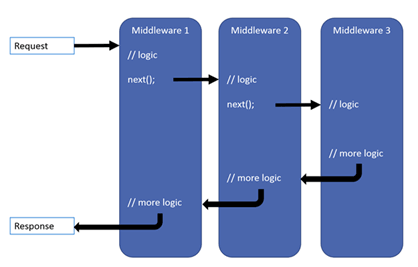
To create a middleware, define a class with a constructor that takes at least one argument of type RequestDelegate, and an Invoke method. The next argument is used to call the next middleware in the pipeline. The Invoke method contains the middleware logic. For debugging, consider adding log statements.
C#
public class HttpStrictTransportSecurityOptions
{
    public TimeSpan MaxAge { get; set; } = TimeSpan.FromDays(30);
    public bool IncludeSubDomains { get; set; } = true;
    public bool Preload { get; set; } = false;
    public bool EnableForLocalhost { get; set; } = false;
}

public class HttpStrictTransportSecurityMiddleware
{
    private readonly RequestDelegate _next;
    private readonly HttpStrictTransportSecurityOptions _options;
    private readonly ILogger<HttpStrictTransportSecurityMiddleware> _logger;

    public HttpStrictTransportSecurityMiddleware(
            RequestDelegate next,
            HttpStrictTransportSecurityOptions options,
            ILogger<HttpStrictTransportSecurityMiddleware> logger)
    {
        if (next == null) throw new ArgumentNullException(nameof(next));
        if (options == null) throw new ArgumentNullException(nameof(options));
        if (logger == null) throw new ArgumentNullException(nameof(logger));

        _logger = logger;
        _next = next;
        _options = options;
    }

    // The Invoke method is the entry point of the middleware
    // _next() calls the next middleware
    public Task Invoke(HttpContext context)
    {
        if (!context.Request.IsHttps)
        {
            _logger.LogDebug("HSTS response header is not set because the scheme is not https.");
            return _next(context); // Continue to the next middleware
        }

        if (!_options.EnableForLocalhost && IsLocalhost(context))
        {
            _logger.LogDebug("HSTS response header is disabled for localhost.");
            return _next(context); // Continue to the next middleware
        }

        var headerValue = GetHeaderValue();
        _logger.LogDebug("Adding HSTS response header: {HeaderValue}.", headerValue);
        context.Response.Headers.Add("Strict-Transport-Security", headerValue);

        return _next(context); // Continue to the next middleware
    }

    private string GetHeaderValue()
    {
        // max-age=31536000; includeSubDomains; preload
        var headerValue = "max-age: " + (int)_options.MaxAge.TotalSeconds;
        if (_options.IncludeSubDomains)
        {
            headerValue += "; includeSubDomains";
        }

        if (_options.Preload)
        {
            headerValue += "; preload";
        }

        return headerValue;
    }

    private bool IsLocalhost(HttpContext context)
    {
        return string.Equals(context.Request.Host.Host, "localhost", StringComparison.OrdinalIgnoreCase);
    }
}
Now, you can add some extension methods to simplify the use of the middleware:
C#
public static class HttpStrictTransportSecurityBuilderExtensions
{
    public static IApplicationBuilder UseHttpStrictTransportSecurity(
            this IApplicationBuilder app,
            HttpStrictTransportSecurityOptions options)
    {
        if (app == null) throw new ArgumentNullException(nameof(app));
        if (options == null) throw new ArgumentNullException(nameof(options));

        return app.UseMiddleware<HttpStrictTransportSecurityMiddleware>(options);
    }

    public static IApplicationBuilder UseHttpStrictTransportSecurity(this IApplicationBuilder app)
    {
        return UseHttpStrictTransportSecurity(app, new HttpStrictTransportSecurityOptions());
    }

    public static IApplicationBuilder UseHttpStrictTransportSecurity(
            this IApplicationBuilder app,
            Action<HttpStrictTransportSecurityOptions> configure)
    {
        if (app == null) throw new ArgumentNullException(nameof(app));

        var options = new HttpStrictTransportSecurityOptions();
        configure?.Invoke(options);

        return UseHttpStrictTransportSecurity(app, options);
    }
}
Finally, you can add the middleware in Configure method:
C#
public void Configure(IApplicationBuilder app, IHostingEnvironment env)
{
    app.UseRewriter(new RewriteOptions().AddRedirectToHttps());
    app.UseHttpStrictTransportSecurity(options => { options.MaxAge = TimeSpan.FromDays(90); });
    app.UseStaticFiles();
}
With these pieces in place, you can easily improve the security of your website using Let's Encrypt, a redirect rule, and the HSTS middleware.
Do you have a question or a suggestion about this post? Contact me!
