Blazor lets you build interactive web UIs using C# instead of JavaScript. Blazor apps are composed of reusable web UI components implemented using C#, HTML, and CSS. While you can build an entire application with Blazor, you may not want to rewrite your existing ASP.NET Core MVC or Razor Pages applications to take advantage of it. Fortunately, you can integrate Blazor components into an existing MVC or Razor Pages application.
Create an ASP.NET Core Razor pages application
Shell
dotnet new "ASP.NET Core Web App"
Add an _Imports.razor file to the root folder of the project with the following content
Razor
@using System.Net.Http
@using Microsoft.AspNetCore.Authorization
@using Microsoft.AspNetCore.Components.Authorization
@using Microsoft.AspNetCore.Components.Forms
@using Microsoft.AspNetCore.Components.Routing
@using Microsoft.AspNetCore.Components.Web
@using Microsoft.JSInterop
@* 👇 Change this namespace to match your application namespace *@
@using DemoBlazor
Create the Blazor Component. Add a file named Components/Counter.razor and set the following content:
Razor
<p>Current count: @currentCount</p>
<button class="btn btn-primary" @onclick="IncrementCount">Click me</button>

@code {
    private int currentCount = 0;

    [Parameter]
    public int InitialValue { get; set; }

    private void IncrementCount() => currentCount++;

    protected override void OnParametersSet()
    {
        currentCount = InitialValue;
    }
}
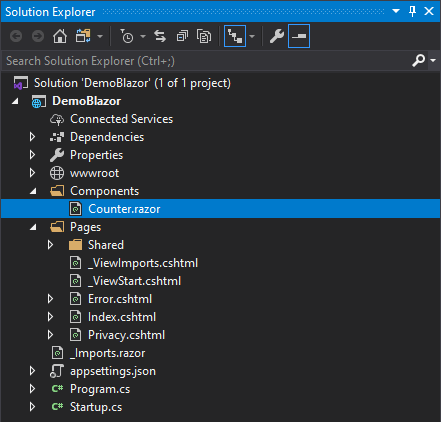
Change the Startup.cs file to add Blazor services services.AddServerSideBlazor() and map the required endpoints endpoints.MapBlazorHub():
C#
public class Startup
{
    public void ConfigureServices(IServiceCollection services)
    {
        services.AddRazorPages();

        // 👇 Add this line
        services.AddServerSideBlazor();
    }

    public void Configure(IApplicationBuilder app, IWebHostEnvironment env)
    {
        if (env.IsDevelopment())
        {
            app.UseDeveloperExceptionPage();
        }
        else
        {
            app.UseExceptionHandler("/Error");
            app.UseHsts();
        }

        app.UseHttpsRedirection();
        app.UseStaticFiles();
        app.UseRouting();
        app.UseAuthorization();
        app.UseEndpoints(endpoints =>
        {
            endpoints.MapRazorPages();

            // 👇 Add this line
            endpoints.MapBlazorHub();
        });
    }
}
Integrate the Blazor component into a Razor page, such as Index.razor, using the component tag helper, and add the Blazor server script. You can add the script via the Scripts section if that section is defined in the _Layout.razor file, or include the script tag directly in _Layout.razor or the current page.
Razor
@page

<component type="typeof(DemoBlazor.Components.Counter)" param-InitialValue="0" render-mode="Server" />

@section Scripts {
    <script src="_framework/blazor.server.js"></script>
}
Run the application
Shell
dotnet run
In the previous code, we use render-mode="Server". There are 3 available render modes:
Static: Renders the component into static HTML. In this case, there is no interactivity and you can remove the blazor.server.js script.Server: Renders a marker for a Blazor server-side application without any component output. When the user agent starts, it uses this marker to bootstrap the Blazor application. Until the SignalR connection is established, nothing is visible to the user.ServerPrerendered: Renders the component into static HTML and includes a marker for a Blazor server-side application. When the user agent starts, it uses this marker to bootstrap the application. Until the SignalR connection is established, the user can see the component content but cannot interact with it.
#Additional resources
Do you have a question or a suggestion about this post? Contact me!
