Websites are becoming increasingly complex, and managing code complexity is a growing challenge. You need to track dependencies between JS files and include them in the right order, or the site will break. Testing also becomes harder as the application grows.
Modules help you segment your application into small, independent, and reusable units of code. Because modules are aware of their own dependencies, they can load them in the right order when needed. Let's see how to use modules in TypeScript!
#How to use modules in TypeScript?
In TypeScript, a module is a file that contains values, functions, or classes. You can make some of them public (visible to other modules) by exporting them. Non-exported items are private. Let's create a simple math module with a single exported function!
First, create a file named math.ts:
TypeScript
// public because of the export keyword
export function add(a: number, b: number): number {
    log(`${a} + ${b}`);
    return a + b;
}

// private
function log(message: string): void {
    console.log(message);
}
You can then consume the math module from another module. The import keyword lets you use exported functions from a module. In this case, we want to use the add function from the math module. Create a new file named main.ts:
TypeScript
// We want to use the add function from the math module
import { add } from "./math";

// Use the add function as if it was in the global context
console.log(add(1, 2));
If you want to use all the exported functions of a module, you can use the * syntax:
TypeScript
// Import the math module as a *namespace*
import * as math from "./math";

// Use the add function in the namespace math
console.log(math.add(1, 2));

// math.log(""); // error: log is not exported
You'll find the complete syntax in the documentation: https://www.typescriptlang.org/docs/handbook/modules.html
#How to include the JS files in the HTML page?
You now know how to create a module in TypeScript, but how do you use them in your HTML files?
Several module formats exist, each with its own trade-offs: AMD, CommonJS, UMD, System, and the native ES6 modules. TypeScript supports all of them, so the choice is yours. Since native ES6 modules are not yet well supported by browsers, you should use another format for now. In this post, I'll use SystemJS, which is a popular choice.
First, you need to configure TypeScript to output this format. Open the tsconfig.json file and set the following line:
JSON
{
    "compilerOptions": {
        "module": "system"
    }
}
Then, add SystemJS to your page. You can get it from cdnjs:
HTML
<script src="https://cdnjs.cloudflare.com/ajax/libs/systemjs/0.20.19/system.js" integrity="sha256-HCJlhCZ21EKx0Wo6wCF+rbeBHlVlOSJccd4zTQe2TNw=" crossorigin="anonymous"></script>
Finally, instruct SystemJS to load your main module. By default, SystemJS resolves files using the module name from the import statement. Since that name does not include a file extension, we need to append .js. You can configure SystemJS to do this automatically:
HTML
<script>
// Instruct SystemJS to add the js extension to the module name to compute the final file name
System.config({
    packages: {
        './': {
            defaultExtension: 'js'
        }
    }
});

// Load the main module
SystemJS.import("main");
</script>
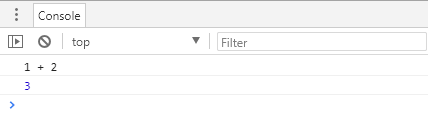
If you open the web page, you should see the following output in the console:
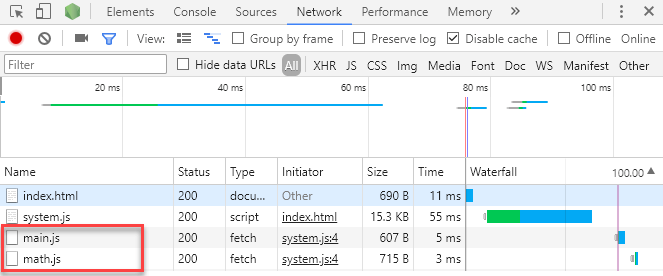
In the network tab, you should see main.js and math.js being downloaded even though they are not directly included in the page. SystemJS handles dependency loading automatically, so you no longer need to manage it manually:
#Conclusion
Getting started with modules in TypeScript and SystemJS is straightforward. Modules help you build cleaner applications and make dependencies between components explicit. While native browser modules are not yet widely supported, you can use SystemJS or requireJS today and migrate to native modules once browser support improves.
Do you have a question or a suggestion about this post? Contact me!
