When a Blazor WebAssembly application starts, it downloads all DLLs upfront. This means that even a DLL used only on a single page is loaded at startup. To improve startup performance, you can defer loading some assemblies until they are actually needed.
#Lazy loading assemblies
First, you need to edit the project file (csproj) and add the list of lazy-loaded assemblies using <BlazorWebAssemblyLazyLoad>:
csproj (MSBuild project file)
<Project Sdk="Microsoft.NET.Sdk.Web">

  <PropertyGroup>
    <TargetFramework>net5.0</TargetFramework>
    <RuntimeIdentifier>browser-wasm</RuntimeIdentifier>
    <UseBlazorWebAssembly>true</UseBlazorWebAssembly>
  </PropertyGroup>

  <ItemGroup>
    <PackageReference Include="Microsoft.AspNetCore.Components.WebAssembly" Version="5.0.0-preview.8.20414.8" />
    <PackageReference Include="Microsoft.AspNetCore.Components.WebAssembly.DevServer" Version="5.0.0-preview.8.20414.8" PrivateAssets="all" />
    <PackageReference Include="YamlDotNet" Version="8.1.2" />
  </ItemGroup>

  <ItemGroup>
    <BlazorWebAssemblyLazyLoad Include="YamlDotNet" />
  </ItemGroup>

</Project>
This will change the way the blazor.boot.json file is generated. You should see a new section named lazyAssembly:
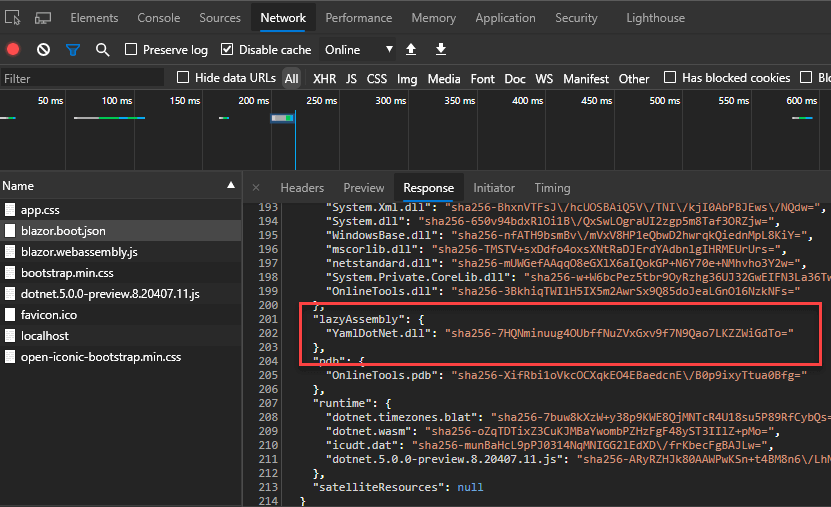
Now if you navigate to a page that needs the DLL, you'll get an error because the DLL is not loaded:
blazor.webassembly.js:1 crit: Microsoft.AspNetCore.Components.WebAssembly.Rendering.WebAssemblyRenderer[100]
Unhandled exception rendering component: Could not load file or assembly 'YamlDotNet, Version=8.0.0.0, Culture=neutral, PublicKeyToken=ec19458f3c15af5e' or one of its dependencies.
System.IO.FileNotFoundException: Could not load file or assembly 'YamlDotNet, Version=8.0.0.0, Culture=neutral, PublicKeyToken=ec19458f3c15af5e' or one of its dependencies.
File name: 'YamlDotNet, Version=8.0.0.0, Culture=neutral, PublicKeyToken=ec19458f3c15af5e'
   at OnlineTools.Pages.YamlToJson.BuildRenderTree(RenderTreeBuilder __builder) in C:\Users\meziantou\source\repos\meziantou\online-tools\OnlineTools\Pages\YamlToJson.razor:line 0
   at Microsoft.AspNetCore.Components.ComponentBase.<.ctor>b__6_0(RenderTreeBuilder builder)
   at Microsoft.AspNetCore.Components.Rendering.ComponentState.RenderIntoBatch(RenderBatchBuilder batchBuilder, RenderFragment renderFragment)
   at Microsoft.AspNetCore.Components.RenderTree.Renderer.RenderInExistingBatch(RenderQueueEntry renderQueueEntry)
   at Microsoft.AspNetCore.Components.RenderTree.Renderer.ProcessRenderQueue()
To fix this error, load the DLL before navigation occurs. Use the OnNavigateAsync router event to intercept navigation and load the required assembly on demand. Edit the App.razor component as follows:
Razor
@inject Microsoft.AspNetCore.Components.WebAssembly.Services.LazyAssemblyLoader AssemblyLoader

<Router AppAssembly="@typeof(Program).Assembly"
        OnNavigateAsync="OnNavigateAsync"
        AdditionalAssemblies="lazyLoadedAssemblies">
    <Found Context="routeData">
        <RouteView RouteData="@routeData" DefaultLayout="@typeof(MainLayout)" />
    </Found>
    <NotFound>
        <LayoutView Layout="@typeof(MainLayout)">
            <p>Sorry, there's nothing at this address.</p>
        </LayoutView>
    </NotFound>
</Router>

@code{
    private List<System.Reflection.Assembly> lazyLoadedAssemblies = new List<System.Reflection.Assembly>();

    private async Task OnNavigateAsync(NavigationContext context)
    {
        if (context.Path == "yaml-to-json") // Url of the page that needs the lazy loaded assembly
        {
            var assemblies = await AssemblyLoader.LoadAssembliesAsync(new[] { "YamlDotNet.dll" });
            lazyLoadedAssemblies.AddRange(assemblies);
        }
    }
}
AssemblyLoader.LoadAssembliesAsync will fetch the assemblies requested via a network call and load them into the runtime.AdditionalAssemblies is optional. It configures the router to search components that can match URIs in the lazy loaded assemblies. If the lazy-loaded DLLs don't contain any component, you can remove it.
#Showing loading indicator when loading DLLs
Loading lazy assemblies can take a moment. During this time, you can display a loading indicator to let the user know something is happening.
Razor
<Router AppAssembly="@typeof(Program).Assembly" OnNavigateAsync="OnNavigateAsync" AdditionalAssemblies="lazyLoadedAssemblies">
    <Found Context="routeData">
        <RouteView RouteData="@routeData" DefaultLayout="@typeof(MainLayout)" />
    </Found>
    <NotFound>
        <LayoutView Layout="@typeof(MainLayout)">
            <p>Sorry, there's nothing at this address.</p>
        </LayoutView>
    </NotFound>
    <Navigating>
        <p>Loading the page...</p>
    </Navigating>
</Router>
Do you have a question or a suggestion about this post? Contact me!
