This post is part of the series 'MSTest v2'. Be sure to check out the rest of the blog posts of the series!
In the previous post, I showed you the basis of writing a unit test with MSTest v2. There was only one unit test for the MathHelper.Add method. Of course, you want to write more tests to validate the behavior of the method. One approach is to copy and paste the method while changing the parameter values.
C#
[TestClass]
public class MathTests
{
    [TestMethod]
    public void Test_Add1()
    {
        var actual = MathHelper.Add(1, 1);
        var expected = 2;
        Assert.AreEqual(expected, actual);
    }

    [TestMethod]
    public void Test_Add2()
    {
        var actual = MathHelper.Add(21, 4);
        var expected = 25;
        Assert.AreEqual(expected, actual);
    }
}
As a developer, you should avoid copy-pasting code whenever possible. The solution is to create parameterized tests. Parameterized tests accept parameters and use them to vary the inputs, allowing a single test method to run as N distinct tests. MSTest v2 provides 3 ways to create parameterized tests.
#Using DataRow
The [DataRow] attribute lets you specify the parameter values for each test run. You can add as many [DataRow] attributes as needed. You also need to replace [TestMethod] with [DataTestMethod]:
C#
[TestClass]
public class MathTests
{
    [DataTestMethod]
    [DataRow(1, 1, 2)]
    [DataRow(12, 30, 42)]
    [DataRow(14, 1, 15)]
    public void Test_Add(int a, int b, int expected)
    {
        var actual = MathHelper.Add(a, b);
        Assert.AreEqual(expected, actual);
    }
}
You can see that there are 3 tests in the test explorer.
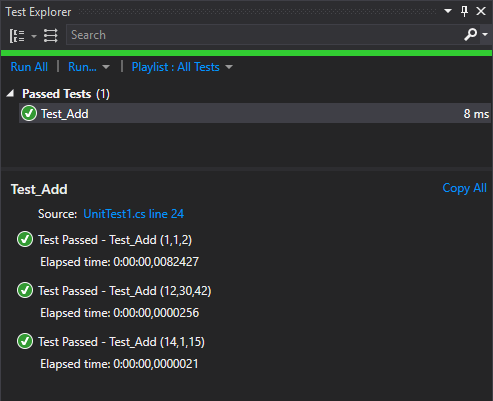
Note that MSTest supports params parameters, so you can use it to easily define arrays:
C#
[TestClass]
public class MathTests
{
    [DataTestMethod]
    [DataRow(1, new [] { "a", "b" })] // Explicit array construction
    [DataRow(1, "a", "b")]            // It will create the array automatically
    public void Test_Add(int a, params string[] b)
    {
        // TODO actual test
    }
}
#Using DynamicData
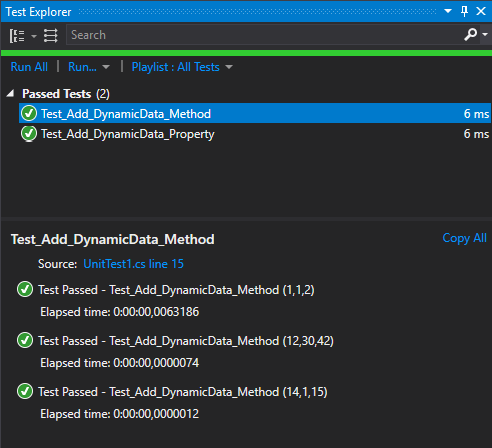
If your data cannot be expressed as an attribute parameter (non-constant values or complex objects), you can use the [DynamicData] attribute. This attribute reads the test values from a method or a property that returns an IEnumerable<object[]>. Each item in the enumerable corresponds to one test case.
Here's an example with a method:
C#
[TestClass]
public class MathTests
{
    [DataTestMethod]
    [DynamicData(nameof(GetData), DynamicDataSourceType.Method)]
    public void Test_Add_DynamicData_Method(int a, int b, int expected)
    {
        var actual = MathHelper.Add(a, b);
        Assert.AreEqual(expected, actual);
    }

    public static IEnumerable<object[]> GetData()
    {
        yield return new object[] { 1, 1, 2 };
        yield return new object[] { 12, 30, 42 };
        yield return new object[] { 14, 1, 15 };
    }
}
Here's an example with a property:
C#
[TestClass]
public class MathTests
{
    [DataTestMethod]
    [DynamicData(nameof(Data), DynamicDataSourceType.Property)]
    public void Test_Add_DynamicData_Property(int a, int b, int expected)
    {
        var actual = MathHelper.Add(a, b);
        Assert.AreEqual(expected, actual);
    }

    public static IEnumerable<object[]> Data
    {
        get
        {
            yield return new object[] { 1, 1, 2 };
            yield return new object[] { 12, 30, 42 };
            yield return new object[] { 14, 1, 15 };
        }
    }
}
#Custom DataSource
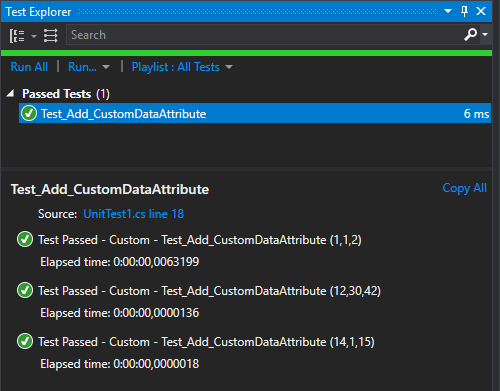
If neither of the previous attributes fits your needs, you can create your own attribute. It must implement ITestDataSource, which defines two methods: GetData and GetDisplayName. GetData returns the data rows. GetDisplayName returns the display name for a given row, visible in the Test Explorer and the console.
C#
public class CustomDataSourceAttribute : Attribute, ITestDataSource
{
    public IEnumerable<object[]> GetData(MethodInfo methodInfo)
    {
        yield return new object[] { 1, 1, 2 };
        yield return new object[] { 12, 30, 42 };
        yield return new object[] { 14, 1, 15 };
    }

    public string GetDisplayName(MethodInfo methodInfo, object[] data)
    {
        if (data != null)
            return string.Format(CultureInfo.CurrentCulture, "Custom - {0} ({1})", methodInfo.Name, string.Join(",", data));

        return null;
    }
}
Then, you can use this attribute like any other data attribute:
C#
[DataTestMethod]
[CustomDataSource]
public void Test_Add(int a, int b, int expected)
{
    var actual = MathHelper.Add(a, b);
    Assert.AreEqual(expected, actual);
}
#Conclusion
Parameterized tests make it easy to cover many scenarios with minimal code. The DataRow and DynamicData attributes will cover most use cases. When you need more flexibility, the extensibility model lets you build custom data source attributes. You can also combine all three approaches on the same test method.
Do you have a question or a suggestion about this post? Contact me!
