This post is part of the series 'MSTest v2'. Be sure to check out the rest of the blog posts of the series!
By default, the MSTest runner executes the tests in an assembly sequentially. If your tests are well isolated, you can run them in parallel to reduce execution time. Since version 1.3, MSTest v2 supports this, but you must opt in.

To enable parallel execution, add the [Parallelize] attribute to the assembly:
C#
[assembly: Parallelize(Workers = 0, Scope = ExecutionScope.MethodLevel)]
The attribute has two properties: Workers and Scope.
Workers: The number of threads used to run tests. Set it to 0 to use the number of logical cores on the machine.Scope: Determines whether the runner parallelizes tests at the method or class level. MethodLevel runs all tests in parallel. ClassLevel runs all test classes in parallel, but tests within a class run sequentially. Use ClassLevel when tests within a class have interdependencies.
If you have multiple test assemblies to parallelize, you can create a .runsettings file at the root of your solution:
XML
<?xml version="1.0" encoding="utf-8"?>
<RunSettings>
  <MSTest>
    <Parallelize>
      <Workers>8</Workers>
      <Scope>MethodLevel</Scope>
    </Parallelize>
  </MSTest>
</RunSettings>
For maximum performance, use Workers = 0 and Scope = ExecutionScope.MethodLevel. Note that at MethodLevel scope, a method can contain multiple tests if you use data tests. Each row of a data-driven test runs sequentially.
C#
[assembly: Parallelize(Workers = 0, Scope = ExecutionScope.MethodLevel)]

namespace UnitTestProject1
{
    [TestClass]
    public class TestClass1
    {
        [TestMethod]
        public void Test1() => Thread.Sleep(5000);

        [TestMethod]
        public void Test2() => Thread.Sleep(5000);

        [DataTestMethod]
        [DataRow(1)]
        [DataRow(2)]
        [DataRow(3)]
        public void Test3(int i) => Thread.Sleep(5000);
    }
}
The three test methods run in parallel, but the three data rows of Test3 run sequentially, so the total execution time is 15 seconds.
Parallelization is opt-in. Once enabled, you can opt out for a specific test or class using [DoNotParallelize].
C#
[assembly: Parallelize(Workers = 0, Scope = ExecutionScope.MethodLevel)]

namespace UnitTestProject1
{
    [TestClass]
    public class TestClass1
    {
        [TestMethod]
        [DoNotParallelize]
        public void Test1() => Thread.Sleep(5000);

        [TestMethod]
        public void Test2() => Thread.Sleep(5000);

        [TestMethod]
        public void Test3() => Thread.Sleep(5000);
    }
}
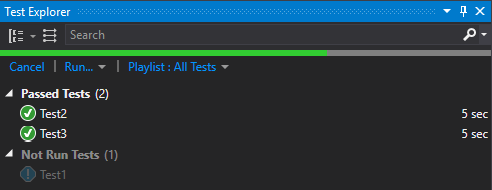
The runner executes Test2 and Test3 in parallel, then runs Test1.
#Conclusion
In most cases, you can reduce test run time by adding a single attribute to your project 😃
Do you have a question or a suggestion about this post? Contact me!
