This post is part of the series 'Roslyn Analyzers'. Be sure to check out the rest of the blog posts of the series!
A Roslyn Analyzer must target .NET Standard 2.0. However, you may also want to target a more recent framework, such as .NET 5.0, to take advantage of Nullable Reference Types. While Nullable Reference Types work with libraries targeting .NET Standard 2.0, that target cannot use the framework's nullable annotations, which results in many meaningless warnings. You can read my previous post for more details.
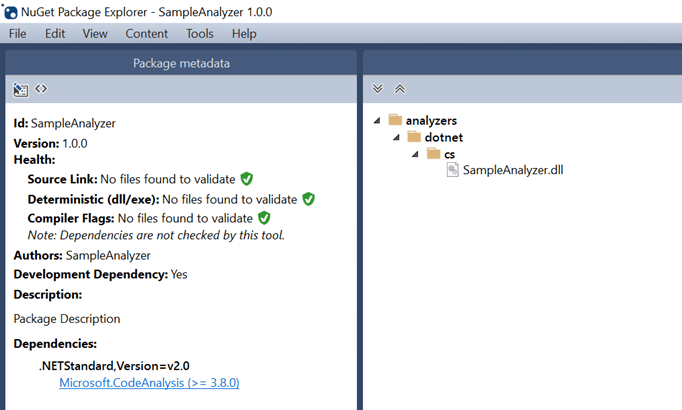
The idea is to build both targets and include only the .NET Standard 2.0 DLL in the published package. The final NuGet package content should look like this:
csproj (MSBuild project file)
<Project Sdk="Microsoft.NET.Sdk">
  <PropertyGroup>
    <!-- Multi-target the library. Must contain at least "netstandard2.0" -->
    <TargetFrameworks>net5.0;netstandard2.0</TargetFrameworks>
    <Nullable>enable</Nullable>

    <!-- https://learn.microsoft.com/en-us/nuget/reference/nuspec?WT.mc_id=DT-MVP-5003978#developmentdependency -->
    <developmentDependency>true</developmentDependency>

    <!-- Do not include the dll into the NuGet package, we'll add it manually at the right location -->
    <IncludeBuildOutput>false</IncludeBuildOutput>
    <NoPackageAnalysis>true</NoPackageAnalysis>
  </PropertyGroup>

  <ItemGroup>
    <!-- Include the netstandard2.0 DLL into the package -->
    <None Include="$(OutputPath)\netstandard2.0\$(AssemblyName).dll" Pack="true" PackagePath="analyzers/dotnet/cs" Visible="false" />
  </ItemGroup>

  <!-- 👇 disable the nullable warnings when compiling for .NET Standard 2.0 -->
  <PropertyGroup Condition="'$(TargetFramework)' == 'netstandard2.0'">
    <NoWarn>$(NoWarn);nullable</NoWarn>
  </PropertyGroup>

  <ItemGroup>
    <PackageReference Include="Microsoft.CodeAnalysis" Version="3.8.0" />
  </ItemGroup>
</Project>
You can now use the .NET CLI to build the package:
Shell
dotnet pack --configuration Release
Et voilà!
Do you have a question or a suggestion about this post? Contact me!
