.NET provides multiple APIs to send HTTP requests. You can use the HttpClient class and the obsolete HttpWebRequest and WebClient classes. Third-party libraries may also send requests outside your direct control. To monitor all HTTP requests, you need to use the hooks that .NET provides.
Program.cs (C#)
var client = new HttpClient();
_ = await client.GetStringAsync("https://example.com");

var request = WebRequest.CreateHttp("https://example.com");
_ = request.GetResponse();

var webClient = new WebClient();
_ = webClient.DownloadString("https://example.com");
.NET provides two ways to monitor an application:
DiagnosticSource: Allows code to be instrumented for production-time logging of rich data payloads, consumed within the instrumented process.EventSource: Allows code to be instrumented for production-time logging, for consumption in-process or out-of-process. Because these events can be observed out-of-process, the data must be serializable, which means you cannot send rich payloads to the observer.
#EventListener
You can observe events produced by an EventSource using the EventListener class. For HTTP requests, you may be interested in the RequestStart and RequestStop events. The RequestStart event exposes several properties about the request, such as the scheme, host, path, or HTTP version.
Program.cs (C#)
using var eventListener = new HttpEventListener();
var client = new HttpClient();
await client.GetStringAsync("https://example.com");
await client.GetStringAsync("https://example.com");
HttpEventListener.cs (C#)
sealed class HttpEventListener : EventListener
{
    protected override void OnEventSourceCreated(EventSource eventSource)
    {
        switch (eventSource.Name)
        {
            case "System.Net.Http":
                EnableEvents(eventSource, EventLevel.Informational, EventKeywords.All);
                break;

            // Enable EventWrittenEventArgs.ActivityId to correlate Start and Stop events
            case "System.Threading.Tasks.TplEventSource":
                const EventKeywords TasksFlowActivityIds = (EventKeywords)0x80;
                EnableEvents(eventSource, EventLevel.LogAlways, TasksFlowActivityIds);
                break;
        }

        base.OnEventSourceCreated(eventSource);
    }

    protected override void OnEventWritten(EventWrittenEventArgs eventData)
    {
        // note: Use eventData.ActivityId to correlate Start and Stop events
        if (eventData.EventId == 1) // eventData.EventName == "RequestStart"
        {
            var scheme = (string)eventData.Payload[0];
            var host = (string)eventData.Payload[1];
            var port = (int)eventData.Payload[2];
            var pathAndQuery = (string)eventData.Payload[3];
            var versionMajor = (byte)eventData.Payload[4];
            var versionMinor = (byte)eventData.Payload[5];
            var policy = (HttpVersionPolicy)eventData.Payload[6];

            Console.WriteLine($"{eventData.ActivityId} {eventData.EventName} {scheme}://{host}:{port}{pathAndQuery} HTTP/{versionMajor}.{versionMinor}");
        }
        else if (eventData.EventId == 2) // eventData.EventName == "RequestStop"
        {
            Console.WriteLine(eventData.ActivityId + " " + eventData.EventName);
        }
    }
}

#EventListener: Correlate Start and Stop events using AsyncLocal
In the previous example, you can correlate the RequestStart and RequestStop events using the ActivityId property. Correlating events is useful for measuring request duration. The ActivityId property is especially useful when observing the application with out-of-process tools such as PerfView. When using in-process monitoring, you can use an AsyncLocal<T> field to store the current request.
Program.cs (C#)
using var eventListener = new HttpEventListenerAsyncLocal();
var client = new HttpClient();
await client.GetStringAsync("https://example.com");
await client.GetStringAsync("https://example.com");
HttpEventListenerAsyncLocal.cs (C#)
using System.Diagnostics;
using System.Diagnostics.Tracing;

internal sealed class HttpEventListenerAsyncLocal : EventListener
{
    private readonly AsyncLocal<Request> _currentRequest = new();

    private sealed record Request(string Url, Stopwatch ExecutionTime);

    protected override void OnEventSourceCreated(EventSource eventSource)
    {
        if (eventSource.Name == "System.Net.Http")
        {
            EnableEvents(eventSource, EventLevel.Informational, EventKeywords.All);
        }

        base.OnEventSourceCreated(eventSource);
    }

    protected override void OnEventWritten(EventWrittenEventArgs eventData)
    {
        if (eventData.EventId == 1) // eventData.EventName == "RequestStart"
        {
            var scheme = (string)eventData.Payload[0];
            var host = (string)eventData.Payload[1];
            var port = (int)eventData.Payload[2];
            var pathAndQuery = (string)eventData.Payload[3];
            _currentRequest.Value = new Request($"{scheme}://{host}:{port}{pathAndQuery}", Stopwatch.StartNew());
        }
        else if (eventData.EventId == 2) // eventData.EventName == "RequestStop"
        {
            var currentRequest = _currentRequest.Value;
            if (currentRequest != null)
            {
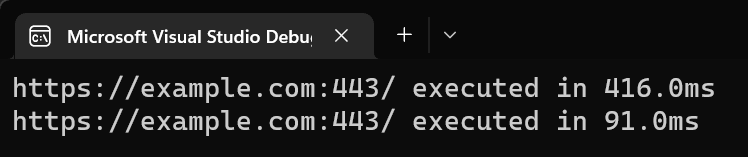
                Console.WriteLine($"{currentRequest.Url} executed in {currentRequest.ExecutionTime.ElapsedMilliseconds:F1}ms");
            }
        }
    }
}
#DiagnosticListener
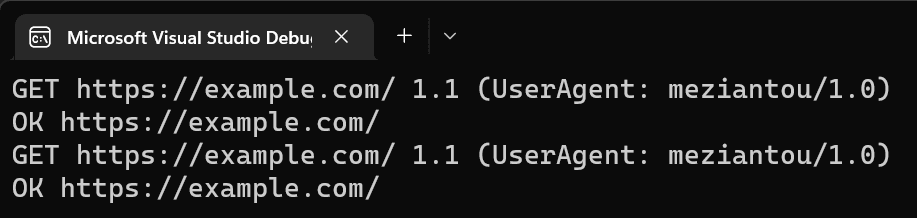
If you need to access the HttpRequestMessage/HttpResponseMessage instances, you can use a DiagnosticListener. This is useful for accessing request headers or the response status code.
Program.cs (C#)
using System.Diagnostics;

using var observer = new HttpRequestsObserver();
using (DiagnosticListener.AllListeners.Subscribe(observer))
{
    var client = new HttpClient();
    await client.GetStringAsync("https://example.com");
    await client.GetStringAsync("https://example.com");
}
HttpRequestsObserver.cs (C#)
using System.Diagnostics;

internal sealed class HttpRequestsObserver : IDisposable, IObserver<DiagnosticListener>
{
    private IDisposable _subscription;

    public void OnNext(DiagnosticListener value)
    {
        if (value.Name == "HttpHandlerDiagnosticListener")
        {
            Debug.Assert(_subscription == null);
            _subscription = value.Subscribe(new HttpHandlerDiagnosticListener());
        }
    }

    public void OnCompleted() { }
    public void OnError(Exception error) { }

    public void Dispose()
    {
        _subscription?.Dispose();
    }

    private sealed class HttpHandlerDiagnosticListener : IObserver<KeyValuePair<string, object>>
    {
        private static readonly Func<object, HttpRequestMessage> RequestAccessor = CreateGetRequest();
        private static readonly Func<object, HttpResponseMessage> ResponseAccessor = CreateGetResponse();

        public void OnCompleted() { }
        public void OnError(Exception error) { }

        public void OnNext(KeyValuePair<string, object> value)
        {
            // note: Legacy applications can use "System.Net.Http.HttpRequest" and "System.Net.Http.Response"
            if (value.Key == "System.Net.Http.HttpRequestOut.Start")
            {
                // The type is private, so we need to use reflection to access it.
                var request = RequestAccessor(value.Value);
                Console.WriteLine($"{request.Method} {request.RequestUri} {request.Version} (UserAgent: {request.Headers.UserAgent})");
            }
            else if (value.Key == "System.Net.Http.HttpRequestOut.Stop")
            {
                // The type is private, so we need to use reflection to access it.
                var response = ResponseAccessor(value.Value);
                Console.WriteLine($"{response.StatusCode} {response.RequestMessage.RequestUri}");
            }
        }

        private static Func<object, HttpRequestMessage> CreateGetRequest()
        {
            var requestDataType = Type.GetType("System.Net.Http.DiagnosticsHandler+ActivityStartData, System.Net.Http", throwOnError: true);
            var requestProperty = requestDataType.GetProperty("Request");
            return (object o) => (HttpRequestMessage)requestProperty.GetValue(o);
        }

        private static Func<object, HttpResponseMessage> CreateGetResponse()
        {
            var requestDataType = Type.GetType("System.Net.Http.DiagnosticsHandler+ActivityStopData, System.Net.Http", throwOnError: true);
            var requestProperty = requestDataType.GetProperty("Response");
            return (object o) => (HttpResponseMessage)requestProperty.GetValue(o);
        }
    }
}
#Additional resources
Do you have a question or a suggestion about this post? Contact me!
