In a previous post about Windows Console (cmd) Tips, I explained how to open cmd from Explorer to execute a command in the current directory. However, that approach opens the old terminal. Windows Terminal is a much better alternative, so let's configure it to open directly from Explorer instead.
You can use wt or wt.exe to launch Windows Terminal from Explorer or the Start menu. By default, it opens in the user directory (%USERPROFILE%) rather than the current directory. To start in the current directory, use the -d option: wt -d ..
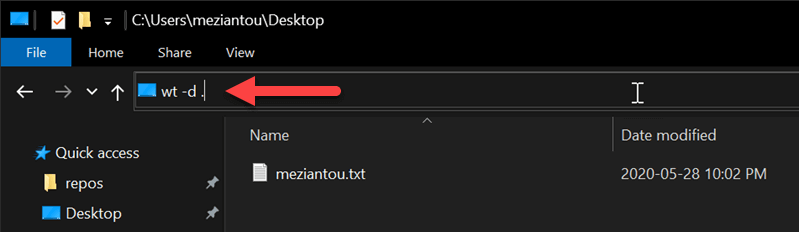
Instead of specifying the directory every time, you can update the Windows Terminal settings to use the current directory as the default starting location.
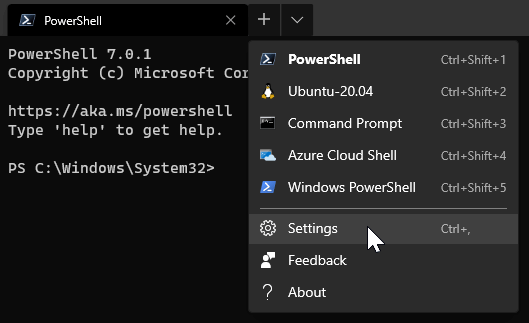
Open the settings file
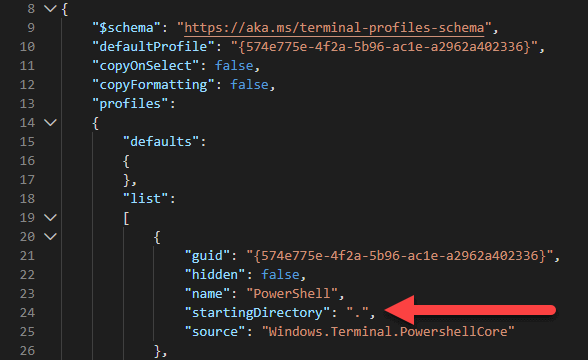
Add "startingDirectory": "." to the profile to set the starting directory to the current directory
#Additional resources
Do you have a question or a suggestion about this post? Contact me!
