Blazor WebAssembly and Blazor Server both support calling JS functions from .NET code. By using IJSRuntime.InvokeAsync<T>(name), you can invoke a JS function and get its result. This interface works well in both hosting models.
Razor
@inject IJSRuntime JSRuntime

@code{
    protected override async Task OnInitializedAsync()
    {
        await JSRuntime.InvokeAsync<string>("MyFunction");
    }
}
In Blazor WebAssembly, you have direct access to the JS runtime. Unlike Blazor Server, no network round-trip is required.
Accessing the JS runtime directly lets you bypass the abstraction layer and gain better performance. You can do this via WebAssemblyJSRuntime or IJSInProcessRuntime. Update the Main method to register these types with dependency injection:
C#
public static async Task Main(string[] args)
{
    var builder = WebAssemblyHostBuilder.CreateDefault(args);
    builder.RootComponents.Add<App>("app");

    builder.Services.AddTransient(sp => new HttpClient { BaseAddress = new Uri(builder.HostEnvironment.BaseAddress) });
    builder.Services.AddSingleton(serviceProvider => (IJSInProcessRuntime)serviceProvider.GetRequiredService<IJSRuntime>());
    builder.Services.AddSingleton(serviceProvider => (IJSUnmarshalledRuntime)serviceProvider.GetRequiredService<IJSRuntime>());

    await builder.Build().RunAsync();
}
Using IJSInProcessRuntime, you don't need asynchronous code. This avoids the state machine generated by the C# compiler and improves performance. It also simplifies your code since there is no need to use the await keyword.
Razor
@inject IJSInProcessRuntime JSInProcessRuntime

@code{
    protected override void OnInitialized()
    {
        // Synchronous call
        JSInProcessRuntime.Invoke<string>("MyFunction");
    }
}
The WebAssemblyJSRuntime also provides a low-level method that skips JS type marshalling. You must use Mono's conversion methods to handle types manually, both for parameters and return values:
JavaScript
function MyUnmarshalledFunction(rawName) {
    // Not documented and may change in future versions of mono, use it at your own risk...
    // The current source code of the BINDING functions: https://github.com/mono/mono/blob/b6ef72c244bd33623d231ff05bc3d120ad36b4e9/sdks/wasm/src/binding_support.js
    // These functions are defined by _framework/dotnet.<version>.js, which is imported by _framework/blazor.webassembly.js

    const name = BINDING.conv_string(rawName);       // Convert the handle to a JS string
    return BINDING.js_to_mono_obj(`Hello ${name}!`); // Convert a JS object to a mono object that you can use in the .NET code
}
Razor
@inject IJSUnmarshalledRuntime JSUnmarshalledRuntime

@code{
    protected override void OnInitialized()
    {
        JSUnmarshalledRuntime.InvokeUnmarshalled<string>("MyUnmarshalledFunction", "meziantou");
    }
}
Here's the performance of each method for 1000 invocations:
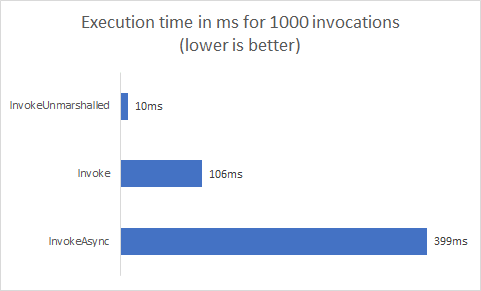
If you are targeting only Blazor WebAssembly, use IJSInProcessRuntime.Invoke whenever possible since it is almost 4 times faster than InvokeAsync and removes the need for await throughout your code. Reserve InvokeUnmarshalled for performance-critical scenarios, as the BINDING functions it relies on are undocumented and may change in future versions of Mono, which could break your code when upgrading.
In the next post, we'll see how to use InvokeUnmarshalled to drastically improve the performance of a specific JS method invocation. Stay tuned!
Do you have a question or a suggestion about this post? Contact me!
