When developing a web application, you often need to add redirection rules. The most common ones are: redirecting from HTTP to HTTPS, adding "www", or moving a website to another domain. URL rewriting is often used to provide user-friendly URLs.
Before diving in, let's clarify the difference between redirection and rewriting. A redirect sends an HTTP 301 or 302 response to the client, telling it to access the resource at a different URL. The browser updates the address bar and issues a new request using the new URL. Rewriting, on the other hand, happens entirely on the server and is a translation of one URL to another. The server processes the request using the rewritten URL, and the client is unaware of the change.
With IIS, you can use the web.config file to define the redirection and rewrite rules or use RewritePath:
XML
<?xml version="1.0" encoding="utf-8"?>
<configuration>
  <system.webServer>
    <rewrite>
      <rules>
        <rule name="Redirect to https">
          <match url="(.*)" />
          <conditions>
            <add input="{HTTPS}" pattern="Off" />
            <add input="{REQUEST_METHOD}" pattern="^get$|^head$" />
            <add input="{HTTP_HOST}" negate="true" pattern="localhost" />
          </conditions>
          <action type="Redirect" url="https://{HTTP_HOST}/{R:1}" />
        </rule>
      </rules>
    </rewrite>
  </system.webServer>
</configuration>
However, this approach does not work with ASP.NET Core. Instead, you can use the Microsoft.AspNetCore.Rewrite NuGet package (GitHub). It is straightforward to use. Open the startup.cs file and edit the Configure method:
C#
public void Configure(IApplicationBuilder app, IHostingEnvironment env, ILoggerFactory loggerFactory, ISiteProvider siteProvider)
{
    app.UseRewriter(new RewriteOptions()
        .AddRedirectToHttps()
        .AddRedirect(@"^section1/(.*)", "new/$1", (int)HttpStatusCode.Redirect)
        .AddRedirect(@"^section2/(\\d+)/(.*)", "new/$1/$2", (int)HttpStatusCode.MovedPermanently)
        .AddRewrite("^feed$", "/?format=rss", skipRemainingRules: false));

    app.UseStaticFiles();

    app.UseMvc(routes =>
    {
        routes.MapRoute(
            name: "default",
            template: "{controller=Home}/{action=Index}/{id?}");
    });
}
Rules are defined using regular expressions and substitutions. The regex is matched against HttpContext.Request.Path, which does not include the domain or the protocol. This means you cannot redirect to another domain or add "www" using this approach, but the next section covers how to handle those cases.
The package also lets you import existing rules directly. If you already have a web.config or an .htaccess file (.NET Core is cross-platform), you can load them as-is:
C#
app.UseRewriter(new RewriteOptions()
    .AddIISUrlRewrite(env.ContentRootFileProvider, "web.config")
    .AddApacheModRewrite(env.ContentRootFileProvider, ".htaccess"));
For complex rules that cannot be expressed with a regular expression, you can implement a custom rule. A rule is a class that implements Microsoft.AspNetCore.Rewrite.IRule:
C#
// app.UseRewriter(new RewriteOptions().Add(new RedirectWwwRule()));

public class RedirectWwwRule : Microsoft.AspNetCore.Rewrite.IRule
{
    public int StatusCode { get; } = (int)HttpStatusCode.MovedPermanently;
    public bool ExcludeLocalhost { get; set; } = true;

    public void ApplyRule(RewriteContext context)
    {
        var request = context.HttpContext.Request;
        var host = request.Host;
        if (host.Host.StartsWith("www", StringComparison.OrdinalIgnoreCase))
        {
            context.Result = RuleResult.ContinueRules;
            return;
        }

        if (ExcludeLocalhost && string.Equals(host.Host, "localhost", StringComparison.OrdinalIgnoreCase))
        {
            context.Result = RuleResult.ContinueRules;
            return;
        }

        string newPath = request.Scheme + "://www." + host.Value + request.PathBase + request.Path + request.QueryString;

        var response = context.HttpContext.Response;
        response.StatusCode = StatusCode;
        response.Headers[HeaderNames.Location] = newPath;
        context.Result = RuleResult.EndResponse; // Do not continue processing the request
    }
}
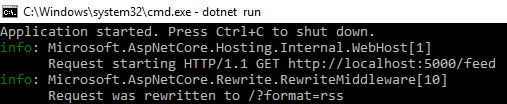
Finally, you can debug your redirections and rewrites using the log. Every standard rule writes a log entry when it transforms a URL:
Adding redirection and rewrite rules in ASP.NET Core is straightforward.
Do you have a question or a suggestion about this post? Contact me!
