Delivering source code to a customer or for a demo can be tedious. Project folders typically contain temporary files, binary files, configuration files for various tools, and more. They may also be linked to a TFS server.
ExportSrc tackles this problem:
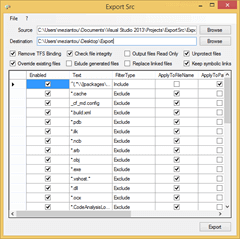
The GUI is simple, though it may seem overwhelming at first due to the many default filters. In most cases, you only need to drag and drop the folder to export onto the window, choose a destination folder, and click the Export button.
The default filters and options are well-tuned and work with many project types (C#, VB.NET, C++, SQL Database, CodeFluent Entities, etc.) and third-party tools such as ReSharper. By default, NuGet packages are preserved during export. To exclude them, uncheck the first filter.
For those who want to automate the export process, the application can also be invoked from a console or as an MSBuild task.
ExportSrc is a handy tool to add to your toolbox. It is available on GitHub: https://github.com/meziantou/exportsrc
Do you have a question or a suggestion about this post? Contact me!
