This article covers recursive queries using Common Table Expressions (CTEs). We will use the following table:
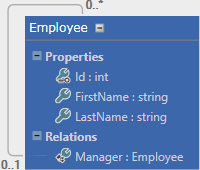
Or in SQL:
SQL
CREATE TABLE [dbo].[Employee] (
   [Id]        INT            IDENTITY (1, 1) NOT NULL,
   [FirstName] NVARCHAR (100) NOT NULL,
   [LastName]  NVARCHAR (100) NOT NULL,
   [ManagerId] INT            NULL,
   PRIMARY KEY CLUSTERED ([Id] ASC),
   CONSTRAINT [FK_Manager] FOREIGN KEY ([ManagerId]) REFERENCES [dbo].[Employee] ([Id])
);
The goal is to retrieve the complete hierarchy with indentation in a single query:

Here's what MSDN is saying about CTE:
A common table expression (CTE) can be thought of as a temporary result set that is defined within the execution scope of a single SELECT, INSERT, UPDATE, DELETE, or CREATE VIEW statement. A CTE is similar to a derived table in that it is not stored as an object and lasts only for the duration of the query. Unlike a derived table, a CTE can be self-referencing and can be referenced multiple times in the same query.
Here is an example of CTE:
SQL
-- Declare the CTE
WITH EmployeeCTE (Id, FullName)
AS
(
    SELECT Id, FirstName + ' ' + LastName
    FROM Employee
)
-- Use the CTE
SELECT * From EmployeeCTE
Let's see how to use CTEs to query the Employee table.
#Get all results with recursion
SQL Server supports recursive CTEs. To write one, you split the query into two parts:
- The first part returns the initial data to start the recursion. In our case, it selects employees with no manager (the root of the hierarchy).
- The second part selects new rows based on the previously selected rows. In our case, it uses the relationship between
Id and ManagerId to find the next level.
Recursion stops when no more rows are returned.
Here is the query to select all employees recursively:
SQL
WITH EmployeeHierarchy(Id, FirstName, LastName, ManagerId)
AS
(
  -- Root level of the hierarchy
  SELECT Id, FirstName, LastName, ManagerId
  FROM Employee
  WHERE ManagerId IS NULL
  -- Combine result with the result of the recursion
  UNION ALL
  -- Load the next level of the hierarchy
  SELECT e.Id, e.FirstName, e.LastName, e.ManagerId
  FROM Employee e
  INNER JOIN EmployeeHierarchy eh -- self-reference! (recursion)
  ON e.ManagerId = eh.Id
)
SELECT * FROM EmployeeHierarchy
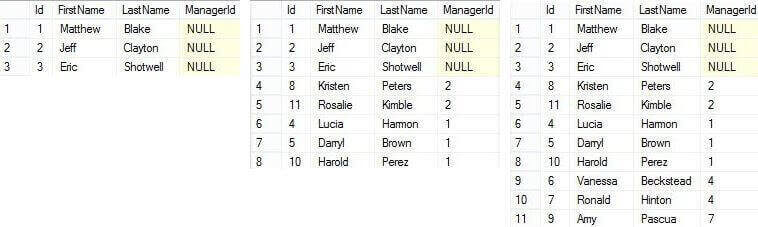
To illustrate how the query works, here are the results after each recursive step:
#Show indentation and full name
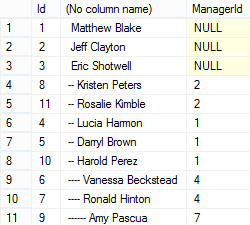
We now have the desired dataset, but the results lack any visual indication of hierarchy (the "–" prefix). We can add a depth column to the CTE and increment it with each recursive step:
SQL
WITH EmployeeHierarchy(Id, FirstName, LastName, ManagerId, level)
AS
(
  SELECT Id, FirstName, LastName, ManagerId, 0
  FROM Employee
  WHERE ManagerId IS NULL
  UNION ALL
  SELECT e.Id, e.FirstName, e.LastName, e.ManagerId, eh.level + 1 -- compute the level
  FROM Employee e
  INNER JOIN EmployeeHierarchy eh ON e.ManagerId = eh.Id
)
SELECT Id, REPLICATE('--', level) + ' ' + FirstName + ' ' + LastName, ManagerId
FROM EmployeeHierarchy
#Sort the rows in the desired order
We have the hierarchy depth, but sorting is still an issue. The existing columns do not produce the correct order. The solution is to add a column that stores the full path of each row as a string, which can then be used for sorting:
SQL
WITH EmployeeHierarchy(Id, FirstName, LastName, ManagerId, level, fullpath)
AS
(
  SELECT Id, FirstName, LastName, ManagerId, 0, CAST(Id AS NVARCHAR(200))
  FROM Employee
  WHERE ManagerId IS NULL
  UNION ALL
  SELECT e.Id, e.FirstName, e.LastName, e.ManagerId, eh.level + 1, CAST(eh.fullpath + '/' + CAST(e.Id AS NVARCHAR(20)) AS NVARCHAR(200))
  FROM Employee e
  INNER JOIN EmployeeHierarchy eh ON e.ManagerId = eh.Id
)
SELECT REPLICATE('--', level) + ' ' + FirstName + ' ' + LastName, fullpath FROM EmployeeHierarchy
ORDER BY fullpath
CAST AS NVARCHAR(200) ensures the fullpath column has a consistent type throughout the recursion, since column types in a CTE must remain constant. If the hierarchy is deep, increase the size of the fullpath column to avoid truncation.
This time the result matches what we expected:

CTEs are a practical and powerful tool for this kind of problem. Note that there are other ways to model hierarchical data that can simplify these queries. For example, SQL Server 2008 introduced the HierarchyId type, which will be covered in another article.
Do you have a question or a suggestion about this post? Contact me!
