.NET 7 introduces a new Regex feature: generating the source code of a regular expression at compile time using a Roslyn Source Generator. Generating source code at compile time rather than at runtime has several advantages:
- The first regex execution is faster because parsing and code generation happen at compile time rather than at runtime.
- The regex benefits from all available optimizations. More time can be spent on optimization at compile time. Currently, the source generator applies the same optimizations as
RegexOptions.Compiled, but this may improve in the future. - On platforms that do not support runtime code generation, such as iOS, you can achieve maximum regex performance.
- The source code is more readable because it requires giving the regex method a meaningful name.
- The generated code includes a description of what the regex matches, making it easier to understand even without deep knowledge of regex syntax.
- The code is more trimmable because it does not require including all the code for Regex parsing and code generation.
- The code can be debugged with breakpoints if needed.
- You can learn useful optimizations by examining the generated code 🙂
To use the Regex source generator, you need .NET 7 and C# 11 (preview). All regex parameters (pattern, options, and timeout) must be constant.
C#
public static bool IsLowercase(string value)
{
    // ✔️ The pattern is contant
    // => can be converted to use the source generator
    var lowercaseLettersRegex = new Regex("[a-z]+");
    return lowercaseLettersRegex.IsMatch("abc");
}

public static bool IsLowercase(string value)
{
    // ✔️ The pattern, options, and timeout are contant
    // => can be converted to use the source generator
    return Regex.IsMatch(value, "[a-z]+", RegexOptions.CultureInvariant, TimeSpan.FromSeconds(1));
}

public static bool Match(string value, string pattern)
{
    // ❌ The pattern is not constant => cannot use the source generator
    return Regex.IsMatch(value, pattern);
}
To convert the previous code to the source generator, you need to extract the Regex to a partial method and decorate the method with the [GeneratedRegex] attribute:
C#
// The Source Generator generates the code of the method at compile time
[GeneratedRegex("^[a-z]+$", RegexOptions.CultureInvariant, matchTimeoutMilliseconds: 1000)]
private static partial Regex LowercaseLettersRegex();

public static bool IsLowercase(string value)
{
    return LowercaseLettersRegex().IsMatch(value);
}
You can view the generated code in Solution Explorer or by using "Go to Definition" on the partial method:
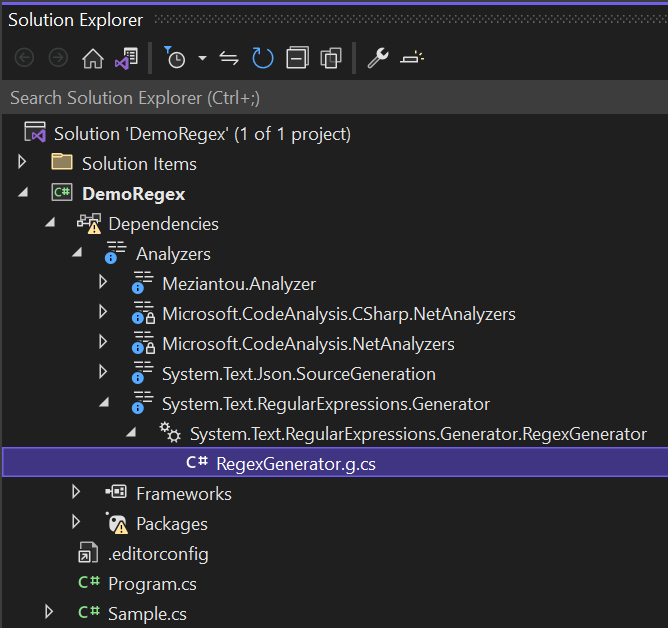
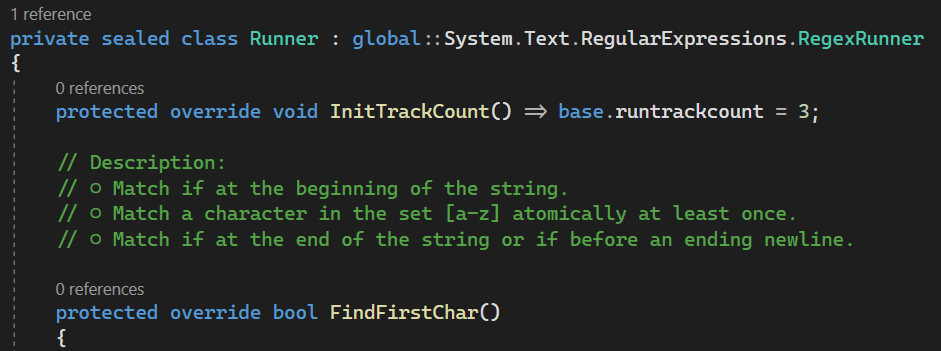
#Automating the conversion of a Regex to a Source Generator
Meziantou.Analyzer contains a rule that identifies Regex instances that can benefit from the Source Generator and provides a code fix to convert them automatically. First, add the NuGet package to your project:
Shell
dotnet add package Meziantou.Analyzer
Then, the rule MA0110 reports any regex that can benefit from the Source Generator. You can use the code fixer to convert the Regex to a Source Generator. The fixer adds the partial keyword if needed to the parent types, extracts the Regex to a partial method, and enters rename mode.
Meziantou.Analyzer only suggests the refactoring when the project targets C# 11 and the [GeneratedRegex] attribute is available (.NET 7).
Do you have a question or a suggestion about this post? Contact me!
