With the rise of microservices, it is increasingly common to develop .NET applications on Windows and deploy them on Linux. Because there are many differences between the two platforms, debugging on Linux directly rather than on Windows helps avoid production errors. In Visual Studio, you can use Docker to debug your application on Linux, but if you don't use Docker for deployment, creating a Dockerfile requires time and expertise. You could also use SSH to debug an application running on Linux, but the development workflow is cumbersome.
A Visual Studio extension now lets you quickly run and debug a .NET application on WSL 2 directly from Visual Studio. WSL 2 includes a full Linux kernel, making it very similar to running the app on an actual Linux machine. WSL 2 is also convenient because it shares the same file system as Windows, so you can easily switch between debugging on Windows and on WSL.
Install WSL (documentation) and be sure the default WSL distribution is supported. Currently, Ubuntu and Debian are supported.
Shell
wsl --list
Shell
wsl --setdefault Ubuntu-20.04
Install the VS Extension: .NET Core Debugging with WSL 2 - Preview
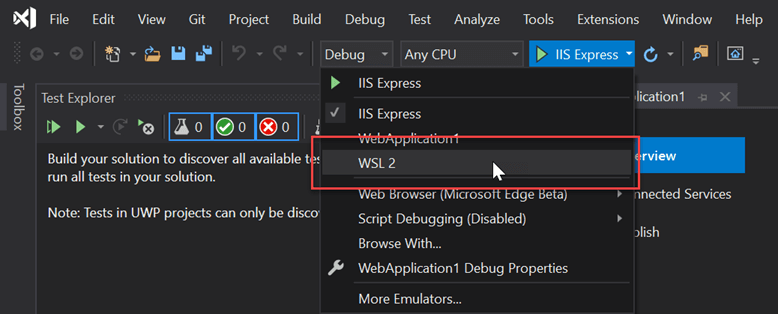
Change the Debug target:
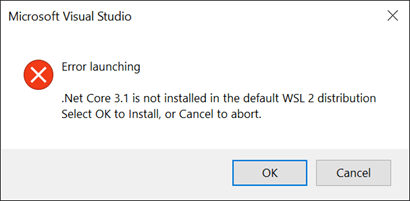
Install .NET and vsdbg in the WSL instance if needed by using the button in the Visual Studio gold bar or the error window:
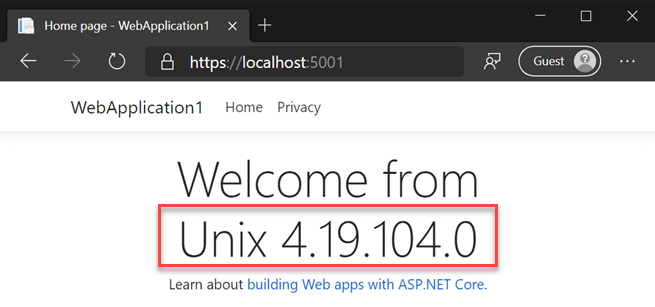
You can verify that the app is running on WSL by checking Environment.OSVersion. Here is an example output from a web application:
Note that this extension does not support running tests in WSL 2. It only supports running and debugging the application.
Do you have a question or a suggestion about this post? Contact me!
