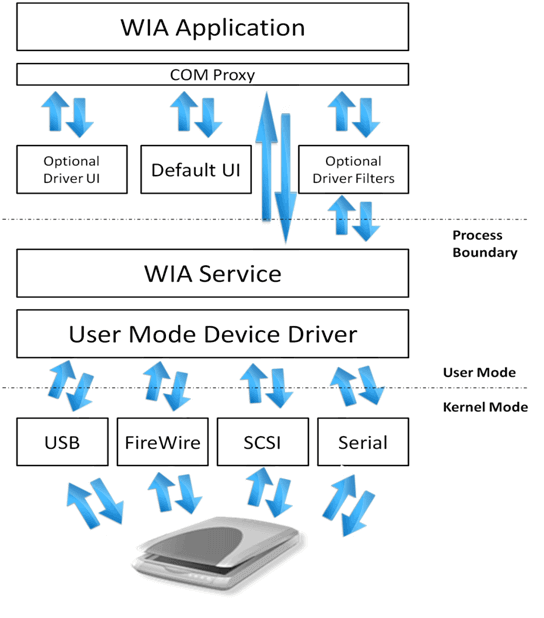
Windows Image Acquisition (WIA) was introduced with Windows 2000. It provides access to scanner and webcam devices without requiring knowledge of low-level device interfaces. WIA also includes built-in GUIs to simplify using these devices from code (scripts, COM, and .NET via COM). Here is a diagram showing the WIA architecture:
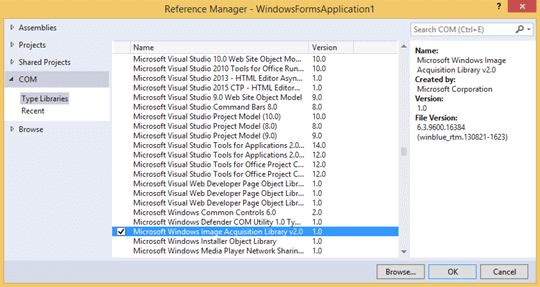
To use WIA from C# code, you must add the Microsoft Windows Image Acquisition Library v2.0 COM reference:
And add the corresponding using directive:
C#
using WIA;
To scan a document, use the CommonDialog class, which displays the built-in WIA screens. Call its ShowAcquireImage method as follows:
C#
var dlg = new WIA.CommonDialog();
ImageFile image = dlg.ShowAcquireImage(
    DeviceType: WiaDeviceType.ScannerDeviceType,
    Intent: WiaImageIntent.ColorIntent,
    Bias: WiaImageBias.MinimizeSize,
    FormatID: ImageFormat.Jpeg.Guid.ToString("B"),
    AlwaysSelectDevice: true,
    UseCommonUI: true,
    CancelError: false);
Here is the description of the arguments:
- ScannerDeviceType: Desired device type (scanner, camera, or webcam)
- Intent: Scanner profile (color, black and white, or text)
- Bias: Quality bias (minimize size vs. maximize quality)
- Format: Output image format
- AlwaysSelectDevice: Controls whether the device selection dialog is shown
- UseCommonUI: Controls whether the WIA UI is displayed
- CancelError: Determines whether an exception is thrown when the user cancels
This method displays the following screens:
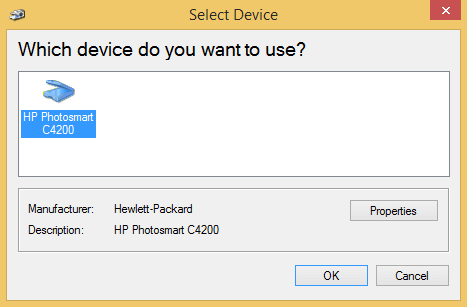
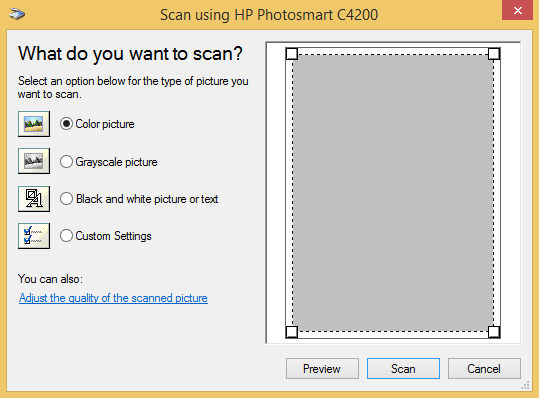
The ShowAcquireImage method returns an ImageFile object representing the scan result. You can save it directly to a file:
C#
string path = @"demo.jpg";
if (image != null)
{
    image.SaveFile(path);
}
Scanned images are often large (several MB), so applying compression before saving is recommended. To do this, read the image data as a byte array, then use the .NET Encoder to compress it:
C#
Vector vector = image.FileData;
if (vector != null)
{
    byte[] bytes = vector.get_BinaryData() as byte[];
    if (bytes != null)
    {
        using (var ms = new MemoryStream(bytes))
        {
            using (Bitmap bitmap = new Bitmap(ms))
            {
                ImageCodecInfo codecInfo = ImageCodecInfo.GetImageDecoders().First(codec => codec.FormatID == ImageFormat.Jpeg.Guid);
                Encoder encoder = Encoder.Quality;
                EncoderParameters parameters = new EncoderParameters(1);
                EncoderParameter qualityParameter = new EncoderParameter(encoder, 80L); // quality 80%
                parameters.Param[0] = qualityParameter;
                bitmap.Save(path, codecInfo, parameters);
            }
        }
    }
}
With just a few lines of code, Windows Image Acquisition lets you provide a graphical scanning interface that works with any scanner.
Do you have a question or a suggestion about this post? Contact me!
