In this post, we will see how to prevent a user from opening multiple instances of an application and how to notify the first instance when the user launches the second instance.
VB.NET developers may wonder why this post is necessary. In VB.NET, you simply tick a checkbox:
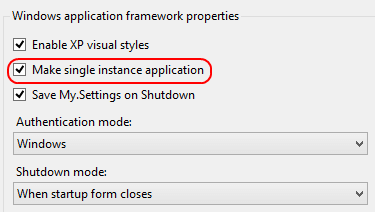
In C#, this option is unfortunately not available. However, you can achieve the same behavior by adding a reference to Microsoft.VisualBasic:
C#
class Program
{
    class App : Microsoft.VisualBasic.ApplicationServices.WindowsFormsApplicationBase
    {
        public App()
        {
            IsSingleInstance = true;
        }

        protected override void OnCreateMainForm()
        {
            MainForm = new Form1();
        }
    }

    static void Main(string[] args)
    {
        var app = new App();
        app.Run(args);
    }
}
This is straightforward, but it only works for Windows Forms applications. For other application types, you need to implement the logic yourself.
Several unreliable approaches exist. The first is to enumerate processes with Process.GetProcesses to check whether a process with the same name is already running. Since multiple applications can share the same process name, this method is unreliable. The second is to create a lock file on startup. If the file already exists, an instance is assumed to be running. The problem is ensuring the file is deleted when the application closes, including when it crashes unexpectedly.
A better approach is to rely on a Windows-native mechanism. When two or more threads need to access a shared resource simultaneously, the system requires a synchronization primitive to ensure only one thread uses the resource at a time. A Mutex grants a single thread exclusive access to a shared resource. If one thread holds a mutex, any other thread attempting to acquire it is blocked until the first thread releases it. Mutexes can be named, which allows them to be shared across processes.
The idea is to create a named Mutex at startup and acquire ownership of it. If a second instance launches, it will not be able to take ownership of the Mutex.
C#
const string AppId = "Local\\1DDFB948-19F1-417C-903D-BE05335DB8A4"; // Unique per application
static void Main(string[] args)
{
    using (Mutex mutex = new Mutex(false, AppId))
    {
        if (!mutex.WaitOne(0))
        {
            Console.WriteLine("2nd instance");
            return;
        }

        Console.WriteLine("Started");
        Console.ReadKey();
    }
}
The next step is to notify the first instance when the user tries to launch another one. For this, you can use IPC (Inter-Process Communication). The first instance registers an IPC channel, and subsequent instances connect to it to send a message.
C#
static void Main(string[] args)
{
    using (Mutex mutex = new Mutex(false, AppId))
    {
        if (!mutex.WaitOne(0))
        {
           ...
        }

        IpcChannel channel = new IpcChannel(AppId);
        ChannelServices.RegisterChannel(channel, false);
        RemotingConfiguration.RegisterWellKnownServiceType(typeof(SingleInstance), "RemotingServer", WellKnownObjectMode.Singleton);
        Console.WriteLine("Started");
        Console.ReadKey();
    }
}

// Objet used by the client and the server
private class SingleInstance : MarshalByRefObject
{
    public void Execute(string[] args)
    {
        Console.WriteLine("Second instance: " + string.Join(" ", args));
    }
}
Now the other instances will send a message to the server (first instance):
C#
if (!mutex.WaitOne(0))
{
    IpcChannel channel = new IpcChannel();
    ChannelServices.RegisterChannel(channel, false);
    SingleInstance app = (SingleInstance)Activator.GetObject(typeof(SingleInstance), string.Format("ipc://{0}/RemotingServer", AppId));
    app.Execute(args);
    return;
}
There are other mechanisms for communicating between applications such as Windows Message (RegisterWindowMessage, PostMessage) or RPC. A fairly complete list is available on MSDN (Interprocess Communications).
The complete code: https://gist.github.com/meziantou/84b46cee16e9b565675e
Do you have a question or a suggestion about this post? Contact me!
