Change Data Capture (CDC) is a mechanism built into SQL Server since version 2008 that tracks the history of changes to data in one or more tables. It is useful when you need to record every step (creation, modification, deletion) that led to the current state of a table's data at any given point in time.
#Enable Change Data Capture
Change Data Capture is not enabled by default, so use the following command:
SQL
USE Sample
GO
EXEC sys.sp_cdc_enable_db
GO
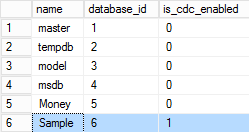
You can verify the command executed successfully with the following query:
SQL
SELECT [name], database_id, is_cdc_enabled
FROM sys.databases
You can also see that SQL Server adds some new tables to the database:
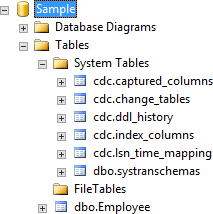
The table names are self-explanatory, but here is an overview of the data each one contains:
cdc.captured_columns: list of captured columns
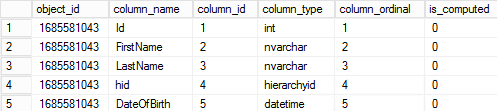
cdc.change_tables: Tables whose capture is enabled

cdc.ddl_history: Contains all structure changes (DDL)

cdc.index_columns: Contains the indexes of the captured tables

cdc.lsn_time_mapping: Contains the link between the LSNs and the date.

#Enable Change Data Capture on a table
Once CDC is enabled at the database level, it must also be enabled on each table you want to track. Run the following procedure:
SQL
EXEC sys.sp_cdc_enable_table
@source_schema = N'dbo',
@source_name   = N'Employee',
@role_name     = NULL
GO
If needed, you can filter which columns to track to reduce the amount of data stored:
SQL
EXEC sys.sp_cdc_enable_table
@source_schema = N'dbo',
@source_name   = N'Employee',
@role_name     = NULL,
@index_name    = N'PK_Employee',
@captured_column_list = N'[Id],[FirstName],[LastName]'
GO
Once again, you can verify that CDC is enabled:
SQL
SELECT [name], is_tracked_by_cdc
FROM sys.tables
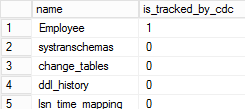
You can also see that a new table has been created:
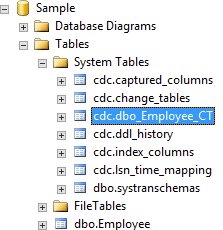
And 2 jobs:
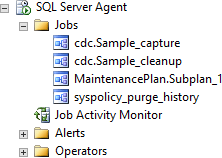
And you can also use the following command to view the configuration of CDC:
SQL
EXEC sys.sp_cdc_help_change_data_capture
Now any change to the Employee table (insert, update, delete) will automatically add one or more rows to the cdc.dbo_Employee_CT table, without any modification to existing queries.
#Querying
Let's start by doing some operations on the table:
SQL
INSERT INTO Employee (FirstName, LastName, hid) VALUES ('John', 'Doe', '/1/')

UPDATE Employee
SET FirstName = 'Jane'
WHERE Id = 20

UPDATE Employee
SET hid = '/2/'
WHERE Id = 20
You can see that the changes are directly saved in raw form in the table created by CDC:
SQL
SELECT * FROM [Sample].[cdc].[dbo_Employee_CT]

In this table we find:
- The operation performed (
__$operation)- 1 = Delete
- 2 = Insert
- 3 = Row value before an update
- 4 = Row value after an update
- A mask indicating which columns were modified, based on their ordinal position
- 0x0F => columns 1, 2, 3 and 4
- 0x02 => column 2
- 0x08 => column 4
- The remaining columns contain the row values from the source table
In the example above, the 3 operations are:
- Row insertion
- Update of the FirstName column from John to Jane
- Update of the hid column from 0x58 to 0x68
SQL Server provides some functions to query this table more easily:
cdc.fn_cdc_get_all_changes_<capture_instance>(from_lsn, to_lsn, row_filter_options) (doc): Returns all changes between two LSNs for all rows.cdc.fn_cdc_get_net_changes_<capture_instance>(from_lsn, to_lsn, row_filter_options) (doc): Returns one change per row, representing its final state. For example, if a row is inserted and then updated three times, the result reflects the row after all four operations.
These functions do not use dates directly but rely on LSNs. To obtain them, use the following helper functions:
sys.fn_cdc_get_min_lsn('dbo_Employee')sys.fn_cdc_get_max_lsn()sys.fn_cdc_map_time_to_lsn('smallest greater than', GETDATE ())sys.fn_cdc_map_time_to_lsn ('largest less than or equal', GETDATE ())
To illustrate, here is an example that lists the net changes to the table over the last 30 minutes:
SQL
SELECT *
FROM cdc.fn_cdc_get_net_changes_dbo_Employee(
        sys.fn_cdc_map_time_to_lsn('smallest greater than', DATEADD(minute, -30, GETDATE())),
        sys.fn_cdc_map_time_to_lsn('largest less than or equal', GETDATE()),
        'all')

And one that lists all changes to the table from the beginning:
SQL
SELECT *
FROM cdc.fn_cdc_get_all_changes_dbo_Employee(
        sys.fn_cdc_get_min_lsn('dbo_Employee'),
        sys.fn_cdc_get_max_lsn(),
        N'all');

Captured data can quickly increase database size. This is why SQL Server includes the cdc.<database>_cleanup job by default. This job regularly purges old records and is configured by default to run daily, retaining data for the last 3 days. It uses the sys.sp_cdc_cleanup_change_table procedure.
This post covered the Change Data Capture feature in SQL Server. As shown, CDC automatically tracks data changes with minimal setup – no custom code required.
Do you have a question or a suggestion about this post? Contact me!
