When a process running as Administrator starts a child process, the child also runs as Administrator. This is a security risk. A good practice is to run processes with the minimum privileges required.
To start a process as a normal user from an Administrator process, you need to create a limited token and use the CreateProcessWithUserW function. Windows provides several ways to create a limited token. In this post, I will use the WinSafer APIs as they are the simplest approach. If you need more control over the access token, you can use the CreateRestrictedToken function instead.
Let's create a new console application:
Shell
dotnet new console
You will need native Win32 methods to create the access token and start the process. Instead of writing [DllImport] declarations yourself, you can use the Microsoft.Windows.CsWin32 source generator. I have already written about this package here: Generating PInvoke code for Win32 apis using a Source Generator. Add the package with:
Shell
dotnet add package Microsoft.Windows.CsWin32 --prerelease
Next, instruct the source generator which methods to generate by creating a NativeMethods.txt file at the root of the project. This file lists the methods and constants you want to use.
NativeMethods.txt
SaferCreateLevel
SaferComputeTokenFromLevel
SaferCloseLevel
SAFER_SCOPEID_*
SAFER_LEVELID_*
SAFER_LEVEL_*
CreateProcessAsUser
TOKEN_MANDATORY_LABEL
SE_GROUP_INTEGRITY
ConvertStringSidToSid
SetTokenInformation
LocalFree
Finally, create the access token and start the process with it. Here is the annotated code:
C#
using System.ComponentModel;
using System.Runtime.InteropServices;
using Windows.Win32;
using Windows.Win32.Security;

unsafe
{
    SAFER_LEVEL_HANDLE saferHandle = default;
    Windows.Win32.Foundation.PSID psid = default;
    try
    {
        // 1. Create a new new access token
        if (!PInvoke.SaferCreateLevel(PInvoke.SAFER_SCOPEID_USER, PInvoke.SAFER_LEVELID_NORMALUSER, PInvoke.SAFER_LEVEL_OPEN, out saferHandle, (void*)null))
            throw new Win32Exception(Marshal.GetLastWin32Error());

        if (!PInvoke.SaferComputeTokenFromLevel(saferHandle, null, out var newAccessToken, 0, null))
            throw new Win32Exception(Marshal.GetLastWin32Error());

        // Set the token to medium integrity because SaferCreateLevel doesn't reduce the
        // integrity level of the token and keep it as high.
        if (!PInvoke.ConvertStringSidToSid("S-1-16-8192", out psid))
            throw new Win32Exception(Marshal.GetLastWin32Error());

        TOKEN_MANDATORY_LABEL tml = default;
        tml.Label.Attributes = PInvoke.SE_GROUP_INTEGRITY;
        tml.Label.Sid = psid;

        var length = (uint)Marshal.SizeOf(tml);
        if (!PInvoke.SetTokenInformation(newAccessToken, TOKEN_INFORMATION_CLASS.TokenIntegrityLevel, &tml, length))
            throw new Win32Exception(Marshal.GetLastWin32Error());

        // 2. Start process using the new access token
        // Cannot use Process.Start as there is no way to set the access token to use
        var commandLine = "ChildApp.exe";
        Windows.Win32.System.Threading.STARTUPINFOW si = default;
        Span<char> span = stackalloc char[commandLine.Length + 2];
        commandLine.CopyTo(span);
        if (PInvoke.CreateProcessAsUser(newAccessToken, null, ref span, null, null, bInheritHandles: false, default, null, null, in si, out var pi))
        {
            PInvoke.CloseHandle(pi.hProcess);
            PInvoke.CloseHandle(pi.hThread);
        }
    }
    finally
    {
        if (saferHandle != default)
        {
            PInvoke.SaferCloseLevel(saferHandle);
        }

        if (psid != default)
        {
            PInvoke.LocalFree((nint)psid.Value);
        }
    }
}
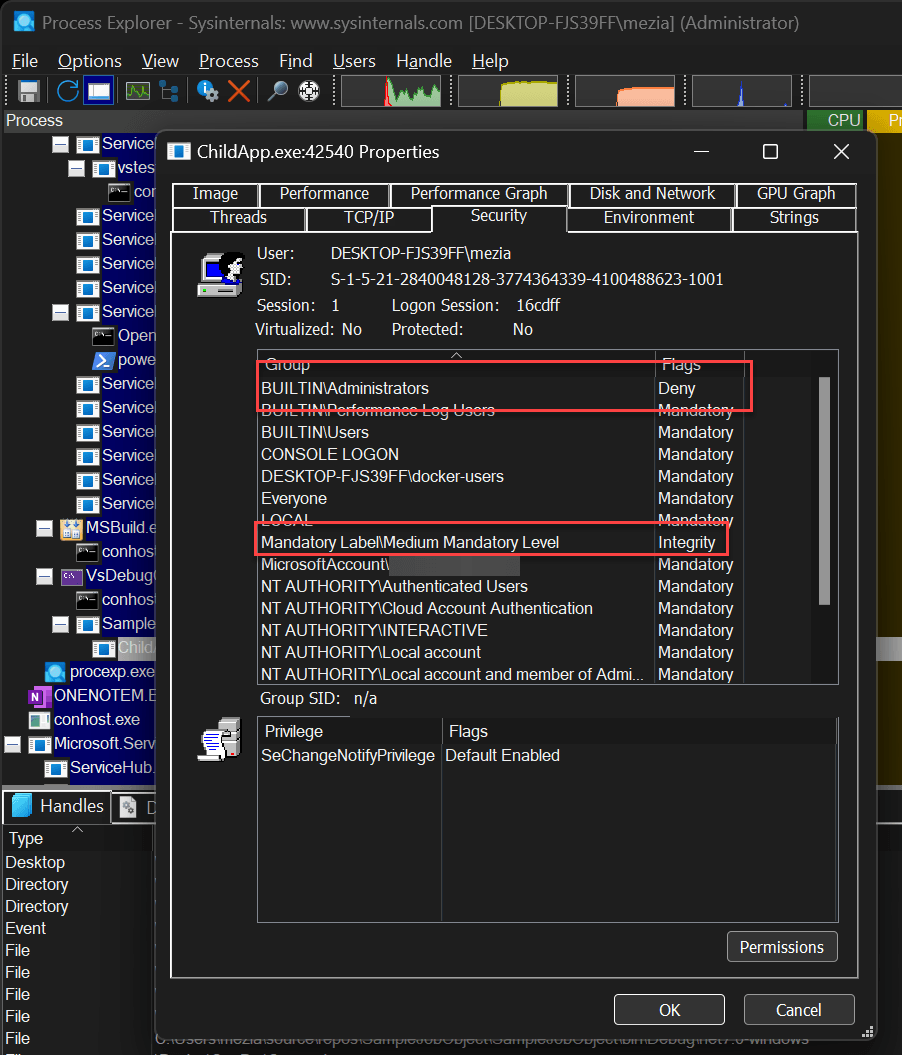
You can use Process Explorer to view the security token associated with a process:
#Additional resources
Do you have a question or a suggestion about this post? Contact me!
