In .NET, strings are immutable. Every operation that appears to modify a string actually creates a new one. When concatenating strings in a loop, use StringBuilder to improve performance. StringBuilder represents a mutable sequence of characters, so you can modify it without allocating a new string each time. However, even with StringBuilder, certain usage patterns can reduce its benefits. This post covers several optimizations worth knowing.
#Call Append multiple times instead of concatenating string
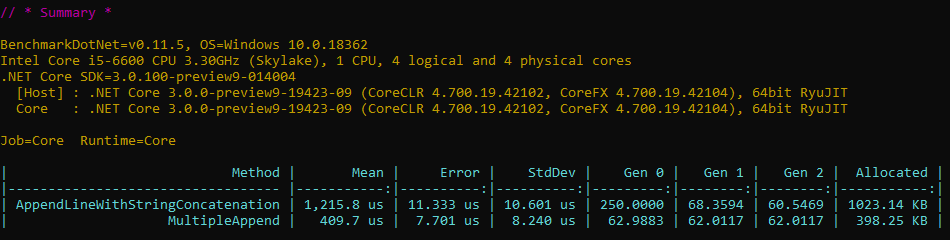
The following code is suboptimal because it allocates a new string by concatenating "test" and i, then passes that intermediate string to AppendLine:
C#
[Benchmark]
public string AppendLineWithStringConcatenation()
{
    var sb = new StringBuilder();
    for (int i = 0; i < 10000; i++)
    {
        sb.AppendLine("test" + i);
    }
    return sb.ToString();
}
Instead, call Append for each part and then call AppendLine. Internally, Append uses ISpanFormattable to avoid allocations when converting numbers to strings. Here is the optimized code:
C#
[Benchmark]
public string MultipleAppend()
{
    var sb = new StringBuilder();
    for (int i = 0; i < 10000; i++)
    {
        sb.Append("test").Append(i).AppendLine();
    }
    return sb.ToString();
}
The second approach is faster and allocates less memory:
#Use Append(char) instead of Append(string) when possible
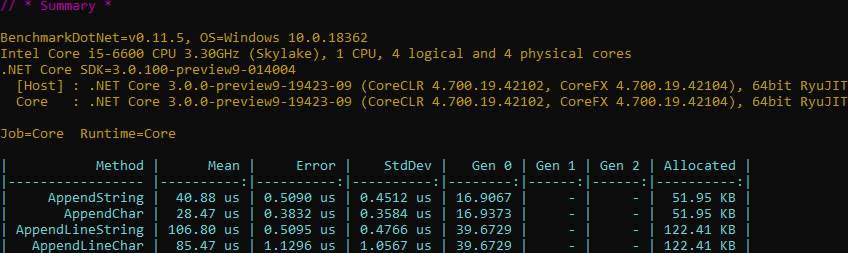
When appending a single character, prefer Append(char) over Append(string). The char overload is about 40% faster. You can also replace AppendLine("a") with Append('a').AppendLine().
C#
[Benchmark]
public string AppendString()
{
    var sb = new StringBuilder();
    for (int i = 0; i < 10000; i++)
    {
        sb.Append("a");
    }
    return sb.ToString();
}

[Benchmark]
public string AppendChar()
{
    var sb = new StringBuilder();
    for (int i = 0; i < 10000; i++)
    {
        sb.Append('a');
    }
    return sb.ToString();
}
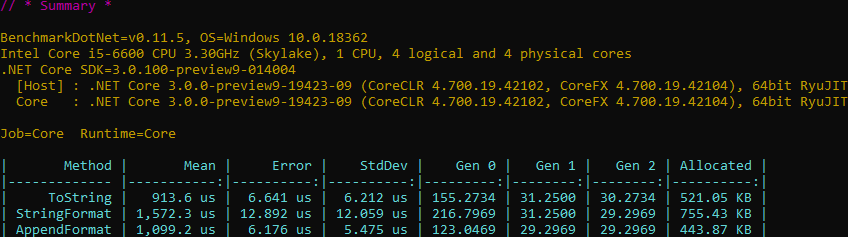
Using ToString is slightly faster, but AppendFormat allocates the least memory.
C#
[Benchmark]
public string ToString()
{
    var sb = new StringBuilder();
    for (int i = 0; i < 10000; i++)
    {
        sb.Append(42.ToString("N2"));
    }
    return sb.ToString();
}

[Benchmark]
public string StringFormat()
{
    var sb = new StringBuilder();
    for (int i = 0; i < 10000; i++)
    {
        sb.Append(string.Format("{0:N2}", 42)); // Or sb.Append($"{42:N2}")
    }
    return sb.ToString();
}

[Benchmark]
public string AppendFormat()
{
    var sb = new StringBuilder();
    for (int i = 0; i < 10000; i++)
    {
        sb.AppendFormat("{0:N2}", 42);
    }
    return sb.ToString();
}
#Use Append(ReadOnlySpan<char>) instead Append(str.SubString())
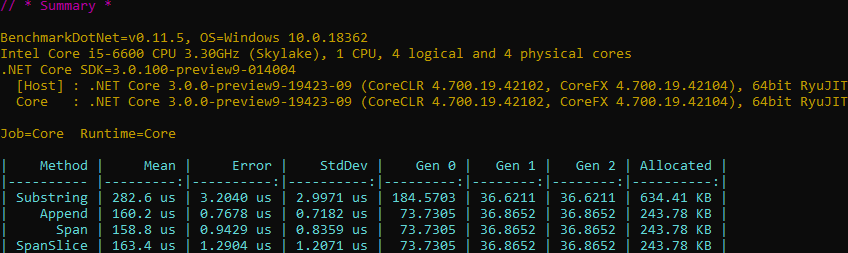
Instead of string.Substring, use the Append overload that accepts a start index and length. This avoids creating an intermediate string, reducing allocations. In .NET Core, you can also pass a Span<char> directly.
C#
private const string Str = "abcdefghijklmnopqrstuvwxyz";

[Benchmark]
public string Substring()
{
    var sb = new StringBuilder();
    for (int i = 0; i < 10000; i++)
    {
        sb.Append(Str.Substring(0, 6));
    }
    return sb.ToString();
}

[Benchmark]
public string Append()
{
    var sb = new StringBuilder();
    for (int i = 0; i < 10000; i++)
    {
        sb.Append(Str, 0, 6);
    }
    return sb.ToString();
}

[Benchmark]
public string Span()
{
    var sb = new StringBuilder();
    for (int i = 0; i < 10000; i++)
    {
        sb.Append(Str.AsSpan(0, 6));
    }
    return sb.ToString();
}

[Benchmark]
public string SpanSlice()
{
    var sb = new StringBuilder();
    for (int i = 0; i < 10000; i++)
    {
        sb.Append(Str.AsSpan().Slice(0, 6));
    }
    return sb.ToString();
}
#Use AppendJoin instead of Append(string.Join())
StringBuilder.AppendJoin is available in .NET Core and may not be widely known. Use it instead of string.Join to avoid the intermediate string allocation.
C#
[Benchmark]
public string StringJoin()
{
    var sb = new StringBuilder();
    for (int i = 0; i < 10000; i++)
    {
        sb.Append(string.Join(' ', s_values));
    }
    return sb.ToString();
}

[Benchmark]
public string AppendJoin()
{
    var sb = new StringBuilder();
    for (int i = 0; i < 10000; i++)
    {
        sb.AppendJoin(' ', s_values);
    }
    return sb.ToString();
}

#Set the capacity of the StringBuilder
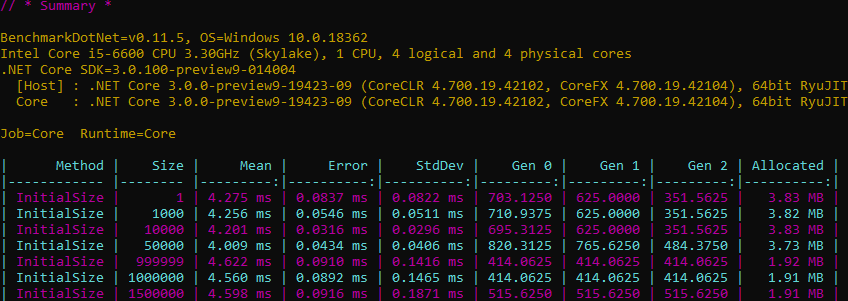
If you know the approximate final size of the string, set the initial capacity. This has a modest impact on speed, but it can reduce the number of allocations. You can also call EnsureCapacity to grow the capacity of an existing StringBuilder.
C#
[Params(1, 1_000, 10_000, 50_000, 999_999, 1_000_000, 1_500_000)]
public int Size { get; set; }

[Benchmark]
public string InitialSize()
{
    var sb = new StringBuilder(Size);
    for (int i = 0; i < 1_000_000; i++)
    {
        sb.Append('a');
    }
    return sb.ToString();
}
#Use a pool of StringBuilder
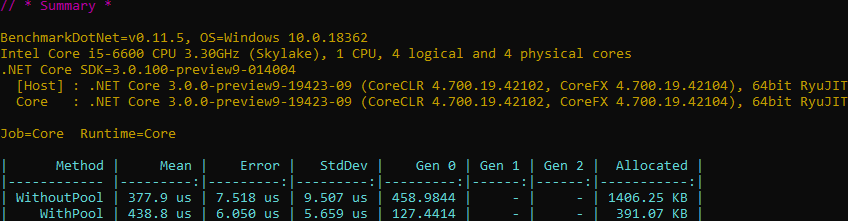
If you create many StringBuilder instances, consider using an object pool to reduce allocations. Instead of creating a new instance each time, you retrieve one from the pool and return it when done. This approach is slightly slower but drastically reduces allocations, meaning less time spent in garbage collection.
C#
[Benchmark]
public void WithoutPool()
{
    for (int i = 0; i < 10000; i++)
    {
        var sb = new StringBuilder();
        sb.Append("sample");
        _ = sb.ToString();
    }
}

[Benchmark]
public void WithPool()
{
    // Use NuGet package Microsoft.Extensions.ObjectPool
    var objectPoolProvider = new DefaultObjectPoolProvider();
    var stringBuilderPool = objectPoolProvider.CreateStringBuilderPool();

    for (var i = 0; i < 10000; i++)
    {
        var sb = stringBuilderPool.Get();
        sb.Append("sample");
        _ = sb.ToString();
        stringBuilderPool.Return(sb);
    }
}
#Automatically fix your code using a Roslyn analyzer
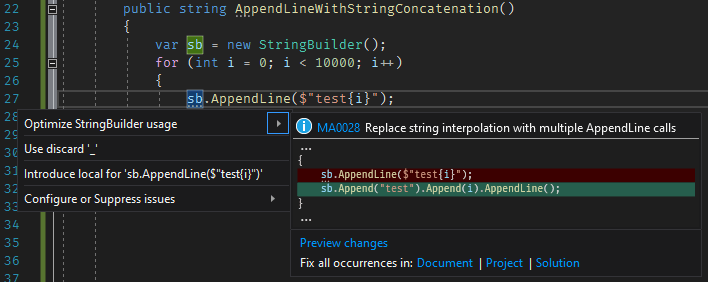
You can audit these usages in your application with a Roslyn analyzer. The free analyzer I built, https://github.com/meziantou/Meziantou.Analyzer, includes rules for all the patterns described above:
Install the Visual Studio extension or the NuGet package to start analyzing your code:
Do you have a question or a suggestion about this post? Contact me!
