Modern web applications rely heavily on JavaScript. Just like back-end code, front-end code must be tested. However, testing front-end code is more complex because it needs to run correctly across multiple browsers (Chrome, Edge, Firefox, Safari, etc.) and their different versions. This means you may need to test your code on a large number of browser targets to be confident it works as expected.
In this post, I'll show how to use Karma to run tests, and Mocha and Chai to write them.
#Quick explanation

Karma allows testing your code on real browsers and real devices such as phones, tablets. It starts the browsers and runs the tests on them.

Mocha is a feature-rich JavaScript test framework running on Node.js and in the browser, making asynchronous testing simple and fun. Mocha tests run serially, allowing for flexible and accurate reporting while mapping uncaught exceptions to the correct test cases.
JavaScript
describe('Array', () => {
  describe('#indexOf()', () => {
    it('should return -1 when the value is not present', () => {
      assert.equal([1,2,3].indexOf(4), -1);
    });
  });
});

Chai is a BDD / TDD assertion library for node and the browser that can be delightfully paired with any JavaScript testing framework.
JavaScript
assert.equal(foo, 'bar');
To summarize: Karma runs Mocha on multiple browsers, and test assertions are written using Chai.
#Installation
Karma comes with multiple plugins for test frameworks and browser launchers. You can install Karma, the plugins, Mocha, and Chai using npm:
Shell
npm i --save-dev karma karma-mocha karma-chai
npm i --save-dev karma-chrome-launcher karma-firefox-launcher karma-ie-launcher
npm i --save-dev mocha chai
You'll find the list of launchers on GitHub: Karma launchers
Next, create a source file, a test file, and the Karma configuration. Your project structure should look like this:
MyProject
├── src
│   └── main.js
├── test
│   └── mainSpec.js
├── package.json
└── karma.conf.js
Here's the content of main.js:
JavaScript
function endsWith(str, suffix) {
    return str.indexOf(suffix, str.length - suffix.length) !== -1;
}
Here's the content of mainSpec.js:
JavaScript
describe('main', function () {
    describe('#endsWith()', function () {
        it('should return true when the value ends with the suffix', function () {
            assert.equal(true, endsWith("abcd", "cd"));
        });

        it('should return false when the value does not end with the suffix', function () {
            assert.equal(false, endsWith("abcd", "cde"));
        });
    });
});
Then, configure Karma. Create a file karma.config.js with the following content:
JavaScript
module.exports = function (config) {
    config.set({
        frameworks: ['mocha', 'chai'],
        files: [
            'src/**/*.js',
            'test/**/*.js'
        ],
        reporters: ['progress'],
        port: 9876,  // karma web server port
        colors: true,
        logLevel: config.LOG_INFO,
        browsers: ['ChromeHeadless', 'Firefox', 'FirefoxDeveloper', 'FirefoxNightly', 'IE'],
        autoWatch: false,
        concurrency: Infinity,
        customLaunchers: {
            FirefoxHeadless: {
                base: 'Firefox',
                flags: ['-headless'],
            },
        },
    })
}
By default, karma-firefox does not register the headless version of the browser, so it must be added manually in the customLaunchers section.
Finally, add the test script in package.json:
JSON
{
  "name": "my-project",
  "version": "0.0.0",
  "devDependencies": {
      // code omitted for brevity
  },
  "scripts": {
    "test": "karma start --single-run --browsers ChromeHeadless,FirefoxHeadless,IE karma.conf.js"
  }
}
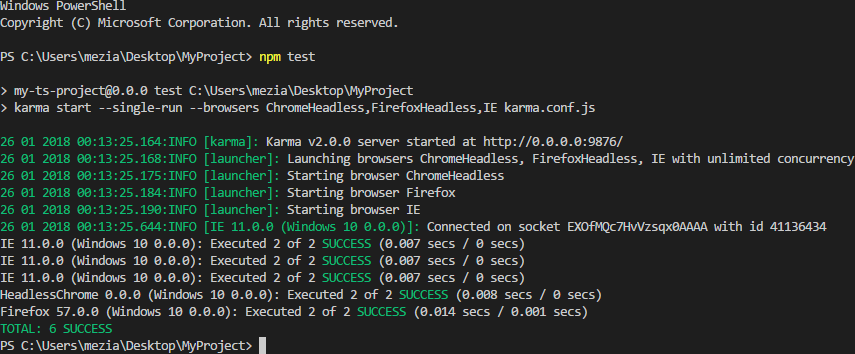
You can now run the tests using npm test:
Shell
npm test
#Conclusion
Your test environment is now set up. You can add tests for your front-end code as needed. Karma and Mocha offer many features. This post only scratches the surface, so be sure to read their documentation to explore the full range of possibilities.
Do you have a question or a suggestion about this post? Contact me!
