Brotli is a compression algorithm that generally outperforms gzip. For example, the default ASP.NET Core project page compresses to 1797 bytes with gzip but only 1333 bytes with Brotli, a 25% reduction!
You can use Brotli with most major browsers (source):
 Brotli browser support
It's time to add Brotli support alongside gzip!
I've previously written about gzip compression in ASP.NET Core using the ResponseCompression package: Enabling gzip compression with ASP.NET Core. In this post, we'll look at how to provide a custom compression method and add Brotli support.
#Implementation
If you follow the CoreFX Lab repository on GitHub, you may have noticed a new project: System.IO.Compression.Brotli. It provides an API for compressing and decompressing data using the Brotli algorithm. Note that this package is a preview and is not yet supported for production use.
CoreFX Lab projects are not published to NuGet.org. Instead, they are published to a public MyGet feed. To use this package, add the feed in Visual Studio:
https://dotnet.myget.org/F/dotnet-corefxlab/api/v3/index.json
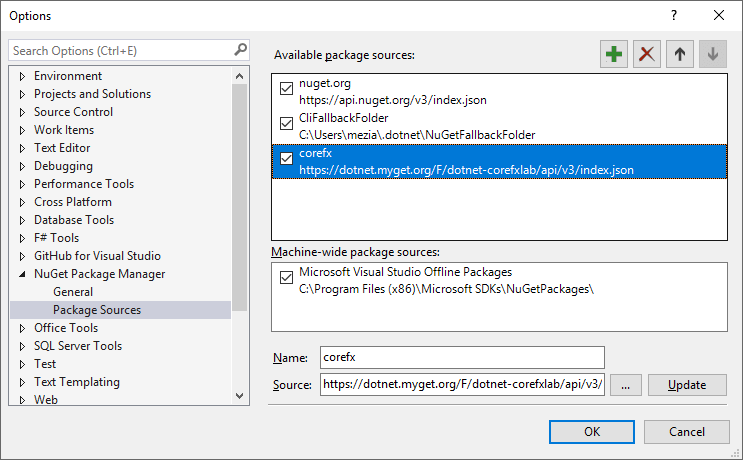
Alternatively, create a nuget.config file at the solution root with the following content:
XML
<configuration>
  <packageSources>
    <add key="dotnet-corefxlab" value="https://dotnet.myget.org/F/dotnet-corefxlab/" />
  </packageSources>
</configuration>
Then, add the following two packages:
System.IO.Compression.BrotliMicrosoft.AspNetCore.ResponseCompression
The response compression middleware inspects the request headers and checks whether a compression provider supports one of the accepted encodings. By default, only gzip is supported. You can add custom encodings by implementing ICompressionProvider, which requires an encoding name property and a method to create a compression stream. Since the Brotli package provides a BrotliStream class, the implementation is straightforward:
C#
public class BrotliCompressionProvider : ICompressionProvider
{
    public string EncodingName => "br";
    public bool SupportsFlush => true;

    public Stream CreateStream(Stream outputStream)
    {
        return new BrotliStream(
            outputStream,
            CompressionMode.Compress,
            leaveOpen: false,
            bufferSize: 65520,
            quality: CompressionLevel.Optimal); // very costly, may not be appropriate for a web server
    }
}
Finally, register the custom provider:
C#
public class Startup
{
    public void ConfigureServices(IServiceCollection services)
    {
        services.AddMvc();

        services.AddResponseCompression(options =>
        {
            options.Providers.Add(new BrotliCompressionProvider());
        });
    }

    public void Configure(IApplicationBuilder app)
    {
        app.UseResponseCompression();
        app.UseStaticFiles();
        app.UseMvcWithDefaultRoute();
    }
}
You can verify that the server is compressing responses with Brotli by inspecting the response headers:

#Conclusion
The Brotli compression package is still in preview and not ready for production use, so proceed with caution. That said, this is a great example of how easy it is to extend ASP.NET Core. Keep an eye on the corefx repository on GitHub for other useful projects like this one.
Do you have a question or a suggestion about this post? Contact me!
