#What's HTTP/3?
HTTP/3 is the latest version of HTTP, already supported by most modern browsers and servers. It brings performance improvements primarily for mobile users and unreliable connections. The key change is replacing TCP with QUIC, a new protocol that addresses several TCP limitations. QUIC provides the following advantages (non-exhaustive list):
- Faster connection setup by combining TCP and TLS handshakes
- Reduced head-of-line blocking through improved packet loss recovery
- Connection migration, so you don't need to reconnect when moving between networks (e.g. Wi-Fi to cellular)
If you want to understand HTTP/3 in detail, you can read the following articles:
.NET 6 supports HTTP/3 for clients (HttpClient, including gRPC) and servers (Kestrel). This implementation is based on MsQuic, Microsoft's implementation of the IETF QUIC protocol. Note that this is still in preview in .NET 6, so you need to explicitly enable it in the csproj or the code. Currently, .NET supports HTTP/3 on:
- Windows 11 and Windows Server 2022
- Linux (you may need to install
msquic using apt install libmsquic)
While msquic supports macOS via OpenSSL, the .NET implementation does not currently support it. The .NET team prefers relying on OS security APIs rather than adding new dependencies (specifically SecureTransport on macOS) to avoid integration issues such as certificate management. However, SecureTransport does not expose the methods needed to implement QUIC.
#Server (Kestrel)
You first need to enable preview features in the csproj:
csproj (MSBuild project file)
<Project Sdk="Microsoft.NET.Sdk.Web">
  <PropertyGroup>
    <TargetFramework>net6.0</TargetFramework>
    <Nullable>enable</Nullable>
    <ImplicitUsings>enable</ImplicitUsings>
    <EnablePreviewFeatures>true</EnablePreviewFeatures>
  </PropertyGroup>
</Project>
Then, you can configure Kestrel to listen on HTTP/1, HTTP/2 and HTTP/3. It's important to support older protocols as not all clients support newer protocols. Also, HTTP/3 requires secure connections, so you must use UseHttps.
C#
using Microsoft.AspNetCore.Server.Kestrel.Core;

var builder = WebApplication.CreateBuilder(args);
builder.WebHost.ConfigureKestrel((context, options) =>
{
    options.ListenAnyIP(5001, listenOptions =>
    {
        listenOptions.Protocols = HttpProtocols.Http1AndHttp2AndHttp3;
        listenOptions.UseHttps();
    });
});
var app = builder.Build();

app.MapGet("/", () => "hello world");
app.Run();
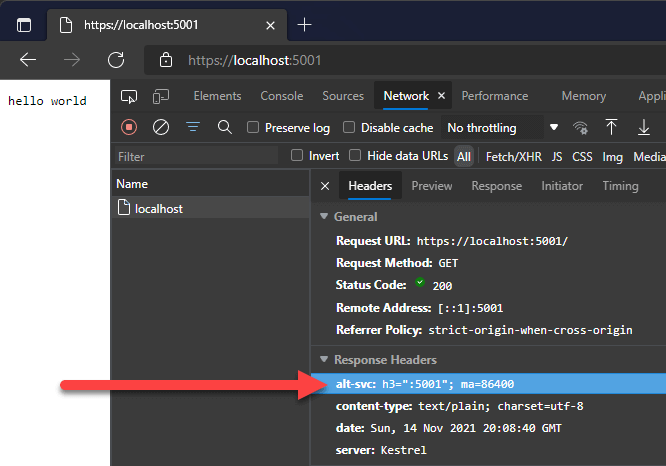
Most browsers don't allow HTTP/3 for localhost addresses. However, you can verify it works by checking the response headers. The response should contain the alt-svc header with the value h3:
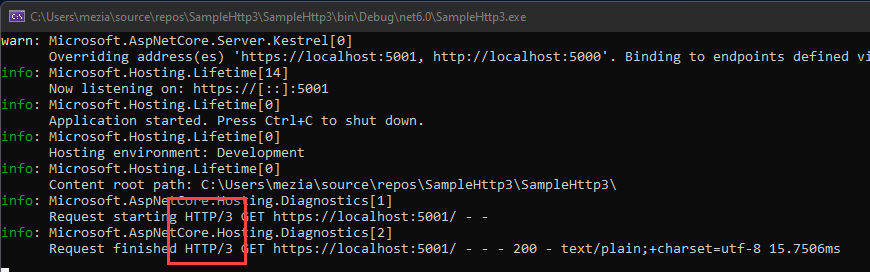
You can also verify the server is using HTTP/3 by enabling more detailed logging. You can change the configuration in appsettings.json or appsettings.Development.json:
JSON
{
  "DetailedErrors": true,
  "Logging": {
    "LogLevel": {
      "Default": "Information",
      "Microsoft.AspNetCore": "Warning",
      "Microsoft.AspNetCore.Hosting.Diagnostics":  "Information"
    }
  }
}
Then, you should see the following in the logs:
You can also use W3C logging and check the protocol version used by the client:
C#
var builder = WebApplication.CreateBuilder(args);
builder.Services.AddW3CLogging(logging =>
{
    logging.LoggingFields = W3CLoggingFields.All;
    logging.LogDirectory = @"C:\logs";
    logging.FlushInterval = TimeSpan.FromSeconds(2);
});

builder.WebHost.ConfigureKestrel((context, options) =>
{
    ...
});

var app = builder.Build();
app.UseW3CLogging();
app.MapGet("/", () => "hello world");
app.Run();

Alternatively, you can use the client from the next section to validate the server works correctly.
#Client (HttpClient)
HTTP/3 is in preview in .NET 6, so you need to manually enable it before using it in HttpClient:
Option 1: Edit the csproj to add a runtime option
csproj (MSBuild project file)
<Project Sdk="Microsoft.NET.Sdk">
  <PropertyGroup>
    <OutputType>Exe</OutputType>
    <TargetFramework>net6.0</TargetFramework>
    <ImplicitUsings>enable</ImplicitUsings>
    <Nullable>enable</Nullable>
  </PropertyGroup>

  <ItemGroup>
    <RuntimeHostConfigurationOption Include="System.Net.SocketsHttpHandler.Http3Support"
                                    Value="true" />
  </ItemGroup>
</Project>
Option 2: Set the following switch before creating the first HttpClient
C#
System.AppContext.SetSwitch("System.Net.SocketsHttpHandler.Http3Support", true);
Then, you can use the HttpClient to make requests to HTTP/3 servers:
C#
using var client = new HttpClient();
client.DefaultRequestVersion = HttpVersion.Version30;

// The client falls back to HTTP2 or HTTP1 if HTTP3 is not supported
client.DefaultVersionPolicy = HttpVersionPolicy.RequestVersionOrLower;

// Will use HTTP3 if the server supports it
var data = await client.GetStringAsync("https://localhost:5001/");
You can also enable HTTP/3 for specific requests:
C#
using var request = new HttpRequestMessage(HttpMethod.Get, "https://localhost:5001/");
request.Version = HttpVersion.Version30;
request.VersionPolicy = HttpVersionPolicy.RequestVersionExact;

using var response = await client.SendAsync(request);
var data = await response.Content.ReadAsStringAsync();
#Additional resources
This post is available in Spanish at https://www.campusmvp.es/recursos/post/como-utilizar-http-3-quic-en-net.aspx.
Do you have a question or a suggestion about this post? Contact me!
